
CRUD with manubes
Build CRUD Apps for Manufacturing
without Programming
Tool management, fault reports, production order confirmations: Many applications in manufacturing are based on the CRUD operations. manubes makes it easy to build such applications on a no-code basis.
Applications
Build CRUD apps:
Six solutions for manufacturing
The following applications from manufacturing illustrate what can be realized with manubes without programming. All of them are based on the same four CRUD operations: Adding, viewing, editing and deleting records. What differs is the data, the people who work with it and what happens automatically in the background. Find out more about CRUD in our article What is CRUD?
| Application | Who uses it? | Typical records | Automatically in the background |
|---|---|---|---|
| Tool and equipment management | Quality assurance, tool crib | Gauge, tool, inspection | Reminder before the due date, lock when overdue |
| Fault reports and maintenance requests | Machine operators, maintenance | Report, priority, photo, status | Report from the machine fault, notification |
| Production order confirmation | Operators, production control | Order, good quantity, scrap | Orders from the ERP, unit count from the machine |
| Quality inspection and defect recording | Operators, quality assurance | Inspection result, defect, defect type | Notification of NOK or a rising defect rate |
| Digital shift log | Shift supervisors, operators, maintenance | Entry, category, comment | Notification of faults, AI assessment |
| Master data: Machines, items, recipes | Product development, quality assurance | Recipe, ingredient, version | Archiving the previous version, setpoints to the dosing system |
Go directly to an application:
Equipment Fault reports Order confirmation Quality inspection Shift log Master data
Application
Tool and equipment management
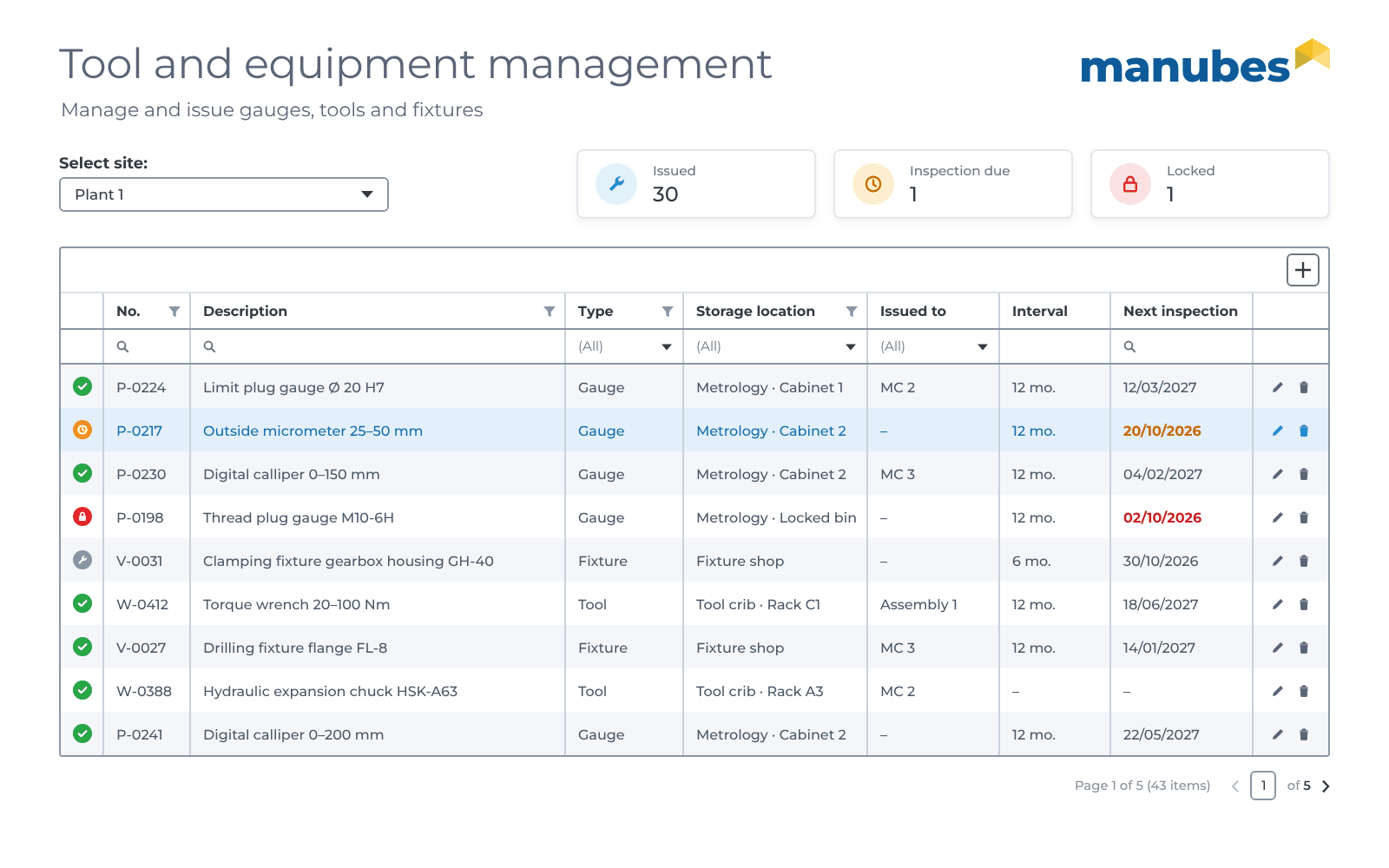
Tool and equipment management in manubes shows at any time where gauges, tools and fixtures are, whether they may be used and when the next inspection is due. It replaces paper issue lists and gauge spreadsheets in Excel that are never quite up to date, and records every inspection as evidence.
- Data model
-
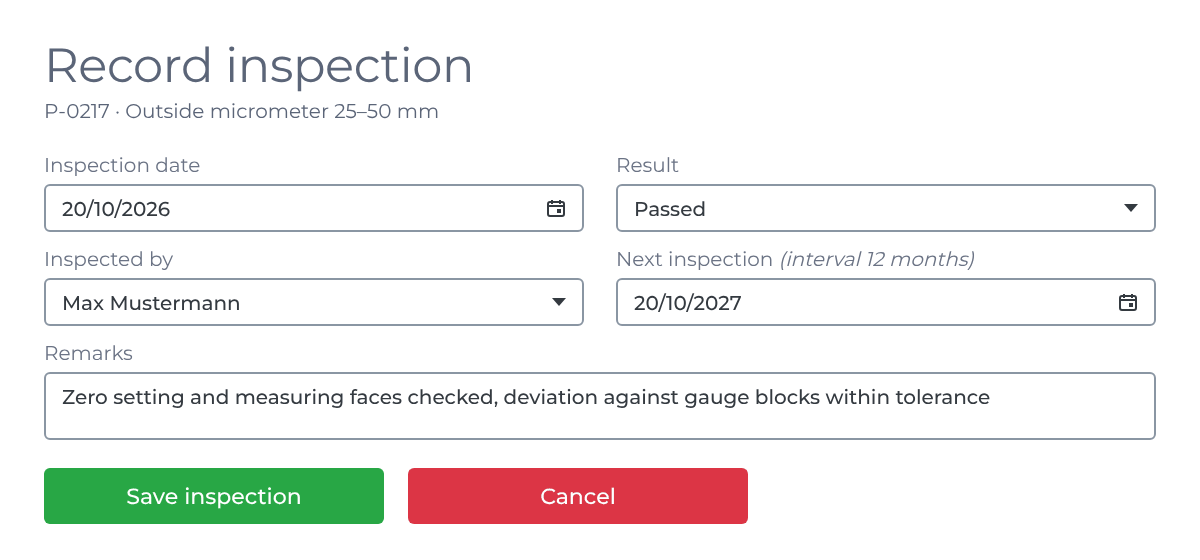
Two linked tables: The equipment with master data and issue status, plus any number of inspections per item as a history.
- Number
- Description
- Type
- Storage location
- Issued to
- Inspection interval
- Status
- Inspection date
- Result
- Inspected by
- Remarks
- User interface
-
A table with filters by type, storage location and issue status, metrics on gauges that are due or locked, and a form for recording inspections, including on a tablet in the measuring room or at the tool crib.
- Who uses it?
-
Quality assurance (gauge managers), tool crib and jig and fixture construction.
-
CREATEAdd
Add new equipment and record an inspection after every check.
-
READView
Stock, issues and due inspections at a glance, with the inspection history of each item.
-
UPDATEEdit
Book an issue to a machine or workstation, update the status and next date after the inspection.
-
DELETEDelete
Remove records created by mistake. Retired gauges get a status so that their inspection history is preserved.
Automatically in the background: A workflow checks the inspection dates every day, reminds the gauge managers before an inspection is due and sets overdue gauges to “Locked”.
Application
Fault reports and maintenance requests
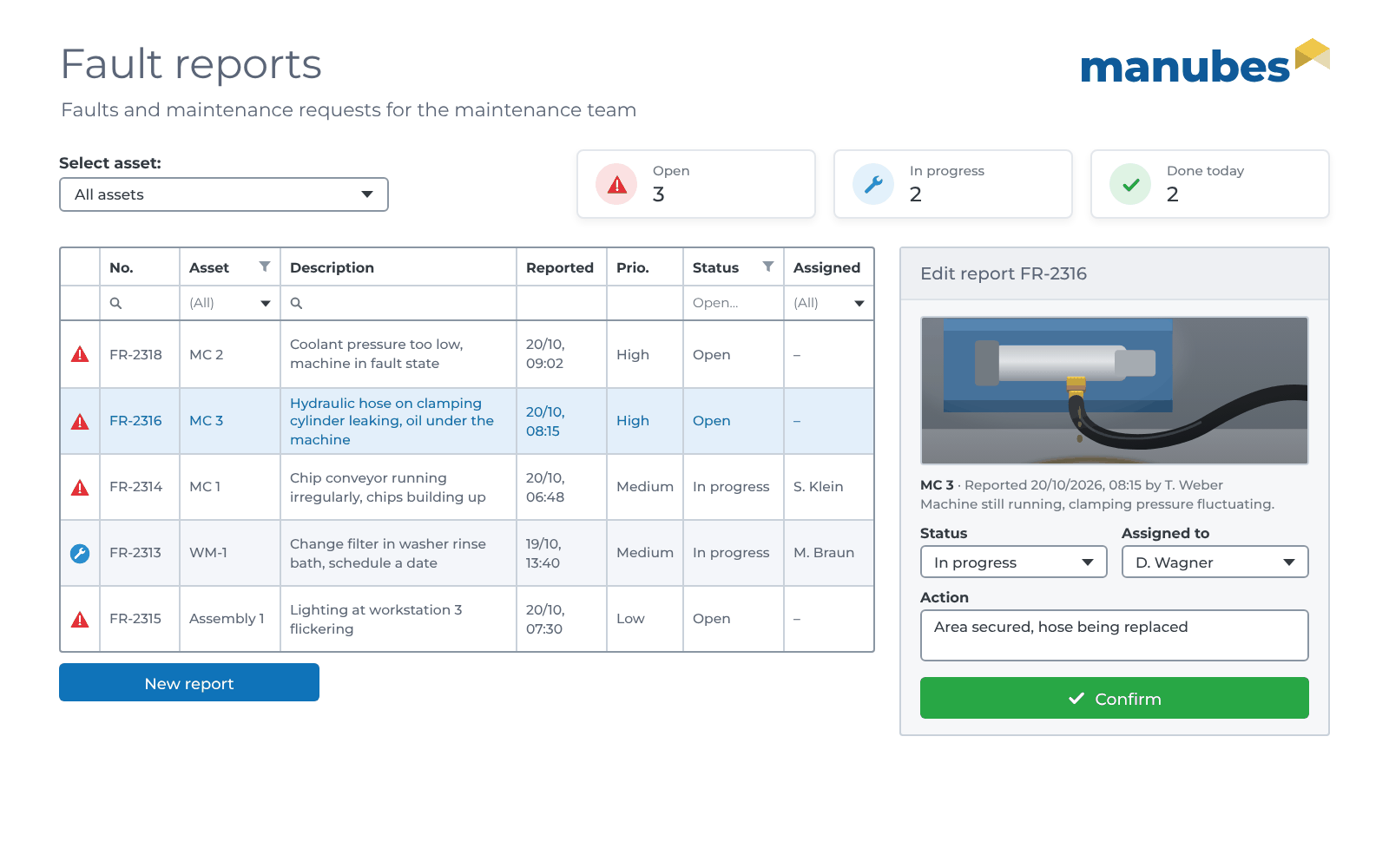
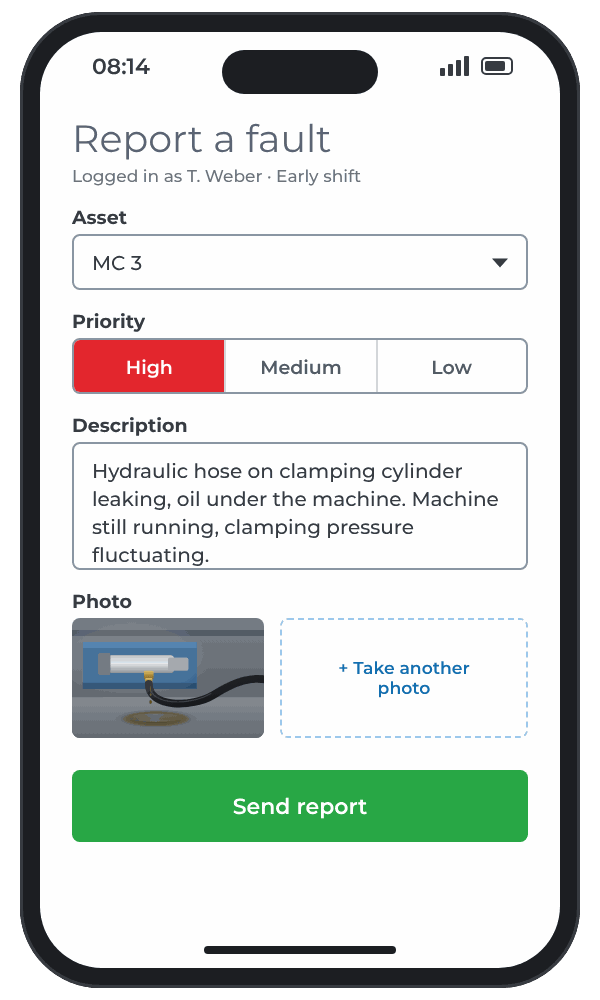
With a fault reporting app in manubes, machine operators report faults directly at the machine, and maintenance sees all open reports in one list. Shouting across the shop floor, phone calls and notes on the noticeboard are no longer needed.
- Data model
-
A report links the asset with its type (fault or maintenance request), description, priority, photos and processing status.
- Asset
- Type
- Description
- Priority
- Photos
- Reported by
- Time
- Status
- Assigned to
- Action
- User interface
-
A lean reporting form for smartphones or operator panels, a table sorted by priority with an editing area for maintenance and, if required, a shop floor display showing open faults per line.
- Who uses it?
-
Machine operators, shift supervisors and maintenance.
-
CREATEAdd
Report a fault with asset, priority and photo.
-
READView
Open reports sorted by priority and asset.
-
UPDATEEdit
Accept a report, set the status, document the action taken.
-
DELETEDelete
Remove duplicate or mistaken reports.
Automatically in the background: If a machine reports a fault via the Edge Node, a workflow creates the report automatically. Every new report notifies the maintenance team on shift. More about workflow automation
Application
Production order confirmation
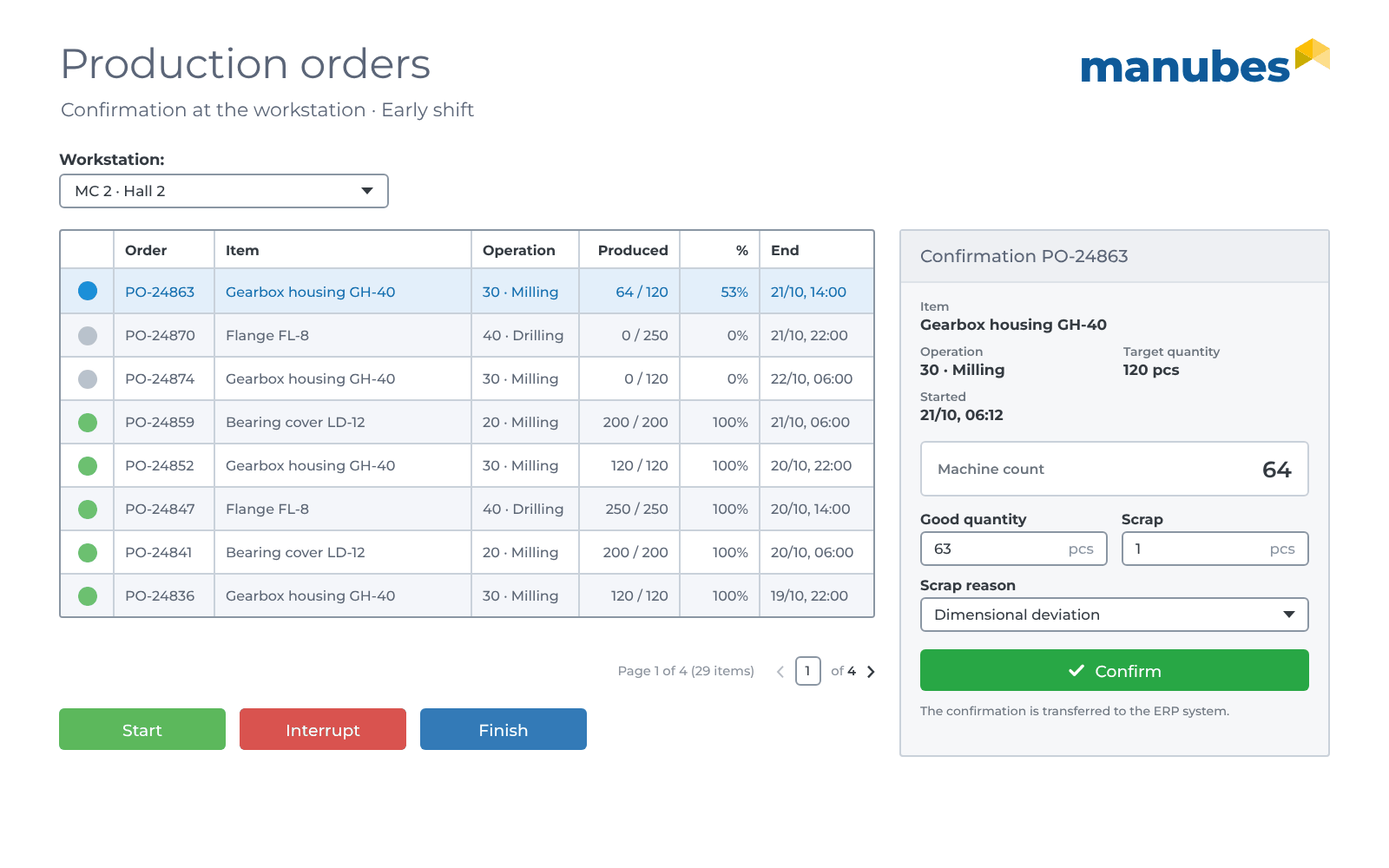
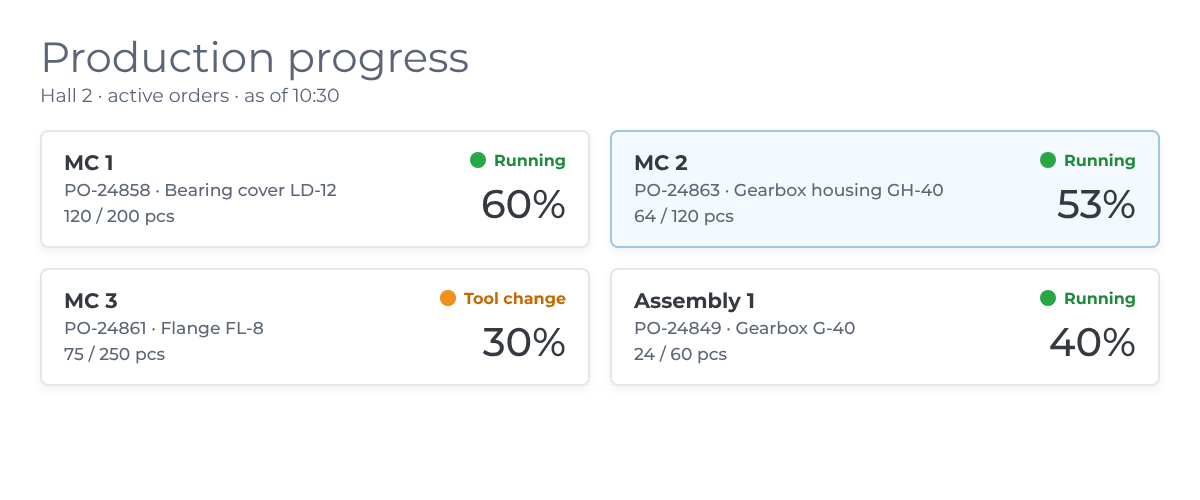
Order confirmation in manubes brings production orders from the ERP system to the workstation and reports quantities, scrap and status back. Operators only see the orders for their workstation, while production control sees the progress in real time.
- Data model
-
Production orders come from the ERP system, and any number of confirmations are created for each order at the workstation.
- Order number
- Item
- Operation
- Target quantity
- Due date
- Workstation
- Status
- Good quantity
- Scrap
- Scrap reason
- Time
- User interface
-
An order list per workstation with buttons for start, interruption and finish, a confirmation form and a progress overview for production control.
- Who uses it?
-
Operators, shift supervisors and production control.
-
CREATEAdd
Confirm the good quantity and scrap.
-
READView
Upcoming orders per workstation and progress per order.
-
UPDATEEdit
Start, interrupt or finish an order, correct a wrong confirmation.
-
DELETEDelete
Remove cancelled orders as soon as the ERP system withdraws them.
Automatically in the background: Workflows take over new orders from the ERP system and report quantities and status back to it. The unit count comes directly from the machine via the Edge Node. More about production orders
Application
Quality inspection and defect recording
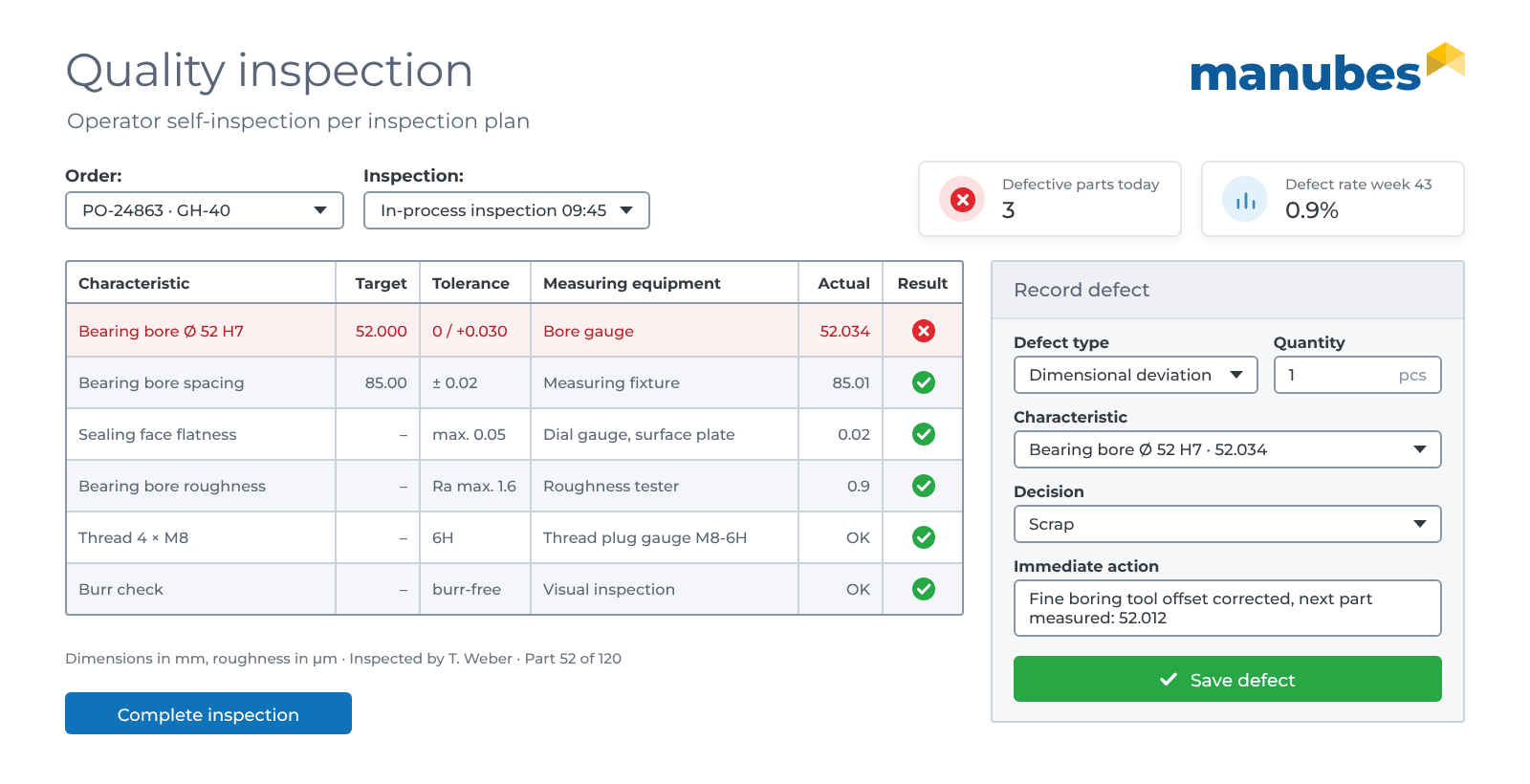
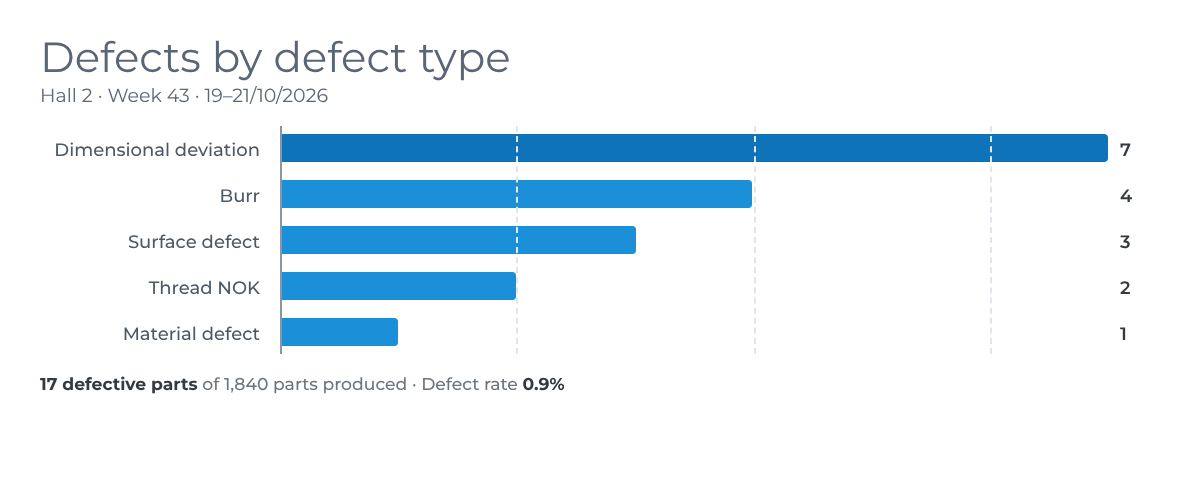
An inspection app in manubes guides operators through the characteristics of the inspection plan, assesses measured values against the tolerance and records defects directly at the machine. Inspection reports no longer need to be typed up, and quality assurance sees defects by defect type, line and shift.
- Data model
-
Three linked tables: The inspection plan with its characteristics, the inspection results per order and the recorded defects with their defect type from the defect catalogue.
- Characteristic
- Target
- Tolerance
- Measuring equipment
- Order
- Actual value
- Result
- Inspected by
- Defect type
- Quantity
- Decision
- Immediate action
- User interface
-
An inspection report per order with an OK / NOK assessment, a form for recording defects with a selection from the defect catalogue and an analysis by defect type for quality assurance.
- Who uses it?
-
Operators, quality assurance and production management.
-
CREATEAdd
Enter inspection results, record defects with defect type and immediate action.
-
READView
Inspection report per order, analyze defects by defect type, line and shift.
-
UPDATEEdit
Maintain the inspection plan and defect catalogue, add the decision on rework or scrap.
-
DELETEDelete
Remove defects recorded twice, only with quality assurance authorization.
Automatically in the background: If a characteristic is rated NOK or the defect rate of a line exceeds a threshold, a workflow notifies quality assurance. More about the reject rate
Application
Digital shift log
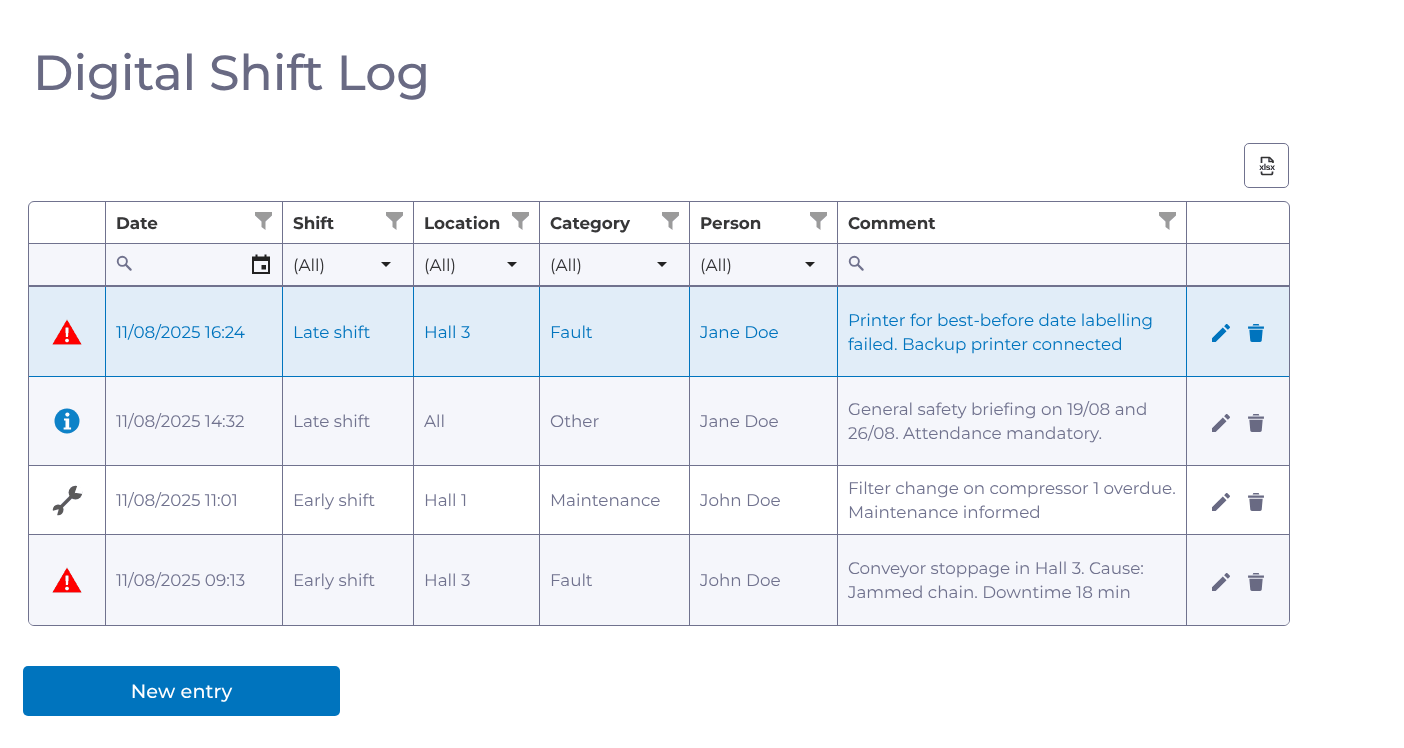
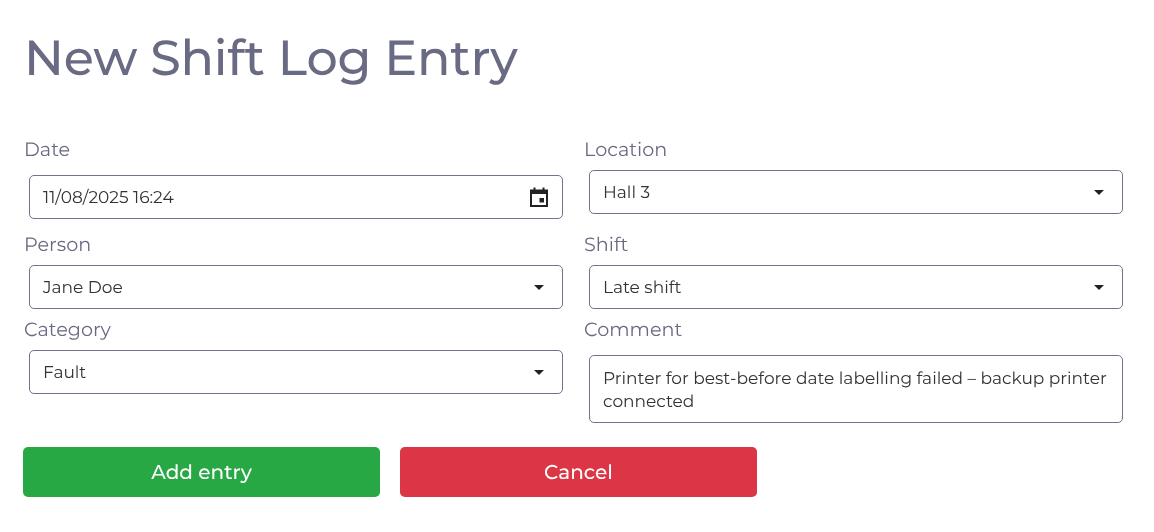
A digital shift log in manubes records faults, maintenance work and other events per shift and makes them immediately readable for the next shift. The paper logbook at the line and verbal handovers are no longer needed, and every entry can be filtered by date, location and category.
- Data model
-
A shift log entry links the master data shift, location, person and category with the time and a comment.
- Date
- Shift
- Location
- Category
- Person
- Comment
- User interface
-
A table with a filter for each column, icons for each category and Excel export. Plus a form for new entries, usable on a PC, tablet or operator panel at the line.
- Who uses it?
-
Shift supervisors, operators and maintenance.
-
CREATEAdd
Record a fault, maintenance work or handover note with location and shift.
-
READView
Read the previous shift’s entries, filter by location, category or person.
-
UPDATEEdit
Add to an entry once a fault has been fixed.
-
DELETEDelete
Remove test entries or incorrect input, only with authorization.
Automatically in the background: For an entry in the “Fault” category, a workflow notifies maintenance on the device of their choice. Optionally, AI assesses each new entry by priority and subcategory. More about the digital shift log
Application
Master data: Machines, items, recipes
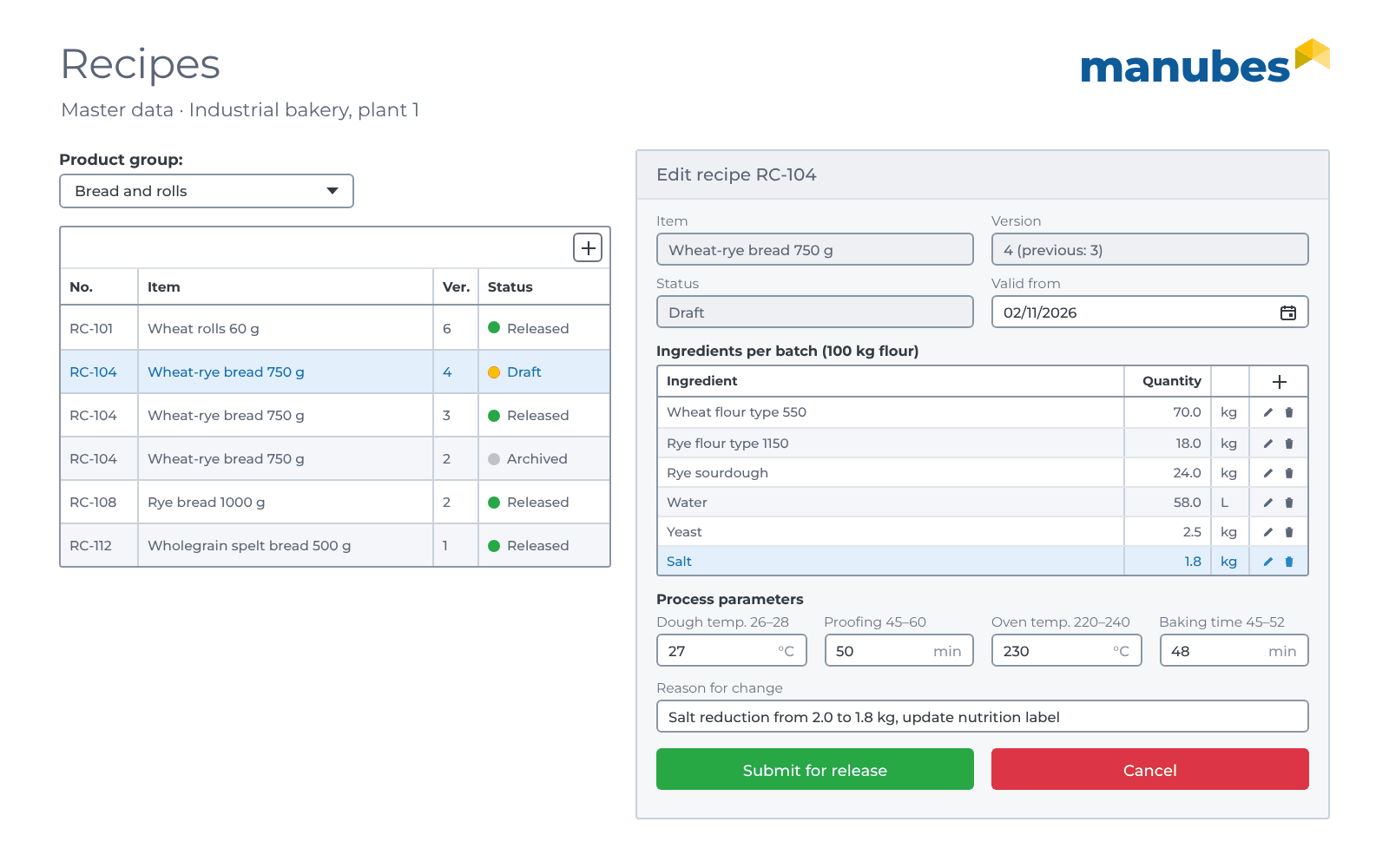
Master data management in manubes keeps machines, items and recipes up to date in one place, and all other applications access the same data. Diverging copies in different lists are a thing of the past, and every change to a recipe can be traced as a new version.
- Data model
-
Machines, items and recipes as separate tables. A recipe belongs to an item and contains ingredients with a quantity per batch and process parameters with target, min and max values.
- Asset
- Area
- Data connection
- Item number
- Description
- Weight
- Version
- Status
- Valid from
- Ingredients
- Quantity
- Process parameters
- Target / Min / Max
- Reason for change
- User interface
-
Admin pages with a table and form for product development and production. New recipe versions are created as drafts, and only quality assurance sets the status when releasing them. At the dough mixer, the baker only sees the version valid today.
- Who uses it?
-
Product development, production management and quality assurance.
-
CREATEAdd
Add a new machine, item or recipe version.
-
READView
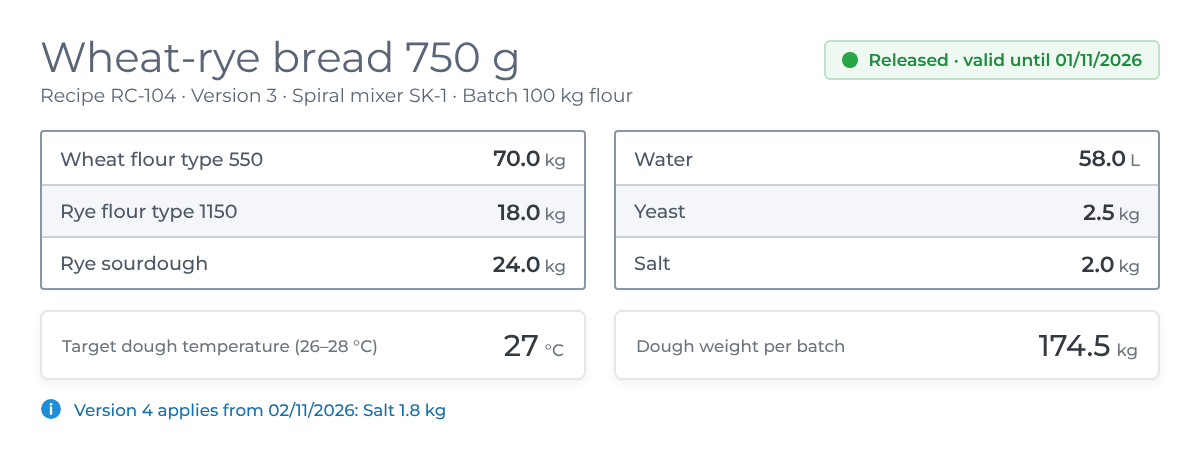
Show the valid recipe version at the dough mixer, provide master data for all applications.
-
UPDATEEdit
Adjust ingredients and process values in a new version and submit it for release, only with authorization.
-
DELETEDelete
Remove rejected drafts. Superseded versions are archived, not deleted.
Automatically in the background: From the “Valid from” date, the released version replaces its predecessor, and a workflow archives the old version automatically. Via the freely configurable REST access, other systems take over the master data or supply it. More about REST
Automation
Who writes the data? People, machines and systems
In manubes, records are created and changed in three ways: Employees work in forms, machines supply values via the Edge Node, and other systems read and write via interfaces. Workflows connect the three ways, so nobody has to type up data or transfer it from one list to the next.
Forms and tables
Employees add, edit or delete records in the browser, on a PC, tablet, smartphone or operator panel.
- Report a fault with a photo
- Record an inspection result and defects
- Add a new recipe version
Roles and permissions define who can only read and who can edit or delete.
Edge Node
The Edge Node in the plant network reads values from controllers and sensors, e.g. via OPC UA or MQTT, and also writes values back. It only establishes outgoing, encrypted connections to manubes.
- Unit count from the machine counter for order confirmation
- A machine fault automatically creates a fault report
- A released recipe goes to the dosing system as setpoints
Interfaces
ERP systems, databases and AI services exchange data with manubes via REST and SQL. Via the freely configurable REST access, other systems can also read and write in manubes themselves.
- Take over production orders from the ERP, report quantities back
- Have shift log entries assessed by AI
Workflows put the rules into practice: In the Workflow Designer, you define when an operation runs automatically: On a schedule (checking the inspection dates every day), when a new record is created (notifying maintenance) or when a threshold is reached (informing quality assurance of a rising defect rate). Under “Automatically in the background”, each application above shows what happens automatically there.
Your own CRUD app in 4 steps
A CRUD app in manubes is built in four steps, without programming and without your own servers. The path is the same for tool management as it is for fault reports or recipes. What differs are the fields and the processes. You can try it out with a free test account.
Define the data
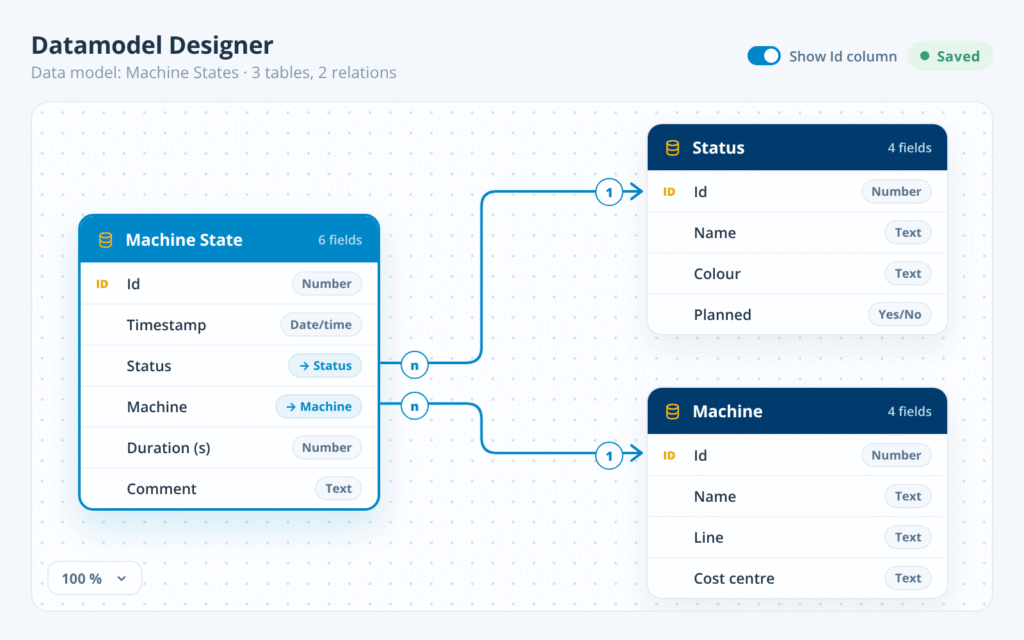
In the Datamodel Designer, you create tables and fields and link them, e.g. a recipe with its ingredients or a fault report with the asset. You don’t need to set up your own database system for this.
Build the user interface
In the Page Designer, you arrange tables, forms and buttons using drag and drop, for a PC, tablet, smartphone, operator panel or shop floor display.
Connect and automate
You connect machines and systems via the Edge Node and interfaces. In the Workflow Designer, you define what happens automatically.
Test and release
You test the application in a separate environment, use roles to define who can only read records and who can edit or delete them, and release it for production. New versions go through the same process, see No-code application development.
Further information
Which application should your production get next?
Whether equipment management, fault reports or an application of your own: We advise you individually and, on request, implement a proof of concept with your data.
Request a consultation
