
Basics & Examples
Workflow Automation in Manufacturing
By automating manual work steps, manufacturing companies can save time and costs, reduce errors and ensure consistent processes. We show examples of possible workflow automations in production.
Basics
What is Workflow Automation?
Workflow automation in manufacturing is the rule-based, automatic execution of recurring processes – such as notifications, reports or data transfers – triggered by events such as machine values, schedules or input from employees.
Workflow automation refers to the combination of individual actions or work steps into a sequence (workflow) that is automated and executed in a specific order.
The execution of a workflow is based on predefined rules. These include trigger conditions that activate the workflow under certain circumstances or branches that check specific attributes and then follow different paths accordingly.
Workflow automation offers many advantages:
- Cost and time savings through the automation of manual tasks
- Lower error rates by avoiding manual data entry
- Consistent processes through predefined rules
- Improved traceability and troubleshooting
- Often flexible customization options
To design and implement custom workflows, companies often use workflow software. These tools typically come with prebuilt action blocks that can be combined into workflows through a graphical user interface.
In Manufacturing
Workflow Automation in Manufacturing: Opportunities and Challenges
Like industries such as financial services, insurance and public administration, industrial production can also benefit significantly from workflow automation.
Opportunities exist in pretty much all areas: From the complex field of production planning, production control and production monitoring to specific tasks related to equipment maintenance, personnel management, documentation or reporting.
One of the biggest challenges lies in integrating workflow software with existing systems. While in many other industries primarily administrative processes at the enterprise level are automated, manufacturing also involves systems in close proximity to the production processes such as MES and SCADA, along with the machines and devices present on the shop floor.
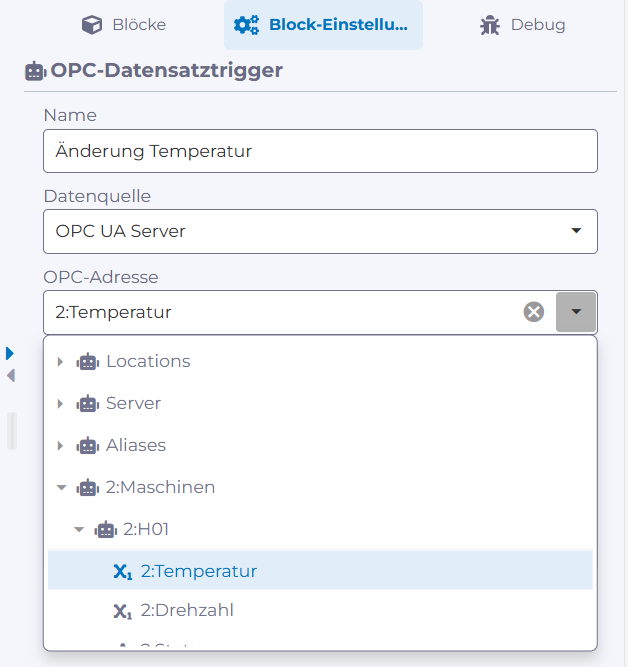
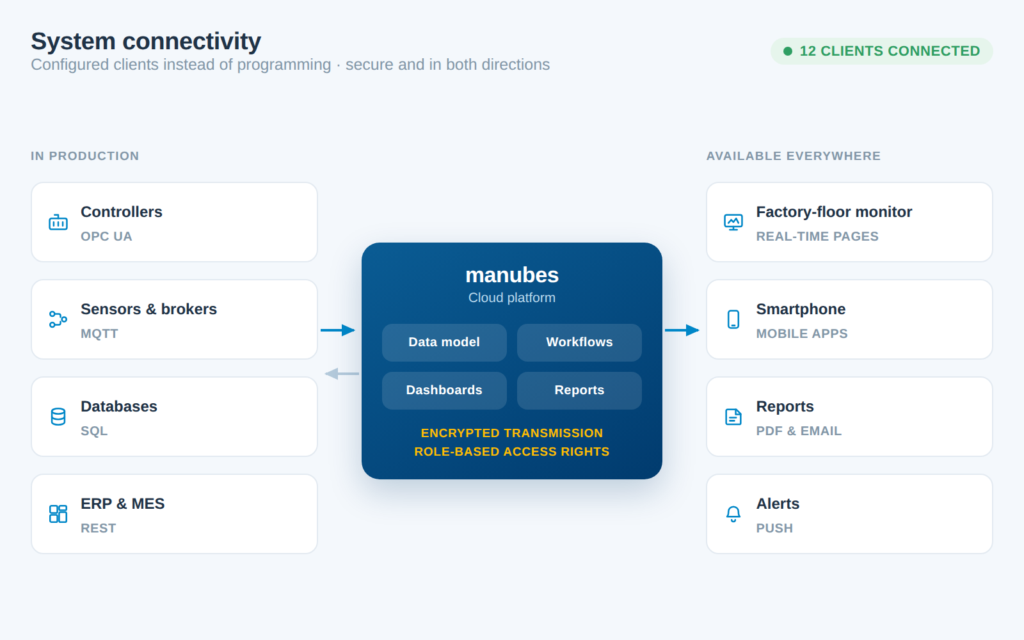
When workflows interact with machine parameters, these must therefore be available in real time. This requires support for appropriate interfaces such as OPC UA or REST API client functionality within the workflow tools.
Figure: Accessing OPC UA data points in the manubes Workflow Designer (German user interface)
Another crucial aspect is the ability to quickly make changes to or scale existing workflows. This is especially true in production, where conditions frequently change and processes need to be adjusted. Many workflow solutions rely entirely on no-code, enabling the creation and modification of workflows through simple dialogs or drag-and-drop functionality.
Features such as version control, staging, diagnostics and monitoring simplify the management of workflow automations and provide greater transparency and security.
Finally, workflows also generate data (e.g. the number of successful executions), which is relevant for analyses, optimizations or meeting compliance requirements.
Structure
How is a workflow structured?
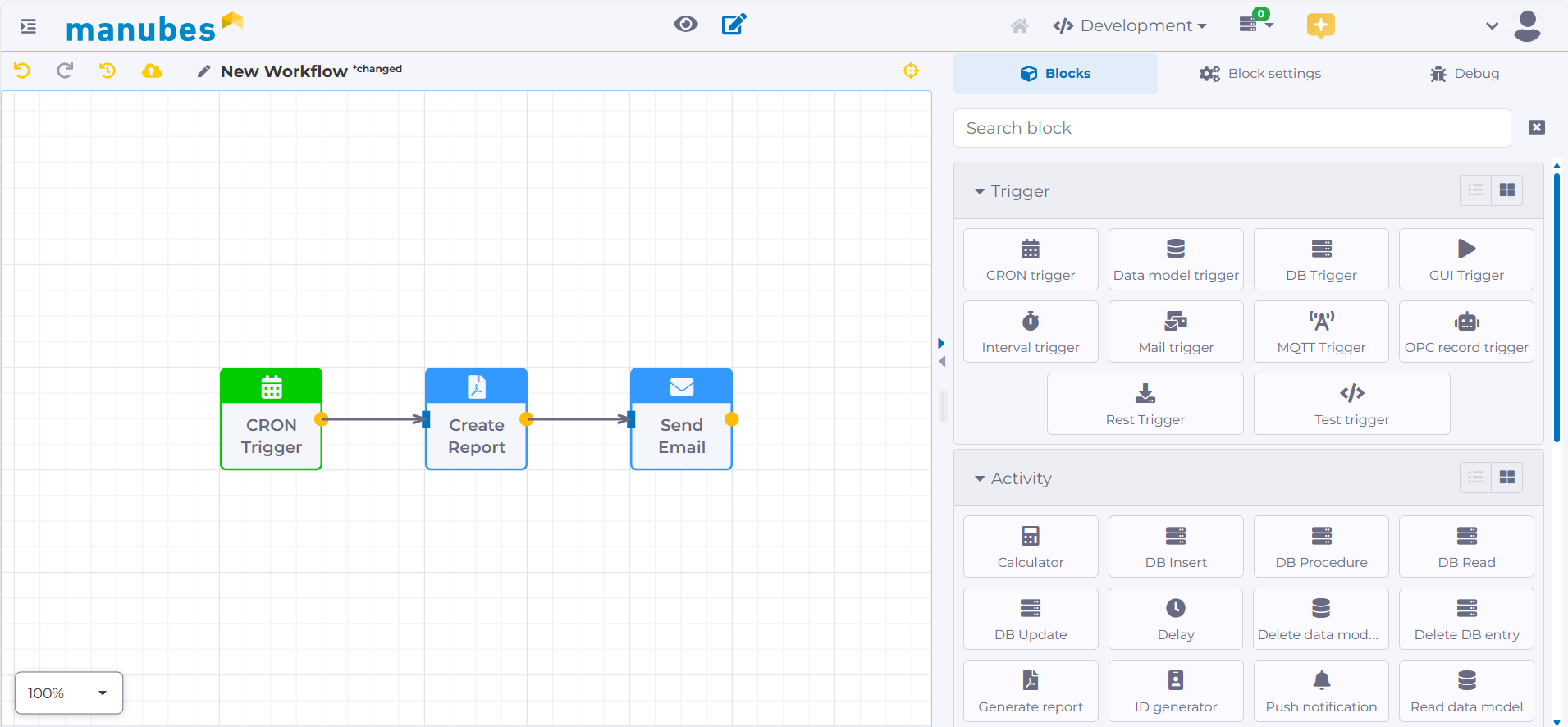
A workflow maps a business process as a series of steps. It consists of a few basic building blocks that are connected in a fixed order. In workflow software for manufacturing, these are:
- Trigger: An event starts the workflow – a point in time or fixed interval, a new or changed record, an MQTT message, a changed value on the OPC UA server, an incoming email, a REST call from another system or a click on a button.
- Condition: A branch checks values, such as “temperature above 95 °C”, and decides which path continues.
- Actions: The individual steps do the actual work – reading values or writing them to a database, creating a report, sending an email or push notification, calculating values.
- Log: Every execution is recorded. Logging and diagnostic functions simplify troubleshooting and make every step traceable.
In the manubes Workflow Designer – specialized for industrial production – these blocks are connected via drag-and-drop. The figure shows a workflow that creates a report on a schedule and sends it by email.
Comparison
Workflow Automation, PLC and RPA Compared
Automation in manufacturing happens on several levels. The terms are often mixed up but describe different tasks: A PLC automates the machine, workflow automation automates the processes between machines, systems and people, and RPA (robotic process automation) automates the operation of office applications.
| Criterion | PLC automation | Workflow automation | RPA |
|---|---|---|---|
| What is automated? | Machines and equipment: Movements, cycles, control loops | Processes around production: Alerts, reports, data transfers, approvals | Operating steps in office applications, carried out by a software robot on the user interface like a person |
| Level | Field and control level | Between the shop floor and the enterprise level | Enterprise level (ERP, email, spreadsheets) |
| Trigger | Sensor signals in the controller's cycle | Events such as value changes, schedules, new records or user input | Schedule or manual start |
| Response time | Milliseconds, deterministic | Seconds; not intended for time-critical control tasks | Depends on the application being operated |
| Data access | Inputs and outputs of the machine | Interfaces such as OPC UA, MQTT, REST and databases | User interfaces of existing programs |
| Who builds the automation? | Automation engineers with PLC programming | Operations teams and production IT, often with no-code tools | IT or RPA developers |
| Example from manufacturing | An injection moulding machine controls pressure and temperature | Sending a push notification to maintenance when motor M3 overheats | Transferring delivery notes from an email inbox into the ERP |
The levels complement each other: Workflow automation does not replace a PLC but uses its values – for example via OPC UA – as triggers for downstream processes.
Examples
Workflow Automation in Manufacturing: 3 Examples
The following section introduces three use cases for workflow automations in industrial production:
Notifications & Alarming
A classic use case for workflows is sending automated notifications in response to specified events.
In production, they could be used to:
- Immediately notify responsible personnel in the event of disruptions
- Inform maintenance teams when servicing is required
- Keep production managers updated on order progress
- Display warnings about material shortages, high energy consumption or quality issues
Notifications can be implemented via email or push notification.
Possible triggers include changes in process parameters, machine status, energy consumption or inventory levels. Manual triggering via a button or similar action is also possible.
With manubes, workflows not only have access to all data in existing data models (provided you have the appropriate access rights), but also to live data from machine and system integrations. This allows value changes to be set as triggers for notification workflows with just a few clicks.
Thanks to its flexible Workflow Designer and extensive integration capabilities, manubes is suitable both for custom real-time notifications and for comprehensive alarm management solutions.
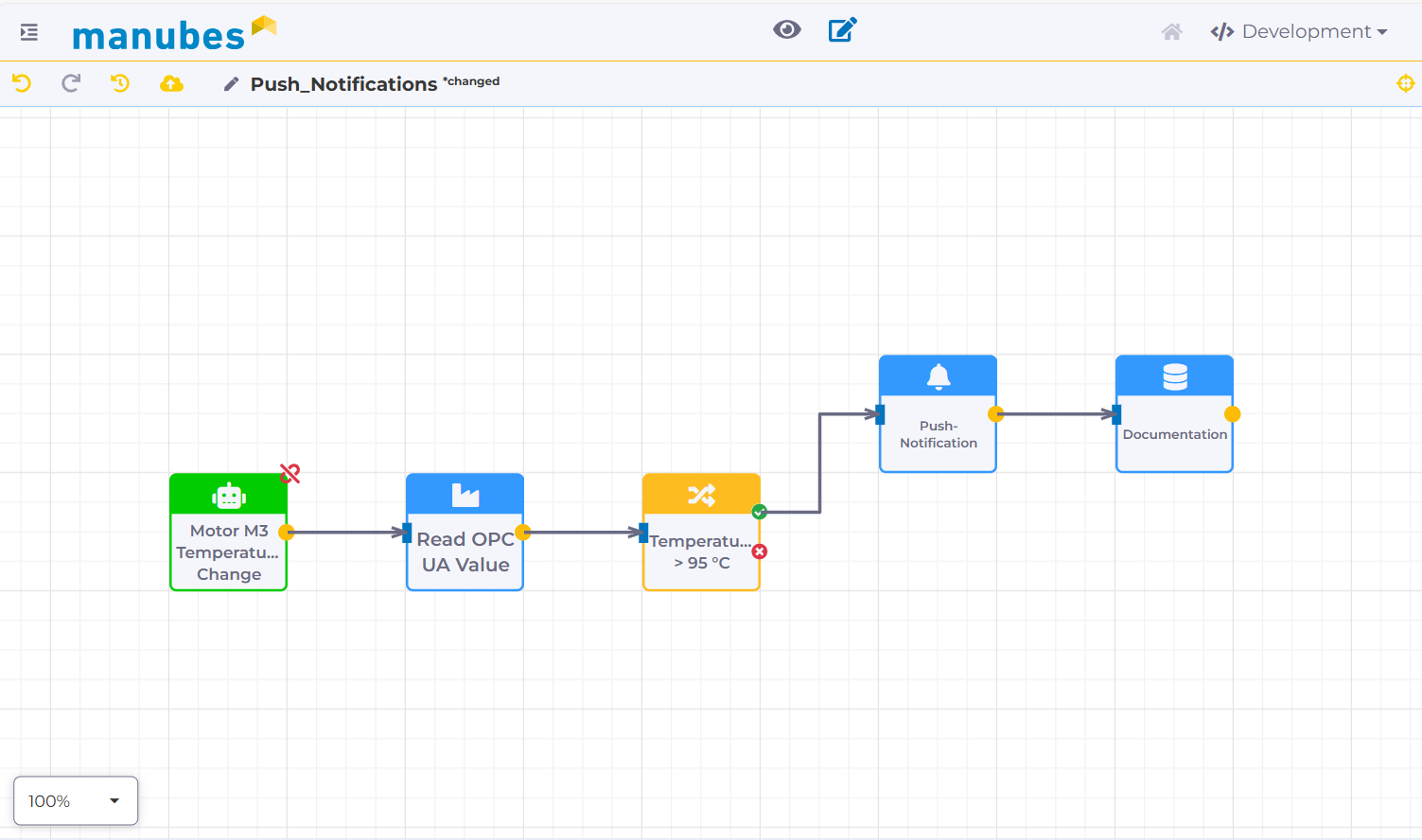
Workflow example 1: Sending a push notification when a specified temperature value is exceeded
Automated Reporting
The creation and distribution of production reports has traditionally been time-consuming – especially the process of collecting and consolidating data from different systems, which takes a lot of effort when done manually.
With manubes, you can automate large parts of production reporting using workflows.
Creating a new report in PDF format can be set up as a simple workflow step. To do this, create your own report template and link it to real-time data sources such as your data models, external databases or OPC UA servers in production.
This ensures that your report is always based on the most up-to-date data at the time of creation.
The workflow can be triggered either by a time-based event or a user action (e.g. clicking a button). As a result, you can not only distribute reports to selected recipients at regular intervals but also make them available on demand as part of reporting portals or dashboards.
By automating report creation and distribution through workflows, you not only achieve significant time savings but also ensure transparency regarding production metrics, progress and developments – always based on the latest data.
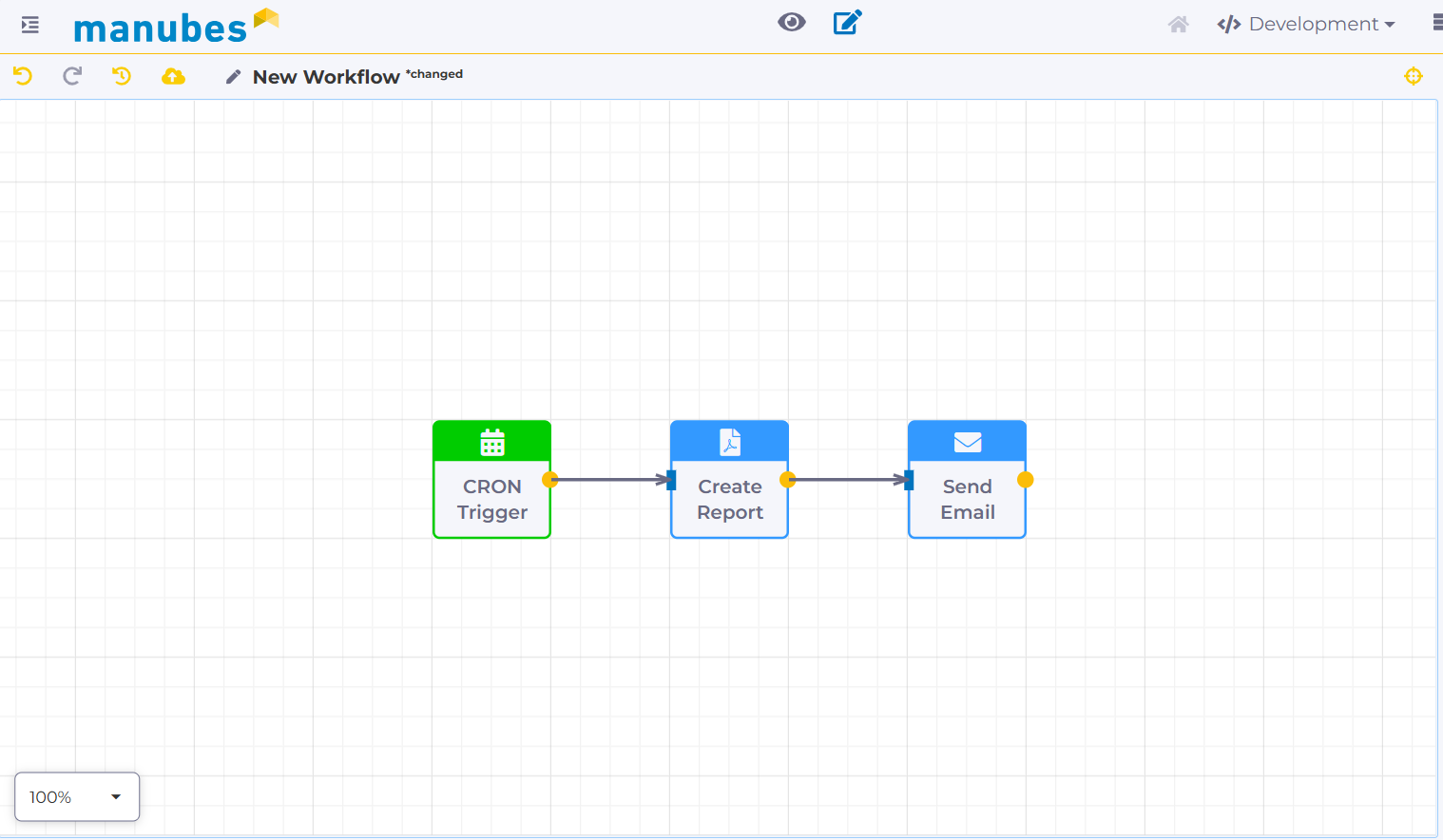
Workflow example 2: Automated creation and distribution of production reports
Integration of AI Systems
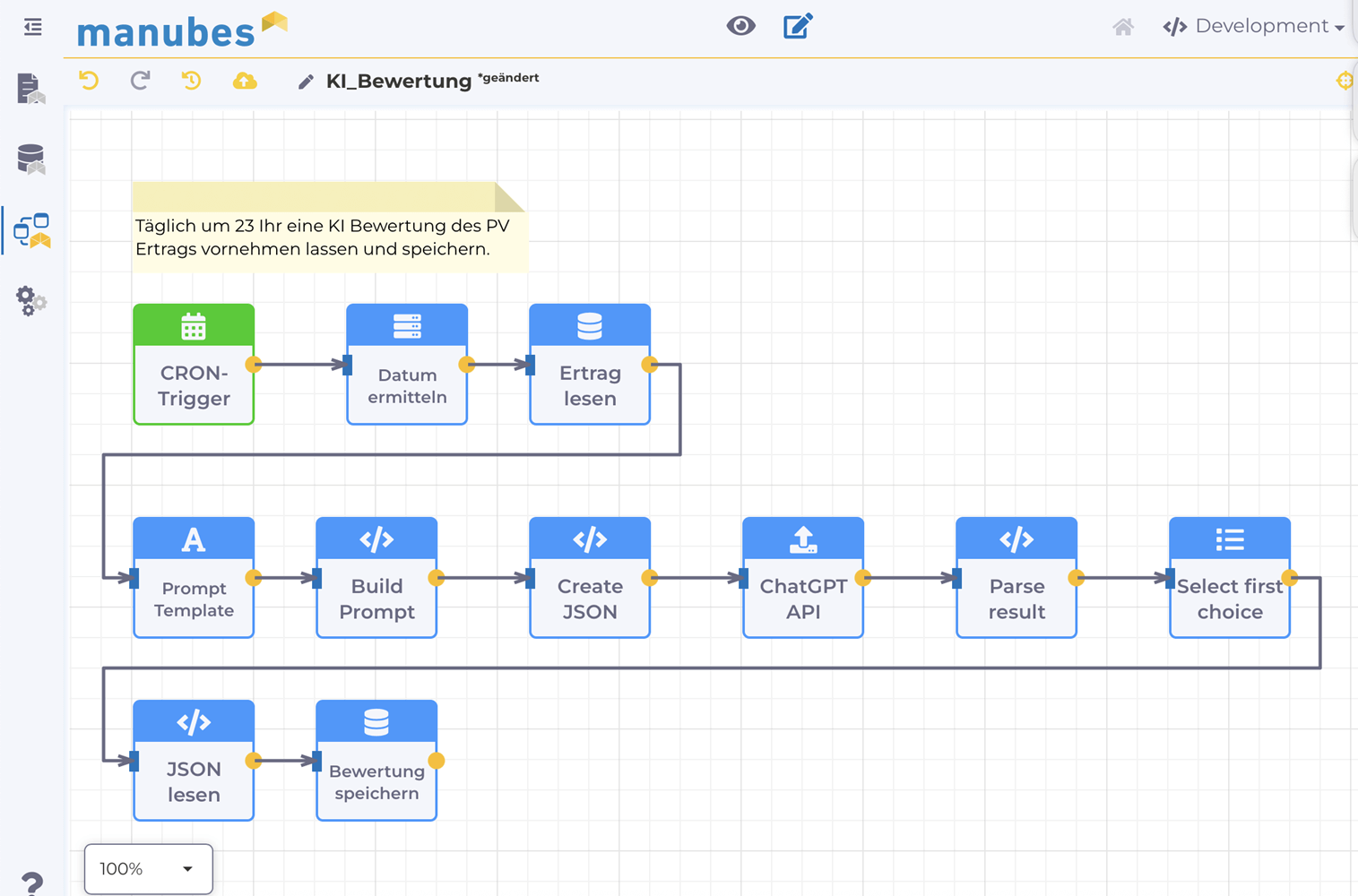
The integration of artificial intelligence in production can also be simplified with the right workflow tools, e.g. by passing production data to AI models for analysis and then processing the results.
Depending on the use case, these may be local, self-trained models or external APIs.
Possible applications include quality inspections using image recognition systems, anomaly detection or the preparation of raw data in the form of reports.
Workflow example 3: Passing asset performance data to the OpenAI API for evaluation (German user interface)
Use Cases
Further Use Cases for Workflows in Manufacturing
Beyond the three examples, workflow automation tools take over many recurring tasks in manufacturing that would otherwise require manual handovers between employees and systems. Typical scenarios:
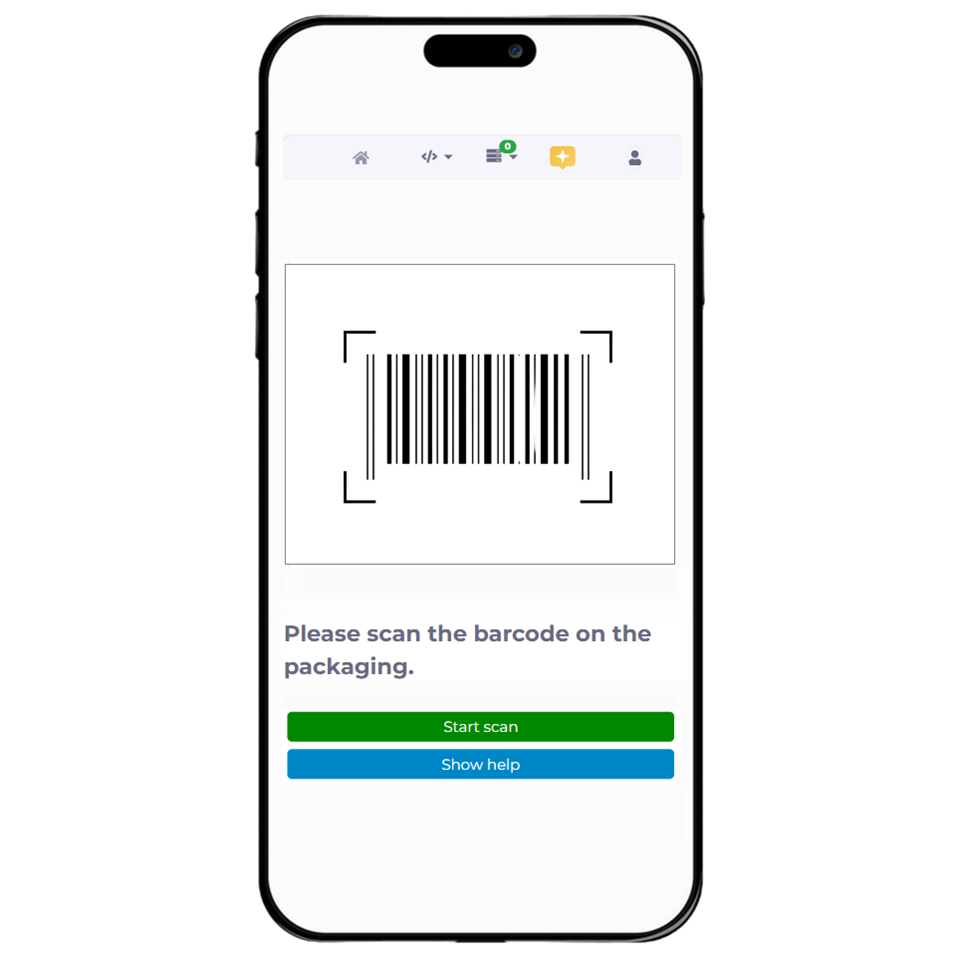
Material checks by scan
Data transfers between systems
Load peaks in energy monitoring
Faults from the shift log
Data entry and feedback
Scheduled tasks
Build your own workflows
Create workflows for your production via drag-and-drop – with access to machine data, databases and interfaces. Try it for free in your personal cloud environment.
Try manubes for freeWhat to Look for in Workflow Software for Manufacturing
Many workflow automation tools come from office and project management. For manufacturing, companies should check these points before choosing workflow software:
Response to real-time values
For real-time process automation, workflows must be able to react directly to value changes on the machine, not just to schedules or forms. Otherwise a fault alert arrives too late.
Building without programming
The teams who know the processes – such as maintenance or quality assurance – should be able to create and change workflows themselves – via drag-and-drop and dialogs. A no-code platform shortens adjustments when conditions in production change.
Version control and staging
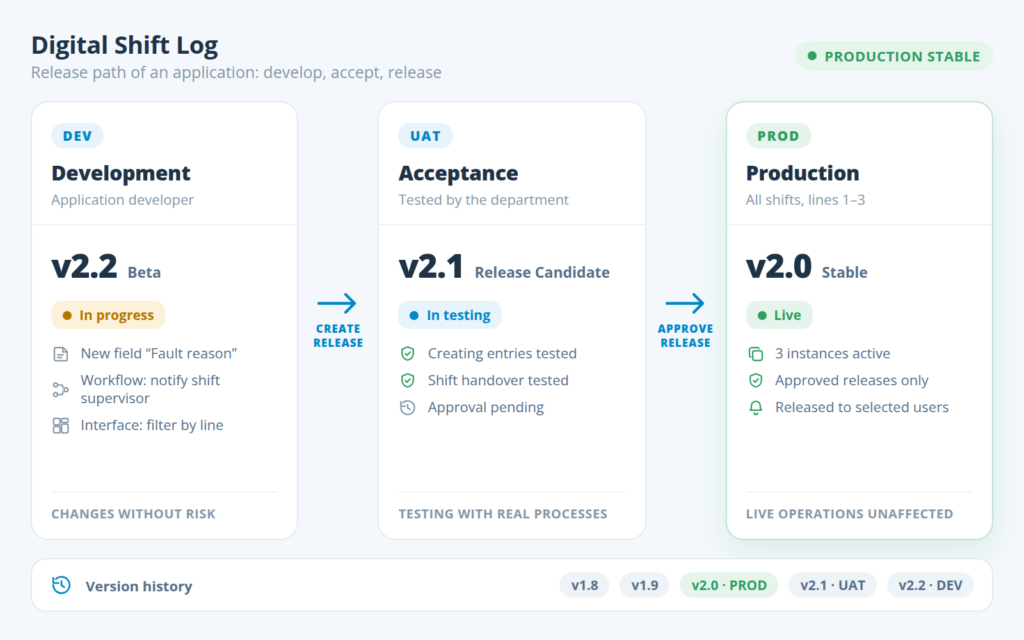
Changes to running workflows should first be tested and versioned in a development or test environment before going live. This keeps production stable.
Logs, permissions and security
Logs and diagnostics simplify workflow management and make every execution traceable, for example for audits. Access rights define who may change workflows and which data a workflow may read; the connection to production must be encrypted.
manubes as a Workflow Solution
Increase your production efficiency through workflow automation
manubes is a digitalization solution that combines a wide range of tools for production optimization in a flexible cloud platform. Manufacturers are able to collect, store and visualize production data from many different sources, using standardized interfaces such as OPC UA or MQTT.
In the background, the manubes Workflow Designer enables fine-grained control and automation of production-related processes and recurring tasks. Create your own automations via drag-and-drop and include data sources and systems, whether on the shop floor or at enterprise level.
The result is powerful solutions tailored precisely to your production environment: From comprehensive dashboards with integrated control options to order release and material procurement.
Which processes are you looking to automate? Get in touch with the manubes team – we will be happy to discuss your specific requirements.
FAQ on Workflow Automation
What is workflow automation?
Workflow automation is the automatic execution of a defined sequence of work steps according to predefined rules. A trigger starts the process, conditions control the flow and actions carry out the tasks. In manufacturing, it automates, for example, notifications about faults, production reports or data transfers between systems.
What are examples of workflow automation in manufacturing?
Typical examples are notifications about faults or exceeded limits, automatically created and distributed production reports, AI-supported evaluations of asset data, material checks after a barcode scan and data transfers between OPC UA servers, databases and MQTT brokers.
What is the difference between workflow automation and industrial automation?
Industrial automation controls machines and equipment directly, usually with a PLC and within milliseconds. Workflow automation works one level above: It uses machine values as triggers and automates the processes around production, such as alerts, reports and data transfers. The two complement each other.
Which software is suitable for workflow automation in manufacturing?
Manufacturing needs workflow software that connects machines and systems via standards such as OPC UA, MQTT and REST, reacts to real-time values and can be used without programming. Version control, staging and logs make changes safe. General office tools are often not designed to access machine data.
What is a trigger in a workflow?
A trigger is the event that starts a workflow. In manufacturing, this can be a point in time or interval, a value change on an OPC UA server, an MQTT message, a new record or a click on a button in an application.
Do you need programming skills to create workflows?
No. With no-code tools such as the manubes Workflow Designer, workflows are assembled from prebuilt blocks via drag-and-drop and configured in dialogs. This allows production staff to automate and adjust processes themselves.
Product video: Get to know manubes
Further information
Try manubes for free
Test the different manubes features in your personal cloud environment.
Get started
