
Verify Materials Directly on the Line
Material Verification
via QR Code Scan
With a QR code or barcode scan, operators check on the line whether packaging, label or raw material matches the order. Mix-ups are detected before they cause scrap, delivery delays or recalls.
Material Verification Process
Scan, compare, start
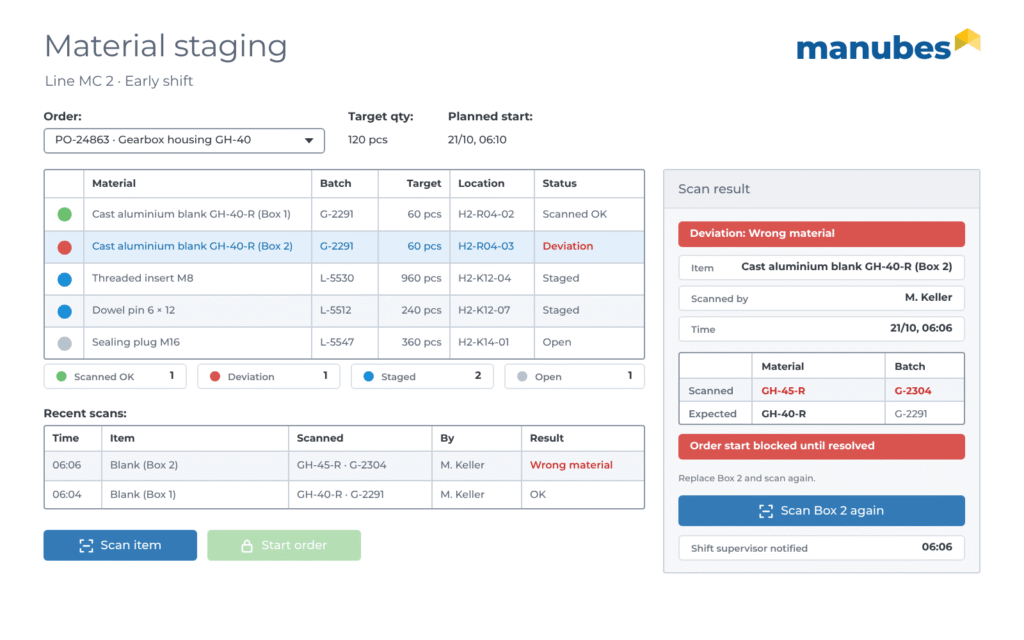
Before an order starts, operators scan the code on the packaging, label or container. manubes compares it with the target material of the order and immediately shows green or red. The order can only be started with the correct material.
If a mix-up goes unnoticed, three types of damage are possible:
Unusable products
Delayed customer orders
Complaints and recalls
Example Application 1
Packaging check before the order starts
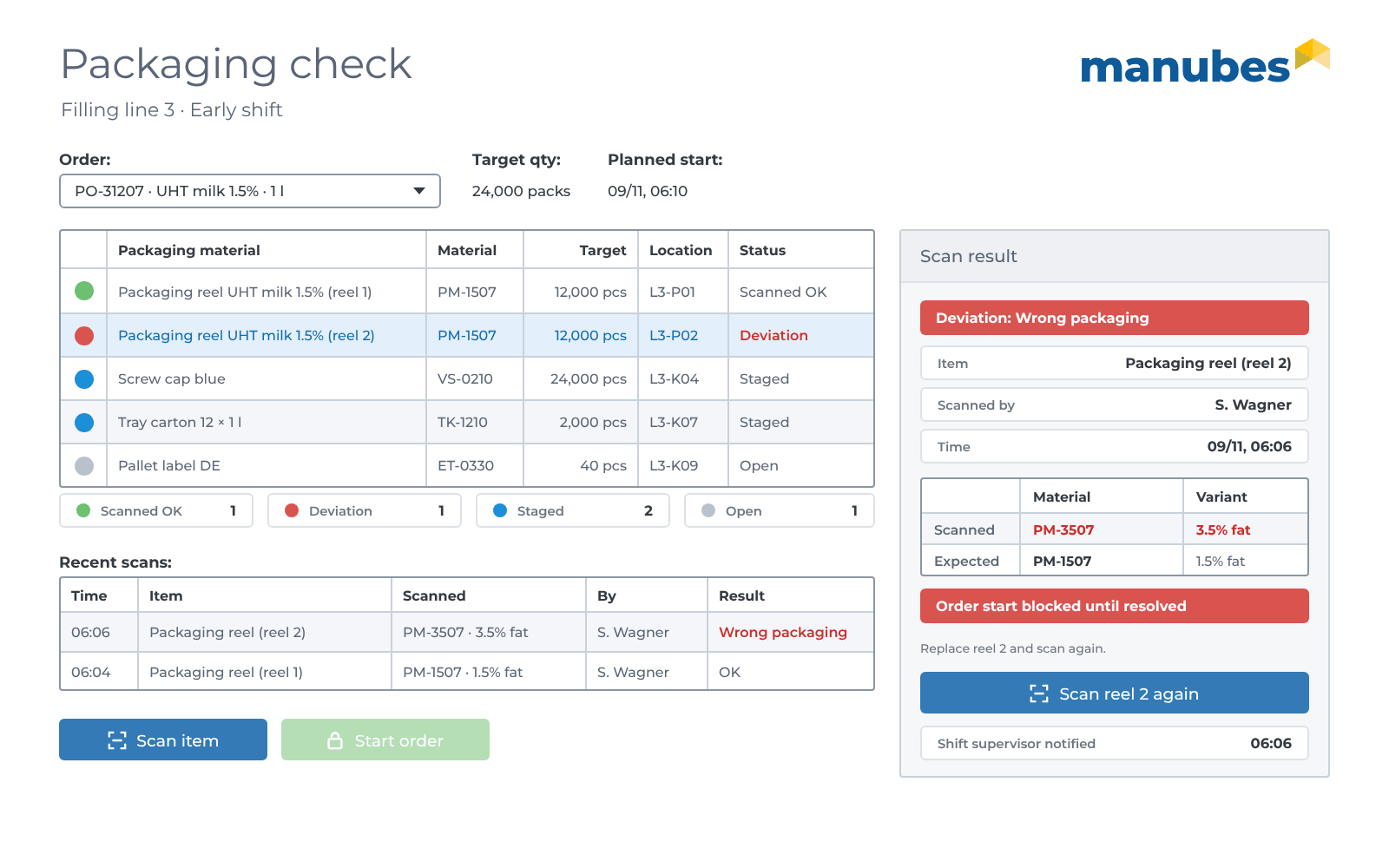
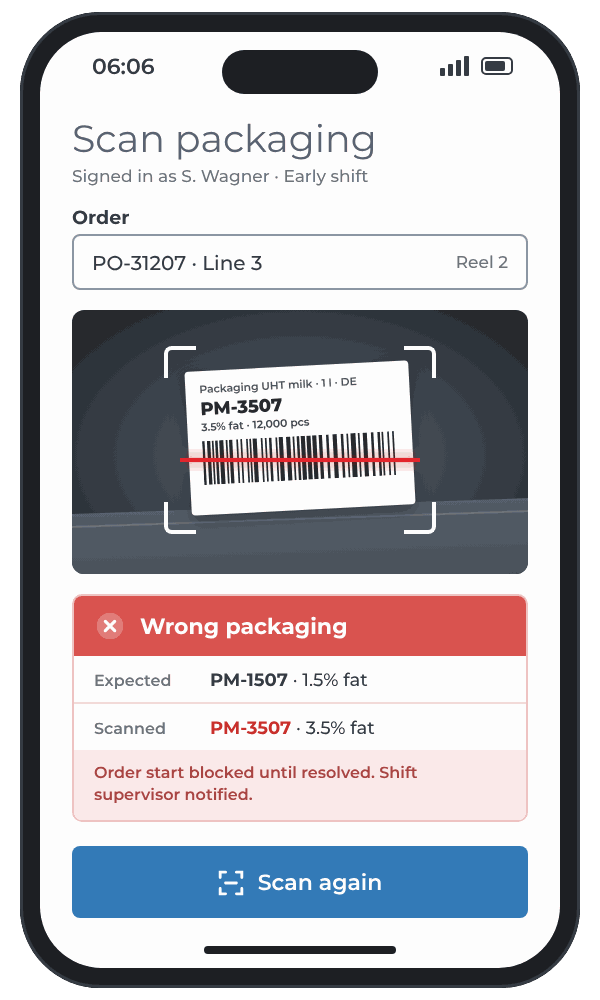
A scan application in manubes checks on the filling line whether the staged packaging material matches the order. The order can only be started once all items have been scanned and are correct.
- Data model
-
The target packaging for each order, plus the scanned code, time, operator and result for each scan.
- Order
- Item
- Material
- Variant
- Quantity
- Scan
- Time
- Result
- Operator
- User interface
-
A scan view for smartphone, tablet or handheld scanner with a green or red indicator, plus a checklist for each line.
- Who works with it?
-
Operators, shift supervisors and quality assurance.
-
Target
Packaging according to the order: Item, variant, size and language version, e.g. from the ERP system.
-
Actual
Scanned barcode or QR code on the packaging reel, folding box, label or carton.
-
Comparison
A workflow compares the scanned packaging material with the order target.
-
Response
If there is a deviation, the application blocks the order start and notifies the shift supervisor.
Automatically in the background: Each scan is stored with time, operator and result on the order and serves as evidence for complaints and audits.
Example Application 2
Ingredient and batch check during addition
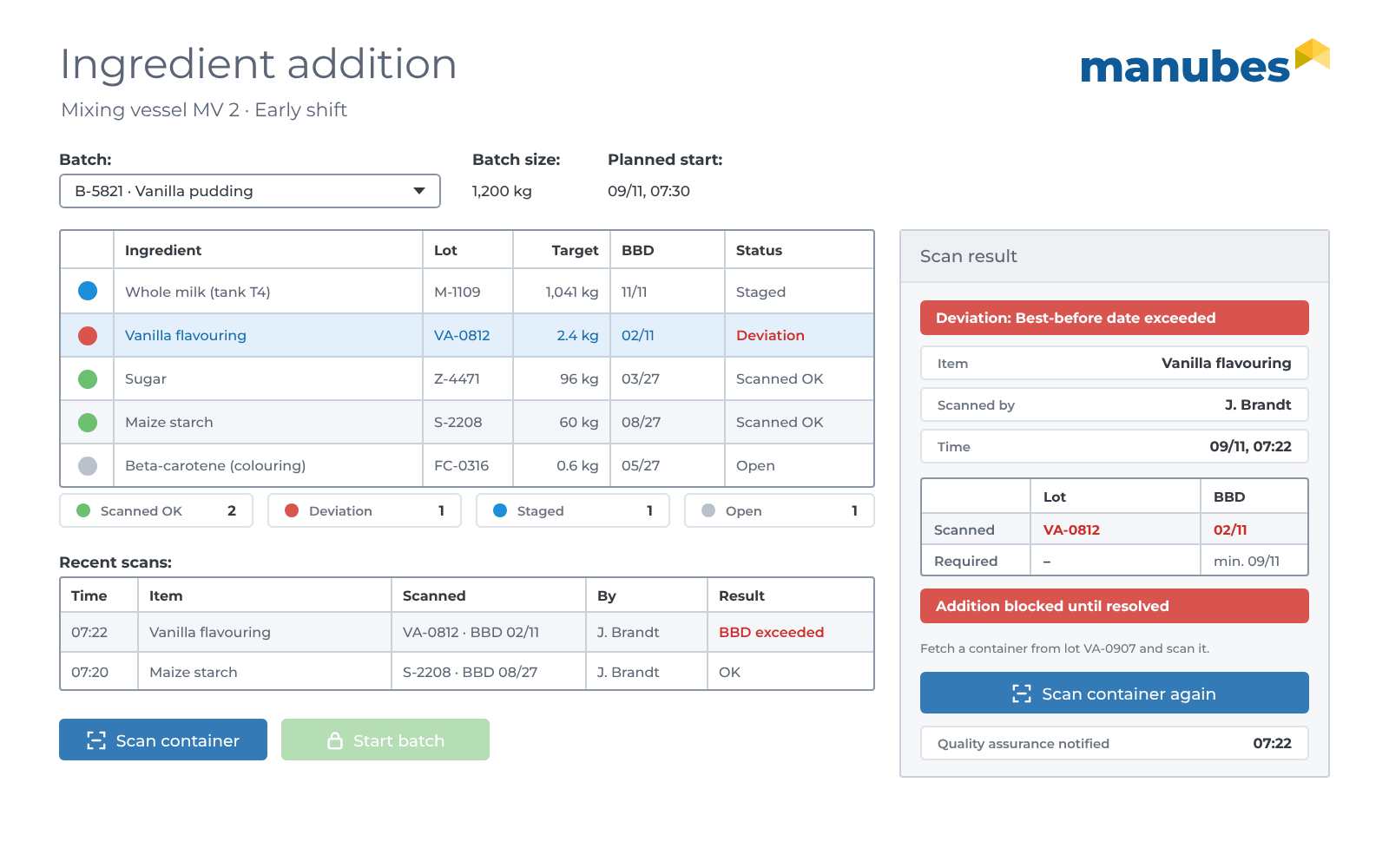
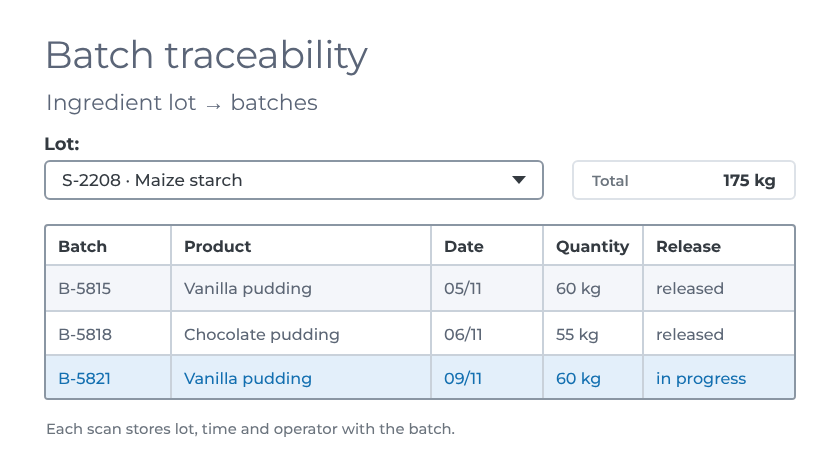
An addition application in manubes checks every container at the mixing vessel against the recipe of the batch and verifies the best-before date. Each lot used is stored with the batch and remains traceable.
- Data model
-
The recipe ingredients with target quantity for each batch, plus lot, best-before date, time and operator for each container.
- Batch
- Recipe
- Ingredient
- Quantity
- Container
- Lot
- Best-before date
- Operator
- User interface
-
An addition list on a tablet next to the vessel and a batch traceability view for quality assurance.
- Who works with it?
-
Operators at the vessel, quality assurance and warehouse.
-
Target
Ingredients and quantities according to the recipe, plus the rule: Best-before date not earlier than the processing day.
-
Actual
Scanned code on the container with ingredient, lot and best-before date.
-
Comparison
A workflow checks ingredient, lot and best-before date against the batch.
-
Response
If there is a deviation, the application blocks the addition and notifies quality assurance.
Automatically in the background: For each lot, traceability shows which batches it was used in, which is important in the event of a complaint or recall.
Practical Examples
Further checks from practice
Where packaging and materials differ only in details, a scan prevents costly mix-ups. Six typical cases from manufacturing:

Packaging in different languages

Different variants and ingredient lists

Packaging in different sizes

Packaging for seasonal products
Material with an expiry date

Packaging for individual customer orders
Getting Started
Three steps
to your own material verification
In the free trial account or together with our team, without programming.
-
Create a trial account
Create your free tenant and get to know the designers for data, pages and workflows.
Go to the trial account -
Build the scan view
Create the order, target material and scan data and assemble the scan view for smartphone or tablet using drag and drop.
Go to the Page Designer -
Automate the comparison
Import the target materials from the ERP system via a REST connector and define comparison, blocking and notification in a workflow.
Go to the Workflow Designer
Frequently asked questions about material identification
What is material identification in production?
Material identification is the check via barcode or QR code scan as to whether a material matches the current production order. It is a simple form of mix-up prevention (poka-yoke) and in the pharmaceutical and food industries is often part of line clearance before the order starts.
Is material identification the same as positive material identification (PMI)?
No. Positive material identification (PMI) determines the chemical composition of a material using measuring instruments, e.g. by X-ray fluorescence. Material identification via code scan checks whether the correct, already labelled material is used for the order.
Barcode or QR code: Which is better?
Both are sufficient for identification alone. Barcodes such as EAN or GS1-128 are usually already printed on packaging and containers. QR codes store more data in a small area and remain readable even when slightly damaged, see What is a QR code?
Which devices do I need for scanning?
Smartphones and tablets that are already used in production are sufficient. manubes enables scans on any device, and handheld scanners can also be used.
What happens if the wrong material is scanned?
Operators see an error message immediately, and the order can only be started in the application after a successful check. In addition, the shift supervisor can receive a push notification with the order, line and scanned material.
Can material verification be connected to SAP or another ERP system?
Yes. manubes imports the target materials for each order from the ERP system via REST connectors, including SAP. How the integration works is explained on System integration with manubes.
What is the difference to data recording via code scan?
In material identification, the scan checks whether something is correct. In data recording via code scan, it provides information or records values. Both can be combined in one manubes application.
Further information

Consulting and Proof of Concept
Implement material verification with our team
Would you like to discuss your use case first or start directly with your labels and your ERP system? Briefly describe your project and we will get back to you promptly.
- Personal consultation on your use case
- Proof of concept with your materials and labels
- More than 30 years of experience with industrial software
Request a consultation
Loading form …

