Knowledge · Production Control
Production Order in Manufacturing:
From ERP to Machine
A production order defines what is produced, in what quantity and by when. Learn what a production order contains, which stages it goes through and how it reaches the machine without paper.
Definition
What is a production order?
A production order (also called a manufacturing order or work order) is the binding instruction to manufacturing to produce a specific quantity of an item by a set date, using defined materials and operations.
A production order is usually created in the ERP system, triggered by a sales order or a stock requirement. It links production planning with the actual manufacturing. Work on the shop floor starts when the order is released. It ends with the confirmation and the goods receipt into inventory.
Production order, manufacturing order or work order? In everyday use, all three terms mean the same thing. Which one is used usually depends on the ERP system: SAP and Microsoft Dynamics 365 Business Central speak of production orders, Odoo of manufacturing orders. Work order is also common, but often refers to a single operation or to maintenance work. In the process industry, the counterpart is often called a process order.
Contents
What does a production order contain?
A production order bundles everything manufacturing needs to make the product. It typically has six components:
Item and quantity
Dates
Bill of materials
Routing
Resources
Status and costs
Traditionally, manufacturing receives printed shop papers for this: A job traveller, a pick list and a time ticket. In many plants, digital solutions have already replaced these papers completely or in part.
What stages does a production order go through?
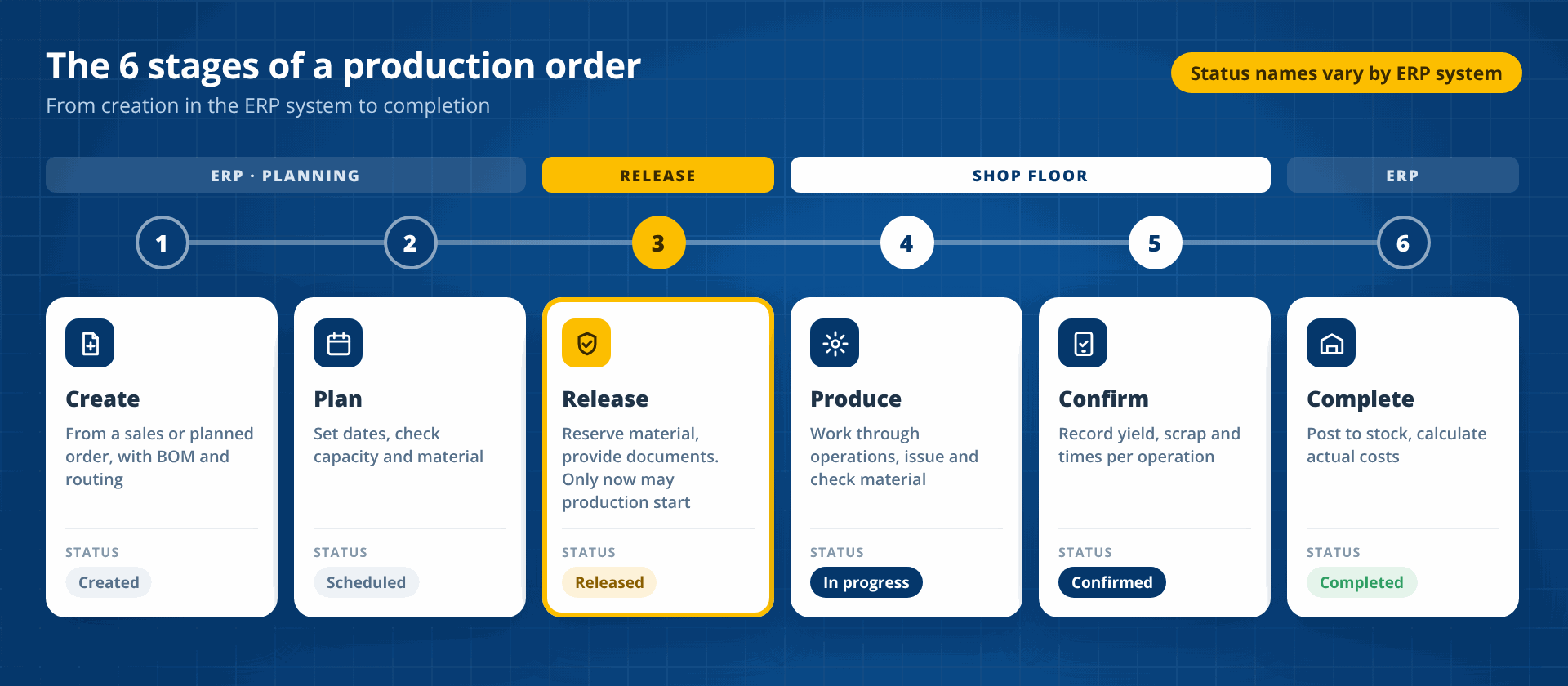
A production order goes through six stages, from creation to completion. The order status shows the current stage at any time. The status names differ from one ERP system to the next, but the stages are almost always the same.
Create
The production order is created from a sales order or a planned order. The bill of materials and the routing are copied from the master data and adapted to the order.
Plan and schedule
Production planning sets the start and finish dates and checks capacity and material availability.
Release
Only a released production order may be produced. On release, material is reserved and the shop papers are provided.
Produce
Manufacturing works through the operations. Material is picked, issued and checked, with batch numbers where required.
Confirm
Yield, scrap, times and downtime are recorded for each operation. The confirmation updates the order status and the actual costs.
Complete
The finished product is posted to inventory or goes to shipping. The order is technically completed and the actual costs are calculated.
Comparison
Production order, planned order and sales order: What is the difference?
Three order types are often confused in practice. Only the production order directly instructs manufacturing.
| Criterion | Sales order | Production order | Planned order |
|---|---|---|---|
| Purpose | Sale to a customer | Binding instruction to manufacturing | Proposal from material requirements planning |
| Created by | Sales | Conversion of a planned order or directly from the sales order | Material requirements planning (MRP) |
| Binding for manufacturing | No | Yes, after release | No, can still be changed |
| Bill of materials and routing | No | Yes, order-specific | Rough |
| Confirmation of quantities and times | No | Yes | No |
Systems
The production order in ERP, MES and on the shop floor
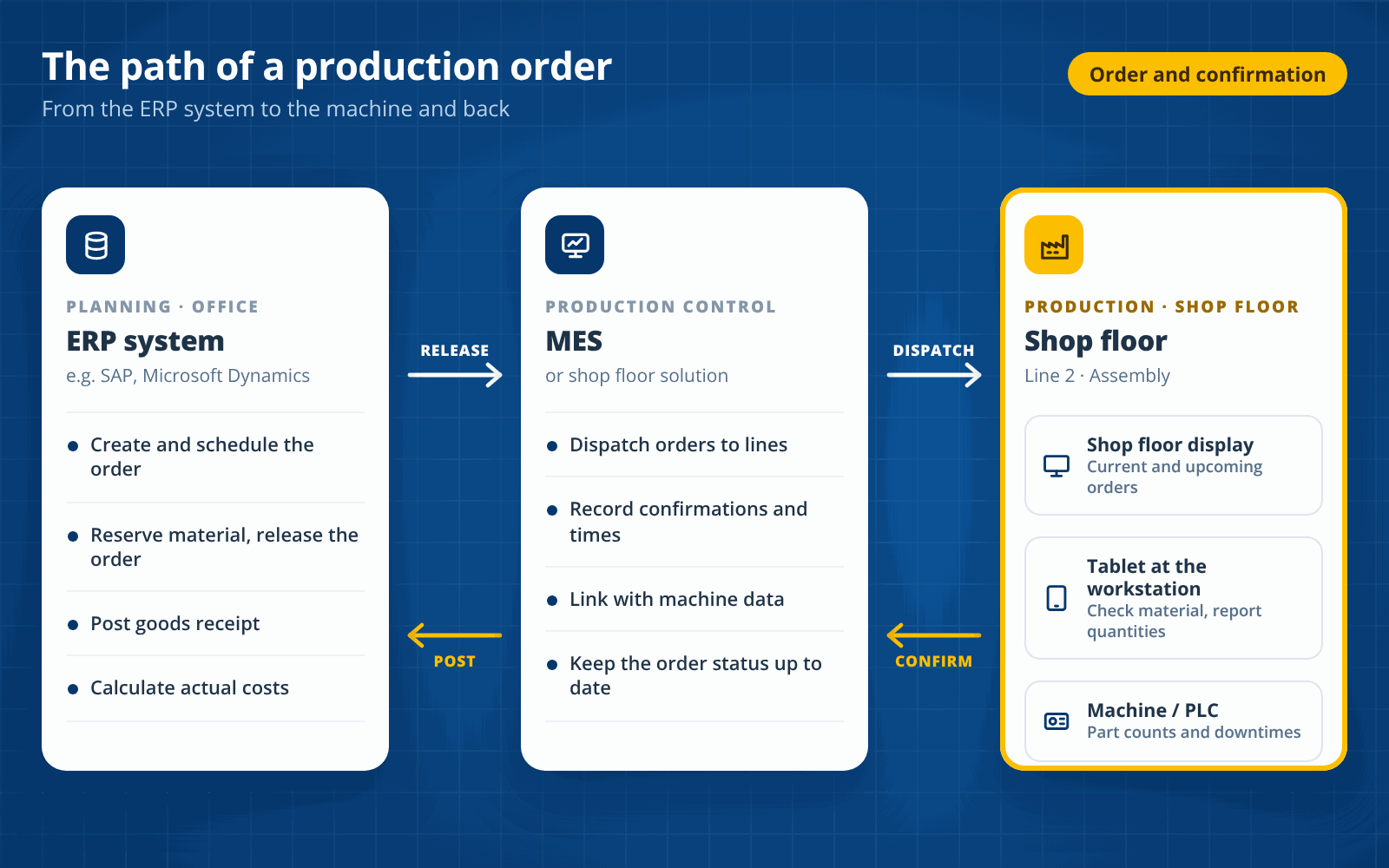
A production order is created in the ERP system but carried out on the shop floor. Production control sits in between. Three levels share the work:
- ERP system (e.g. SAP): Creates the production order, plans materials and costs and, at the end, posts the goods receipt and actual costs.
- MES or shop floor solution: Distributes released orders to lines and workstations, records confirmations and times and links them to machine data.
- Shop floor: Operators see the next order, check material, work through the operations and report quantities back.
If the link between these levels is missing, media breaks occur. The order then reaches the machine as a printed job traveller and comes back as a handwritten note.
Challenges
Typical problems with paper-based production orders
Outdated information
Late confirmation
Wrong material
No link to machine data
manubes
Digital production orders
with manubes
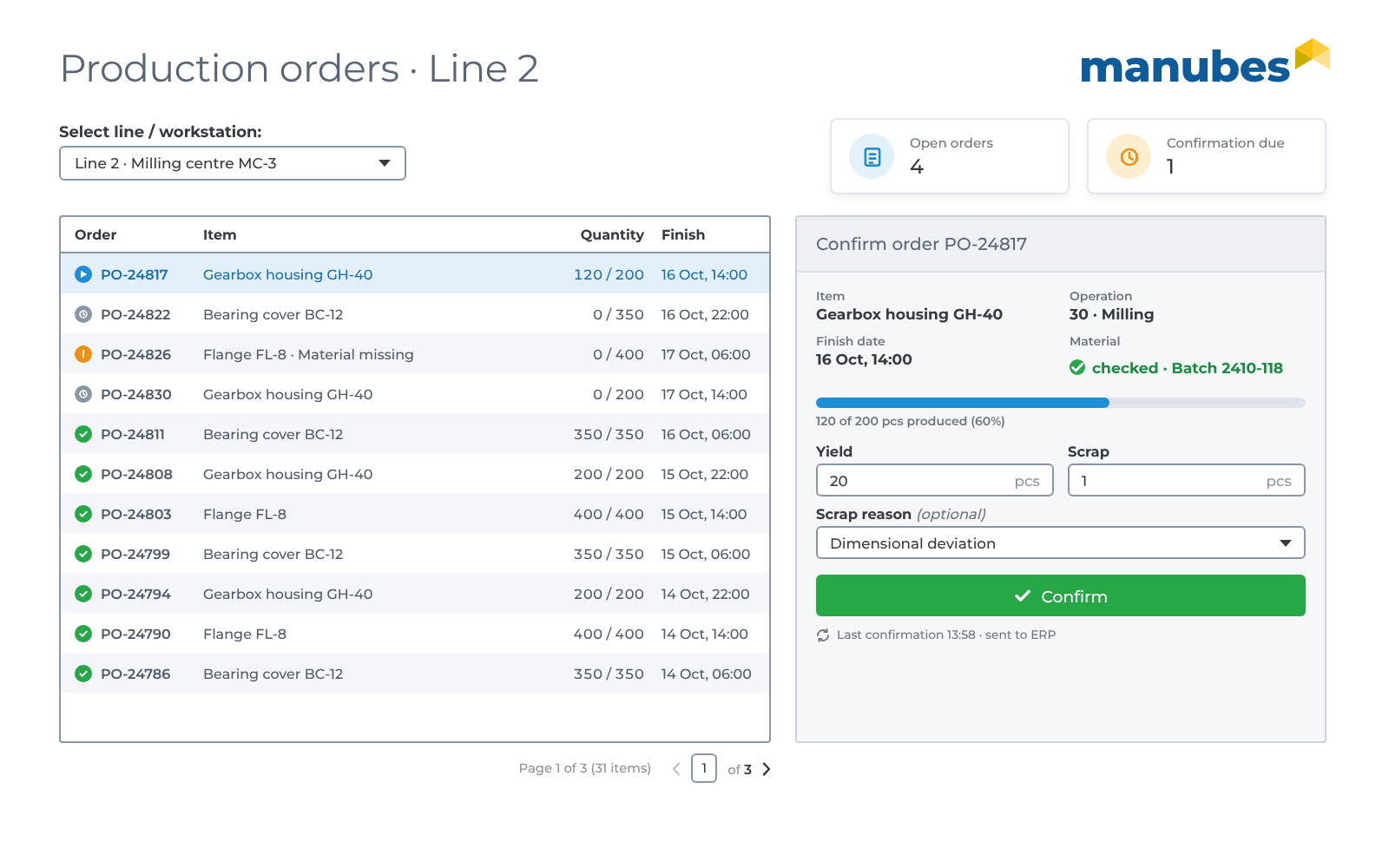
manubes does not replace your ERP system. It reads released production orders from the ERP system, displays them at the line and writes confirmed quantities, scrap and times back to the ERP system. Set up via drag and drop, without programming.
-
Retrieve
Released orders are read from the ERP system via REST or SQL.
Our customers

















Frequently asked questions about production orders
What is a production order?
A production order is the binding instruction to manufacturing to produce a specific quantity of an item by a set date. It contains the bill of materials, the routing, dates and resources.
What does a production order contain?
A production order contains the item and quantity, the start and finish dates, the bill of materials with all components, the routing with its operations and the scheduled resources. It also includes the order status and costs.
What is the difference between a production order and a work order?
In many companies, both terms mean the same thing. Where they are distinguished, the production order covers the whole product, while a work order refers to a single operation, a work centre or maintenance work.
What stages does a production order go through?
A production order goes through six stages: Create, plan and schedule, release, produce, confirm and complete. Production may only start after release.
How do I create a production order?
A production order is usually created in the ERP system by production planning or process planning. It is often created automatically from a sales order or by converting a planned order.
What is a job traveller?
A job traveller is the paper document that accompanies a production order and moves through manufacturing with the material. It lists the operations, and quantities and times are recorded on it for each operation. Digital solutions replace it with an order view on a tablet or shop floor monitor.
How can production orders be digitized?
A shop floor solution retrieves the released orders from the ERP system and shows them at the workstations. Quantities, scrap and times are recorded there and automatically written back to the ERP system.
Bring production orders to the machine without paper
Show us your process from ERP to confirmation. We’ll show you how manubes closes the gap.
Request a product presentationFurther information