
Optimize Shop Floor Control
Digital Applications
for Shop Floor Control
Approvals and order confirmations in a few clicks, automated fault escalation and more: Digitizing shop floor control saves time in day-to-day production while avoiding errors, information discrepancies and delays.
Applications
Digital shop floor control:
Five applications for production
manubes lets you develop digital applications that fit your processes.
Integrate order and operating data from the ERP system with automatically captured machine data and manual input on mobile devices. In the background, workflows automate data transfers and notifications.
| Application | Task | Who uses it? | Automatically in the background |
|---|---|---|---|
| Material verification | Material flow | Logistics, operators | Comparison of material and order, block on mix-ups |
| Setup and first-off approval | Release to start | Setters, quality assurance | Call quality assurance, escalation without acknowledgement |
| Order confirmation at the workstation | Shop floor data collection | Operators, shift supervisors | Unit count from the machine, quantities back to the ERP |
| Control centre and shop floor display | Order monitoring | Production management, production controllers | OEE and lead time in real time, shift report by email |
| Faults and escalation | Response to deviations | Machine operators, maintenance, shift supervisors | Report from the machine fault, time-based escalation |
Go directly to an application:
Material verification First-off approval Order confirmation Control centre Fault escalation
Material Flow
Material verification
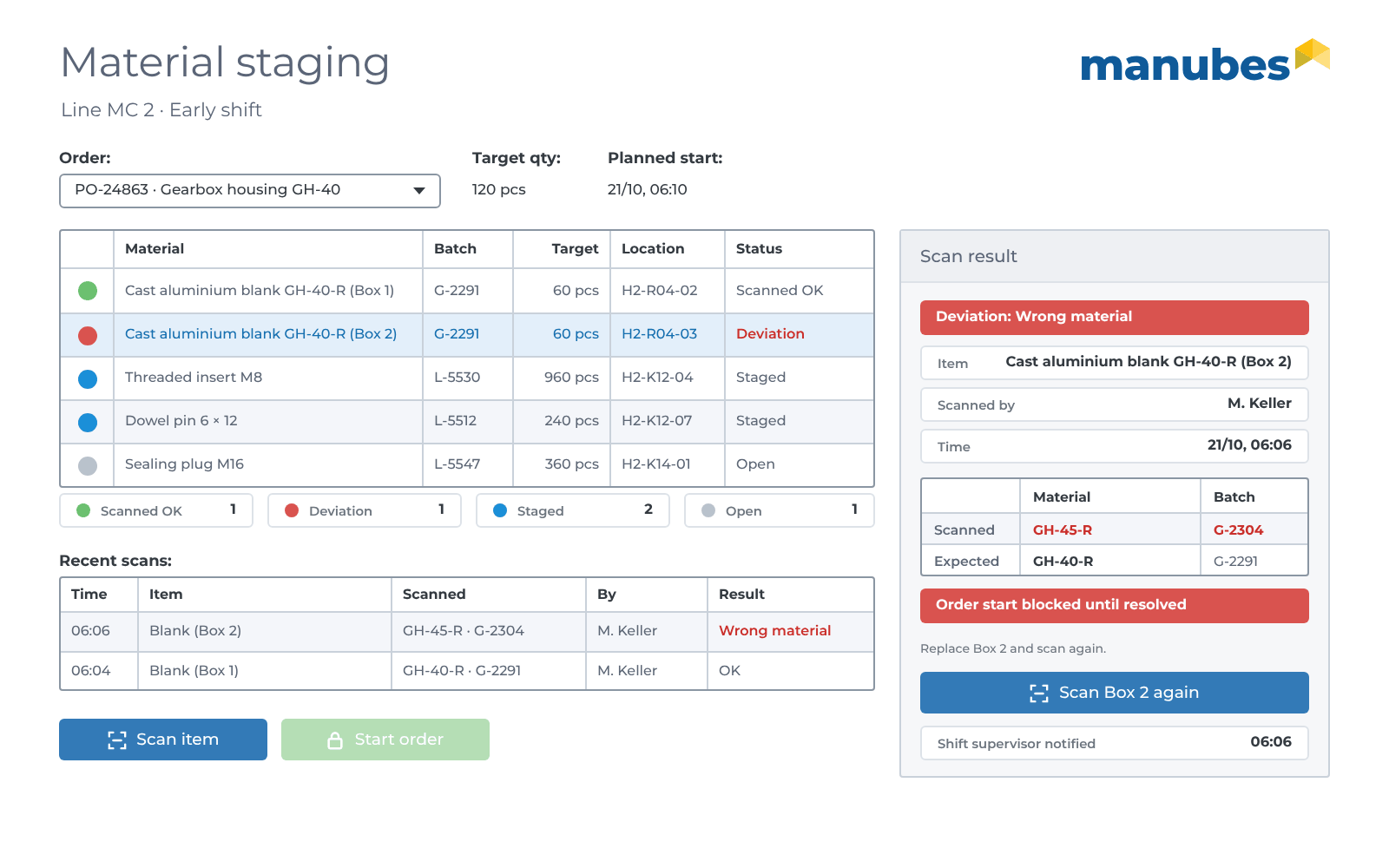
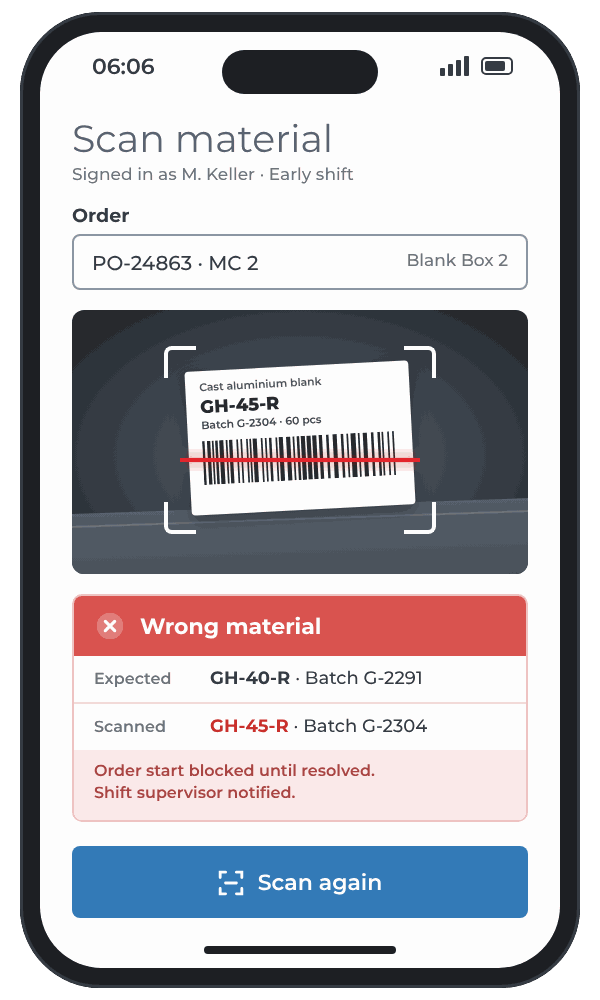
A scanning app in manubes checks on the line whether the material provided matches the order and reports the staging back to logistics. Mix-ups are spotted before the wrong material is processed.
- Data model
-
For each order, the target material from the bill of materials, plus batch, time and result for each scan.
- Order
- Material
- Batch
- Quantity
- Storage location
- Scan
- Time
- Result
- Operator
- User interface
-
A scan with a smartphone or handheld scanner with a green or red indication, plus a staging list for each line for logistics.
- Who uses it?
-
Operators, logistics and quality assurance.
-
Target
Bill of materials for the order with material and quantity.
-
Actual
Scanned barcodes or QR codes on pallets and containers.
-
Comparison
A workflow compares material, batch and order.
-
Response
If there is a deviation, the app blocks the order start and notifies the shift supervisor.
Automatically in the background: Every batch used is saved against the order and can be traced later. More about material identification
Release to Start
Setup and first-off approval
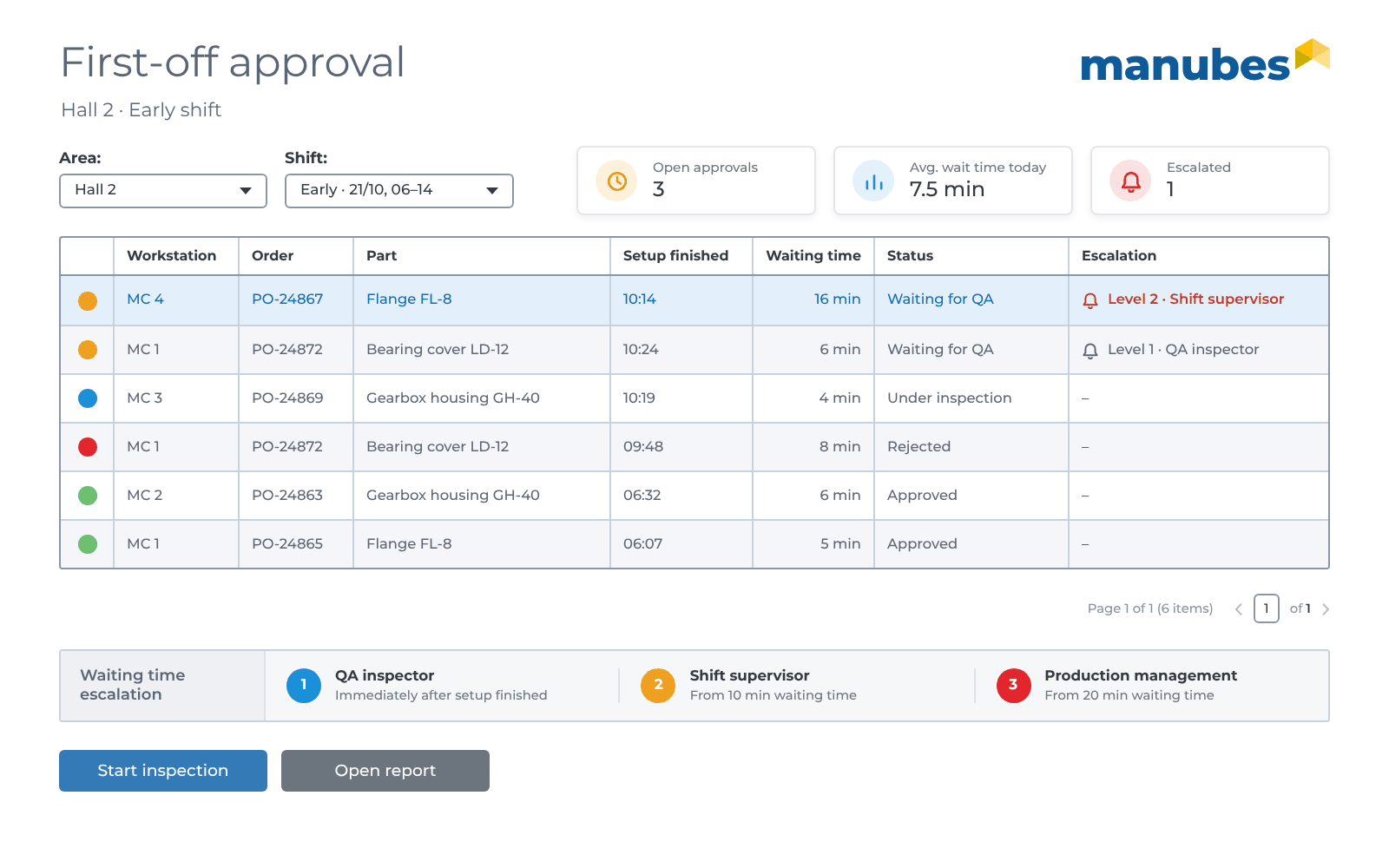
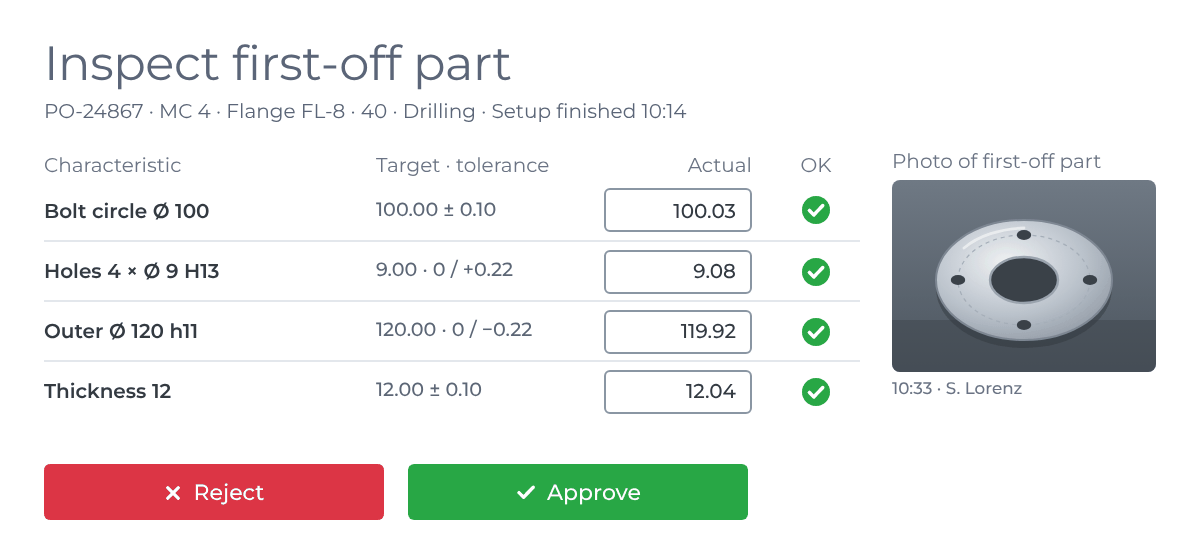
An approval app in manubes ensures that an order only goes into series production once the setup and the first-off part have been inspected and approved. Quality assurance is called automatically, and every approval is documented with inspector, time and measured values.
- Data model
-
For each order and operation, one approval with the characteristics of the first-off part.
- Order
- Operation
- Workstation
- Setup finished
- Characteristic
- Target
- Tolerance
- Actual value
- Result
- Approved by
- Time
- Status
- User interface
-
A “Setup finished” button at the workstation. For quality assurance, an overview of all pending approvals and an inspection form with a photo, in which they approve or reject on a tablet.
- Who uses it?
-
Setters, operators and quality assurance.
-
Target
Characteristics and tolerances of the first-off part from the inspection plan.
-
Actual
Measured values and a photo of the first-off part.
-
Comparison
Each characteristic is assessed against the tolerance.
-
Response
The order can only be started after approval. If it is rejected, it goes back to setup.
Automatically in the background: When the setter reports “Setup finished”, a workflow notifies quality assurance. If they do not acknowledge within 10 minutes, the notification goes to the shift supervisor. More about workflow automation
Shop Floor Data Collection
Order confirmation at the workstation
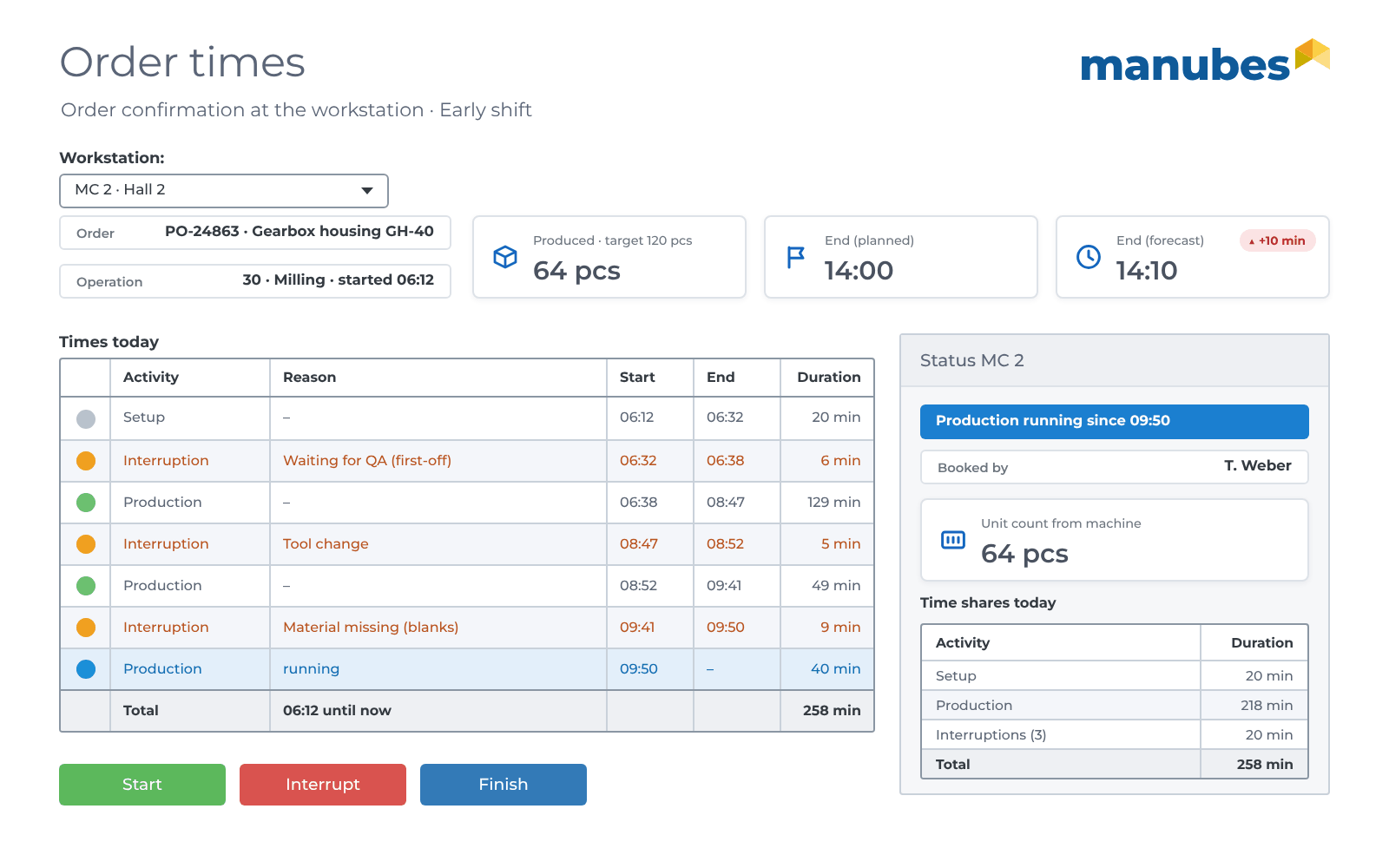
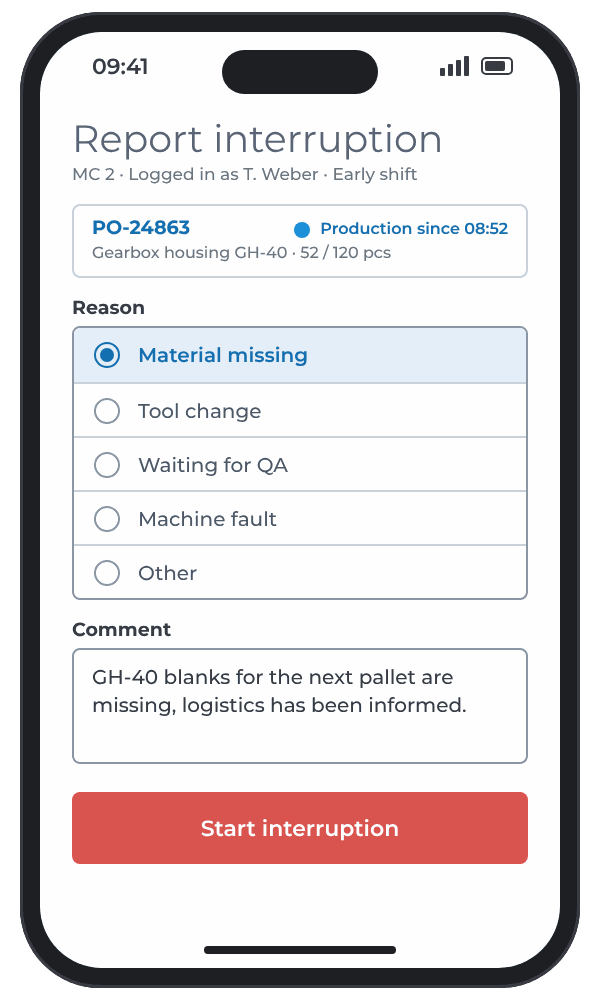
A confirmation app in manubes records at the workstation what shop floor control needs for the target/actual comparison: Quantities, scrap, times and reasons for interruptions. Production controllers see the status of every order in real time, without job cards or manual re-entry.
- Data model
-
Any number of confirmations and interruptions with a reason for each operation.
- Order
- Operation
- Workstation
- Status
- Good quantity
- Scrap
- Scrap reason
- Start
- End
- Interruption
- Reason
- User interface
-
An order list for the workstation with Start, Interrupt and Finish, a mandatory selection of the interruption reason and a confirmation form, on the operator panel or a smartphone.
- Who uses it?
-
Operators, shift supervisors and production controllers.
-
Target
Target quantity and planned time for each operation.
-
Actual
Good quantity and scrap, actual times and interruptions.
-
Comparison
Progress as a percentage and deviation from the planned time.
-
Response
If the deviation is large, the order is shown as at risk in the control centre.
Automatically in the background: The unit count comes directly from the machine counter via an OPC UA connector. A workflow sends quantities and status back to the ERP system via the REST connector. More about production orders
Order Monitoring
Control centre and shop floor display
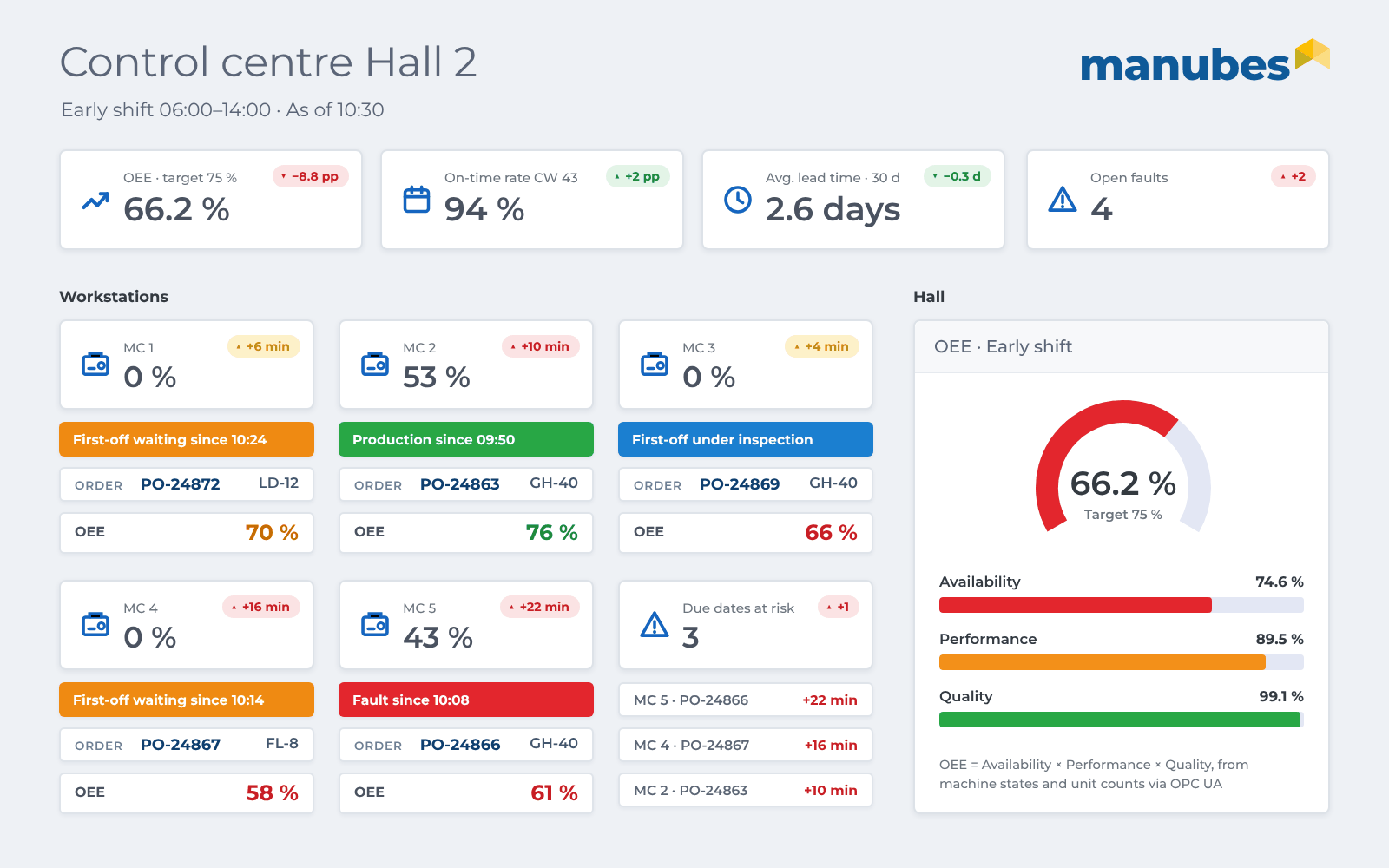
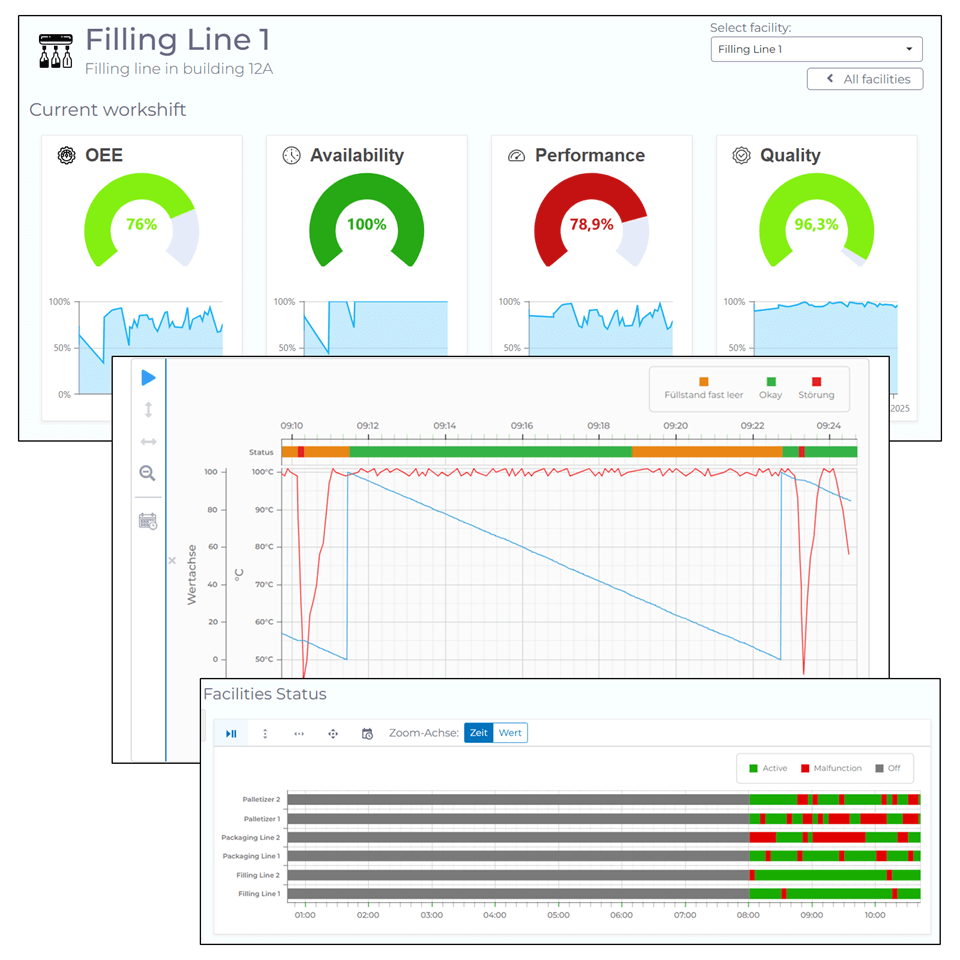
A control centre in manubes shows at a glance which orders are running, which workstations are at a standstill and where due dates are at risk. manubes continuously calculates OEE and lead time from machine and confirmation data.
- Data model
-
The control centre uses the data from approvals and confirmations and the machine states from the OPC UA connectors. It needs no data maintenance of its own.
- Machine status
- Order
- Progress
- OEE
- Lead time
- Schedule adherence
- User interface
-
A dashboard for production management on the PC and a shop floor display for each line, with drill-down from the hall to the individual machine.
- Who uses it?
-
Production management, production controllers and shift supervisors.
-
Target
Planned quantity, cycle time and due date for each order.
-
Actual
Machine status and unit counts in real time.
-
Comparison
OEE for each machine, lead time and schedule adherence for each order.
-
Response
Production controllers spot bottlenecks and adjust priorities and sequence in the ERP or APS system.
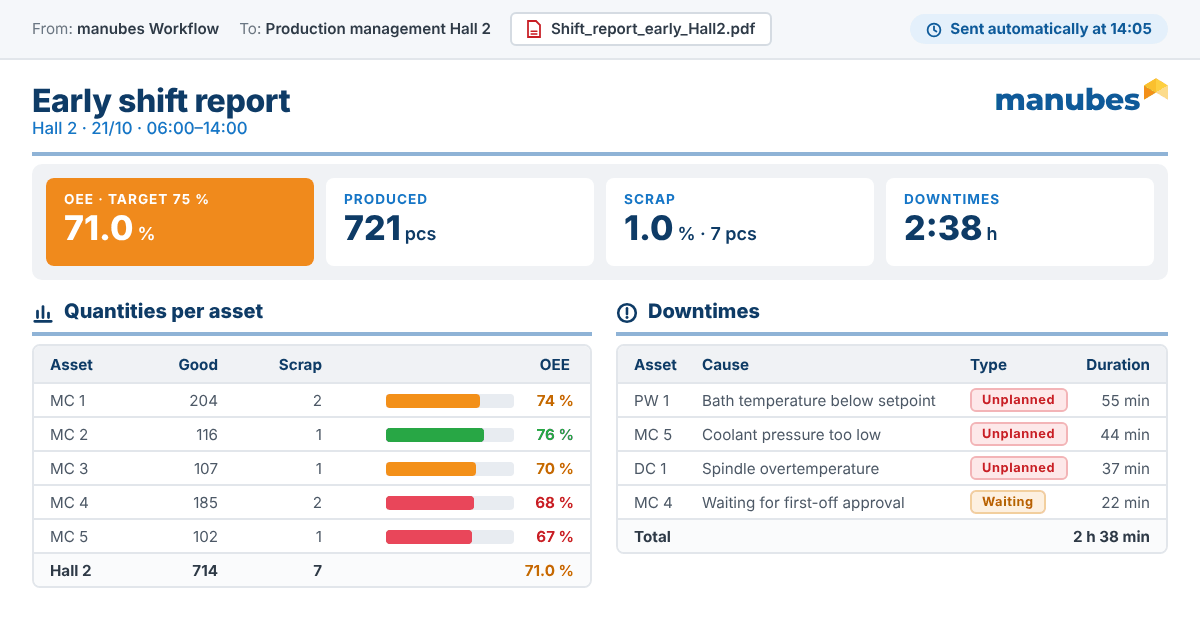
Automatically in the background: At the end of the shift, manubes creates a report with quantities, OEE and faults and emails it to production management. More about automated reporting
Response to Deviations
Faults and escalation
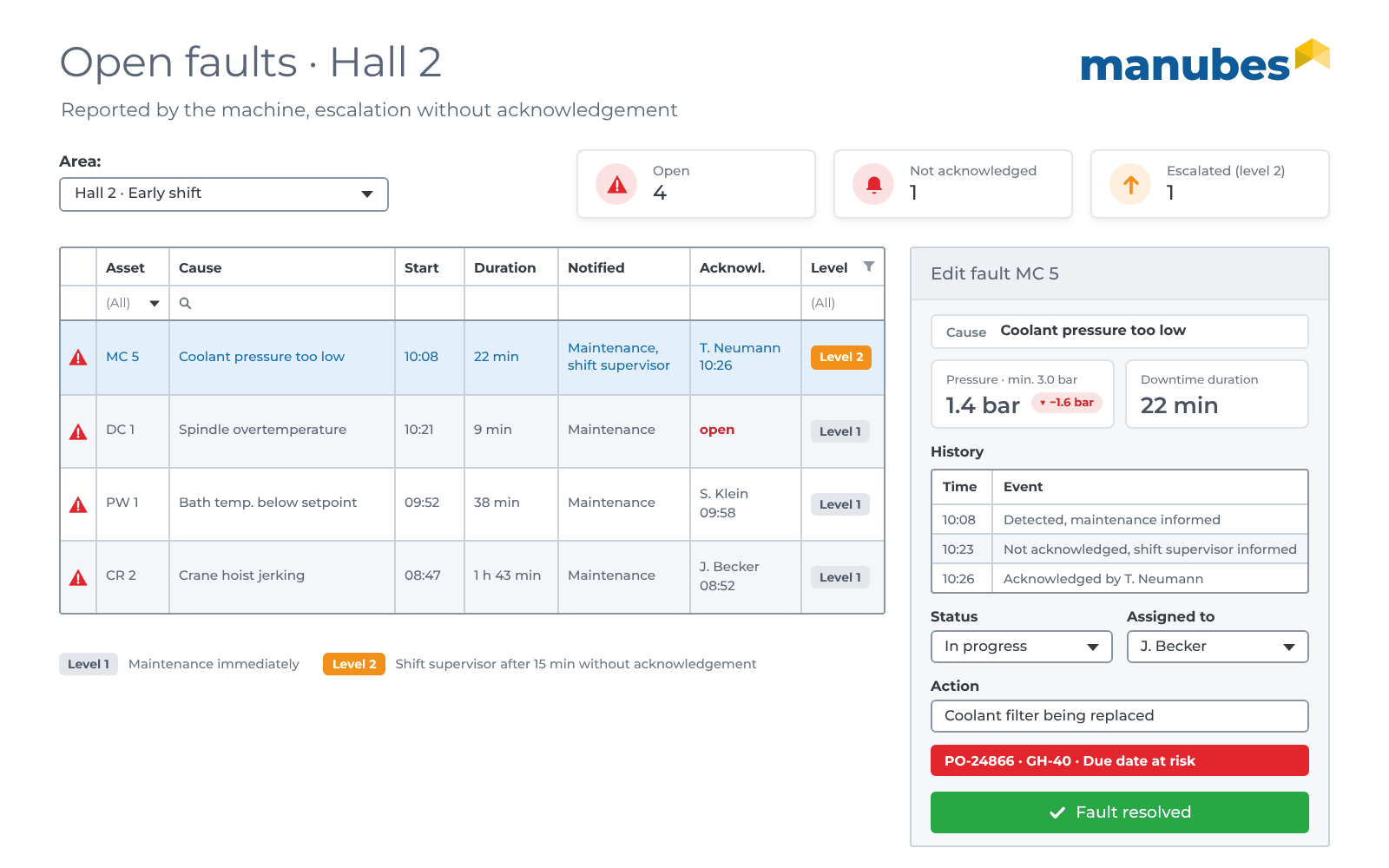
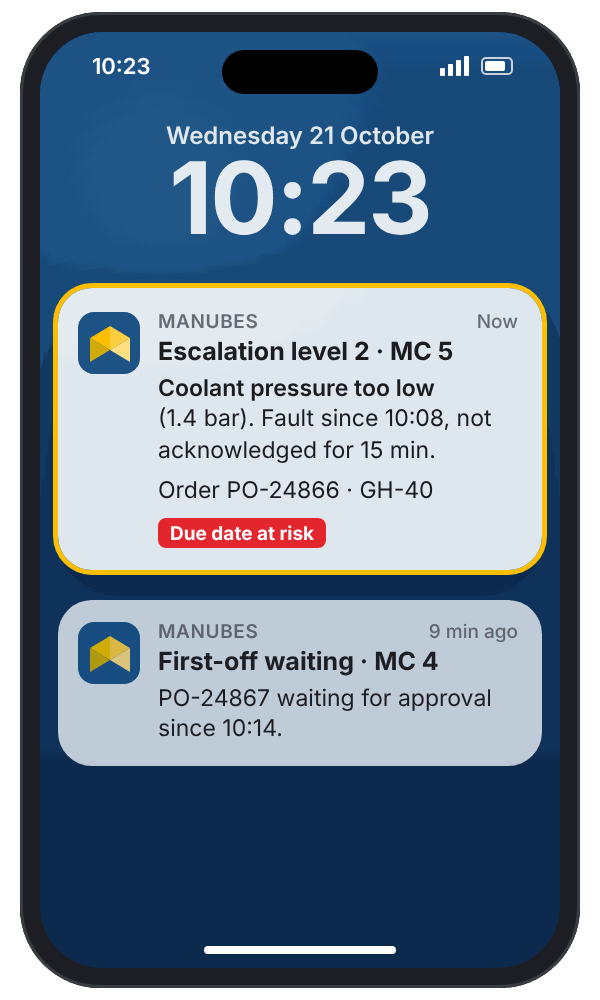
A fault app in manubes immediately notifies the people responsible on their smartphones when a machine stops, and escalates if nobody responds. Shop floor control finds out about the fault while it is happening, not at the shift handover.
- Data model
-
For each fault, machine, cause, duration and the path of the notification.
- Machine
- Cause
- Start
- Duration
- Priority
- Notified
- Acknowledged by
- Escalation level
- Action
- User interface
-
A push notification, a list of open faults with acknowledgement and a form in which the machine operator adds the cause on the operator panel.
- Who uses it?
-
Machine operators, maintenance, shift supervisors and production controllers.
-
Target
Machine running, limits such as temperature or pressure observed.
-
Actual
Machine status and process values via the OPC UA connector.
-
Comparison
A standstill or a limit violation triggers the fault.
-
Response
Notification to maintenance, and to the shift supervisor after 15 minutes without acknowledgement.
Automatically in the background: Affected orders are marked as at risk in the control centre so that production controllers can reschedule. More about mobile notifications
Context
Where manubes fits into shop floor control: ERP, shop floor, machines
manubes replaces neither the ERP system nor the detailed scheduling of an APS system. manubes closes the gap between plan and shop floor. Orders and due dates come from your existing systems, manubes brings them to the workstation and returns the actual data. MES applications can be implemented according to your needs.
REST connector
Applications on the shop floor
Forms, control centre and workflows are created in the Datamodel Designer, Page Designer and Workflow Designer.
- Scan and check material
- Approve the first-off part
- Record quantities, times and faults
OPC UA connector
MES at a glance: Our article What is an MES? explains which functions an MES covers.
Your own shop floor control application in 4 steps
Implement your custom shop floor control application in four steps. Start with one bottleneck or a single line and then expand the application step by step. With a free test account, you can get started today.
Define the data
In the Datamodel Designer, you create tables and fields and link them, e.g. an order with its components or a fault with the machine.
Build the user interface
In the Page Designer, you arrange lists, forms, metrics and buttons by drag and drop, for PC, tablet, smartphone, operator panel or shop floor display.
Connect and automate data
You connect ERP systems such as SAP via REST connectors, and your machines and equipment via OPC UA connectors. In the Workflow Designer, you define what happens automatically, such as notifying quality assurance, escalating a fault or sending the shift report.
Test on one line, then roll out
You test the application in a separate environment, use roles to define who can see and change what, and release it for further lines.
Further information

Which shop floor control task should go digital first?
Whether order confirmation, control centre or fault management: We advise you individually and, on request, implement a proof of concept with your data and your ERP system.
Request a consultation
