
Main differences explained
Low-Code vs No-Code vs Vibe Coding
Three ways to build your own application compared: what sets low-code, no-code and vibe coding apart, their advantages and disadvantages, and which approach suits which task.
Definition
What are low-code, no-code and vibe coding?
Both low-code and no-code platforms aim to speed up the application development process. In this article, we discuss the most important differences between the two models, introduce vibe coding as a third route to building your own apps and explain when which solution is most suitable.
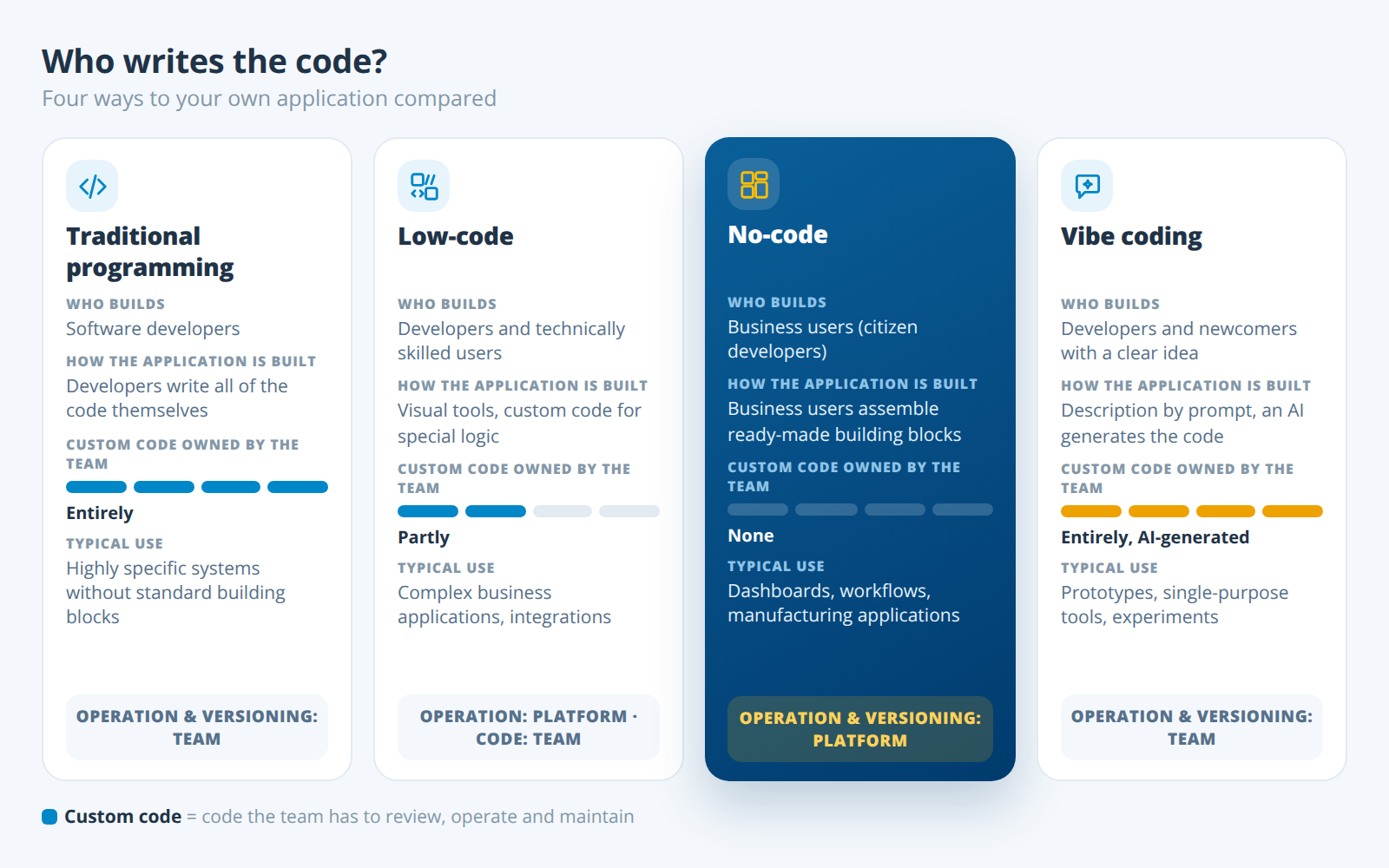
Low-code is an approach to application development in which visual tools replace most of the programming, while custom code can be added for more complex requirements.
No-code is an approach in which applications are built entirely with visual tools and ready-made building blocks, without any code input.
Vibe coding is a form of software development in which users describe an application in natural language and an AI model generates the source code.
Differences
Low-code and no-code – What's the difference?
Low-code platforms and no-code platforms are special development environments for software applications or websites. Both aim to speed up traditional application development by replacing the writing of code with the use of graphical tools.
The main difference between the two models is clear from the name: No-code platforms require no code input at all. The resulting applications are created using drag-and-drop tools, intuitive selection dialogues and ready-made building blocks. The entire program code is generated in the background.
Low-code platforms also offer graphical tools that replace writing code. In contrast to no-code platforms, they require at least some level of developer experience: with the help of scripts or commands, users have the option of adding their own code. This offers more flexibility when developing more complex applications, but also requires prior knowledge or appropriate training.
The above-mentioned differences also determine the target groups for low-code and no-code platforms. Low-code solutions are generally aimed at developers. Although they can save time by using the existing tools, they still have the option of making their own adjustments and more complex configurations.
No-code platforms, on the other hand, are primarily aimed at citizen developers – end users without programming knowledge. By using a no-code platform, they can not only be involved in the development process of business applications but also contribute their specific expertise from marketing, logistics, production or other areas.
Both low-code and no-code platforms are often provided as Platform-as-a-Service or Software-as-a-Service in the cloud and can be operated directly in the browser. Both contribute significantly to making software development in companies more efficient. Many digitalisation projects that would fall by the wayside due to a lack of IT capacity can be easily implemented with low-code or no-code.
No-code development for manufacturers

Our cloud platform manubes enables the development of specialised applications for industrial production.
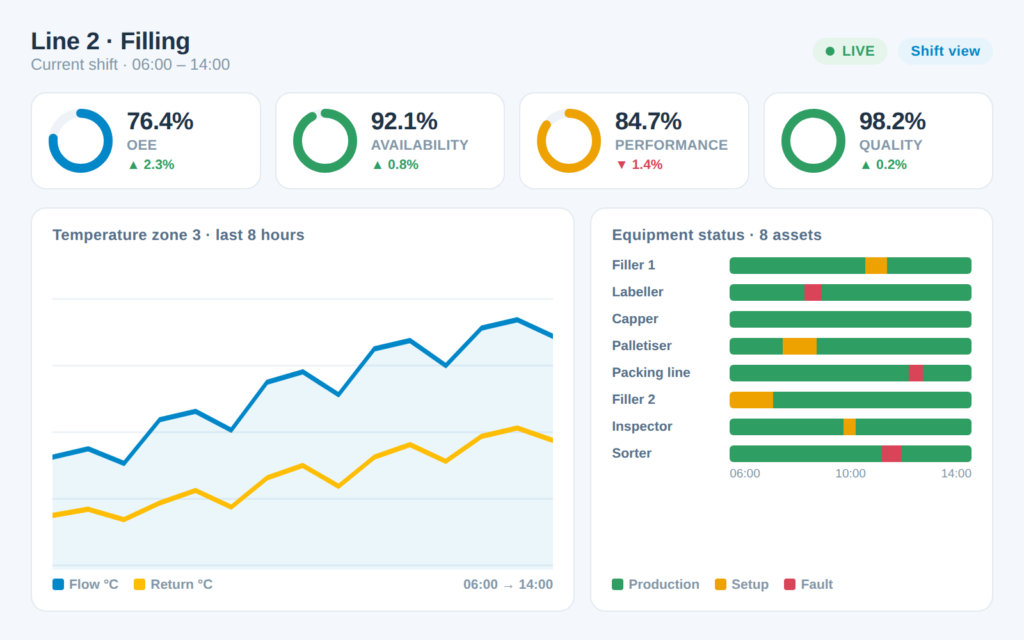
Utilise intuitive design tools to systematically automate production processes and visualise all areas of your production in real time.
AI instead of building blocks
Vibe coding: how does it differ from low-code and no-code?
Vibe coding is a form of software development in which users describe an application in natural language and an AI model generates the source code. The term was coined by AI researcher Andrej Karpathy in February 2025. Vibe coding is not a third type of platform but a different route in development: instead of assembling building blocks, it produces code of your own.
How vibe coding works: the user describes in a prompt what the app should do. An AI tool such as GitHub Copilot or Cursor generates the code. The result is tried out and refined with further prompts. Anyone who does not read the generated code themselves is working on “vibes” – hence the name.
The strengths are obvious: a working prototype of an app often takes only minutes, no programming knowledge is needed to get started, and because any code can be generated, there are hardly any functional limits.
The limits show up in operation: the generated code belongs to your own team. Someone has to understand it, test it, host it, secure it against vulnerabilities and maintain it with every change. Every change also belongs in a version control system such as Git – otherwise changes generated by prompt can be neither traced nor undone. Finding bugs requires programming knowledge, and integration with machines, databases or ERP has to be built from scratch. A low-code or no-code platform largely takes care of these tasks – from hosting, updates and versioning to the security concept.
The approaches are not mutually exclusive. Many low-code and no-code platforms now offer AI assistants of their own. For businesses, one pattern works well in practice: test an idea as a vibe-coded prototype, then run the long-term application on a platform that provides versioning, user rights and operation.
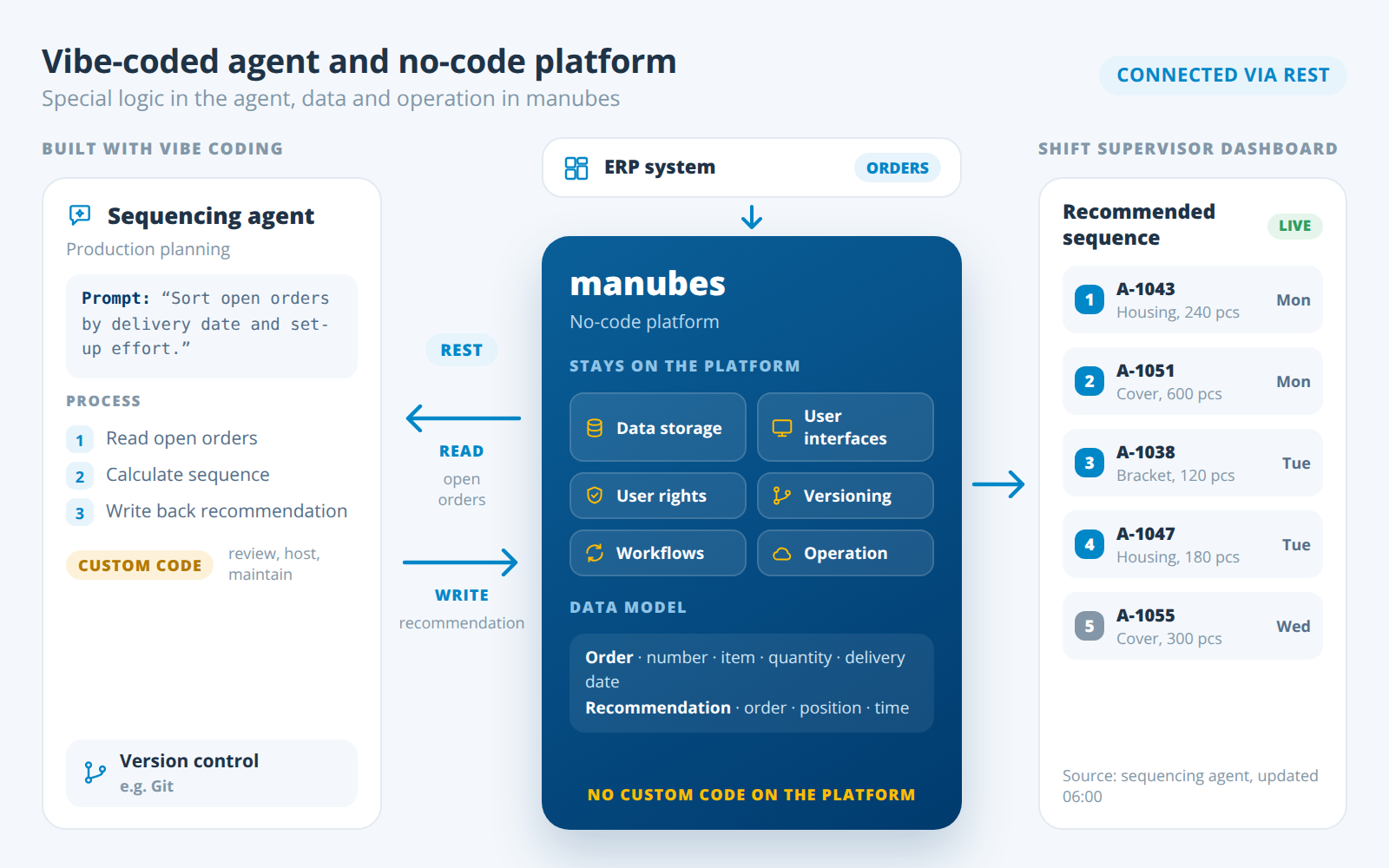
The two worlds can also be combined. manubes does not allow custom code, but it connects agents built with vibe coding via its REST interface. Highly specific logic thus stays in a small, separate tool, while data, user interfaces, user rights and operation remain on the no-code platform.
Comparison
Advantages and disadvantages of low-code, no-code and vibe coding
Both low-code and no-code development environments are already widely used today, yet steadily increasing in importance. Which of the two options should be used depends primarily on the type of applications a company wants to develop.
When it comes to automating standard processes in different departments, no-code platforms are often very suitable – especially if they are specialised in a certain area and already offer corresponding templates for workflows or similar. If the requirements for functionality, design and developer tools are more complex, low-code platforms offer a higher degree of flexibility.
We have compared the advantages and disadvantages of both concepts below – and added those of vibe coding.
Advantages and disadvantages of a low-code platform
A low-code platform does not completely eliminate the need for code input. Although this offers more flexibility, it also requires technical knowledge or at least thorough training.
Advantages of low-code:
- More flexibility through individual modifications
- Option to develop more complex applications
- Custom systems can be connected via code
Disadvantages of low-code:
- Higher learning curve
- Complexity of application troubleshooting and maintenance
- Custom code has to be maintained over time
Advantages and disadvantages of a no-code platform
A no-code platform requires no code input and relies entirely on graphical tools. This means that end users without traditional programming skills (citizen developers) can also develop software-based solutions for their everyday work. However, choosing the right platform is particularly important here, as the desired application must be fully realisable with the platform’s tools.
Advantages of no-code:
- Intuitive use
- Does not require any programming knowledge
- Pre-built modules and templates
- The platform handles operation, updates and security
Disadvantages of no-code:
- Range of functions defined by the platform – general-purpose builders are often too narrow for specialist processes
- Highly specific logic without matching building blocks can only be implemented via interfaces
How much these disadvantages weigh depends on the platform. General-purpose no-code builders quickly reach their limits with specialist processes. Platforms specialised in one domain compensate for this with building blocks for exactly that domain, open interfaces and workflows that call external services. For manufacturing, the no-code platform manubes, for example, provides connectors for OPC UA, MQTT, REST APIs and databases, connects local systems via edge nodes (system integration with manubes) and calls external services such as AI models in workflows. For special requirements, inray supports you as a partner with long-standing experience in industrial software.
Advantages and disadvantages of vibe coding
Vibe coding significantly lowers the barrier to building your own software, but it shifts the effort to later: what is generated quickly still has to be reviewed, operated and maintained.
Advantages of vibe coding:
- Very fast prototype from a description in natural language
- No programming knowledge needed to get started
- Hardly any functional limits, as any code can be generated
Disadvantages of vibe coding:
- Code quality and security only assured with code review
- Hosting, updates and maintenance lie entirely with your own team
- Troubleshooting requires programming knowledge
- Version control (e.g. Git) has to be set up and maintained yourself
Comparison
Low-code, no-code and vibe coding compared
The table summarises the key differences between the three approaches – from how they work to typical use cases.
| Criterion | Low-code | No-code | Vibe coding |
|---|---|---|---|
| How it works | Visual tools plus custom code | Visual tools and ready-made building blocks only | Description in natural language, AI generates the code |
| Target group | Developers and technically skilled users | Business users (citizen developers) | Developers and newcomers with a clear idea |
| Programming knowledge | Basic knowledge required | Not required | Not to start, but for review and maintenance |
| Result | Application on the platform, partly with custom code | Application on the platform, no custom code | Stand-alone source code |
| Flexibility | High | Within the building blocks; extendable via interfaces and workflows on specialist platforms | Very high |
| System connectivity | Via custom code | Via the platform’s ready-made connectors | Has to be programmed yourself |
| Operation, updates, security | Platform; custom code lies with the team | Platform | Entirely with your own team |
| Maintenance and troubleshooting | More effort with a lot of custom code | Using the platform’s tools | Code has to be understood |
| Versioning | Depends on the platform; custom code additionally | Included in the platform | Own version control needed, e.g. Git |
| Learning curve | Medium | Flat | Flat at the start, steep when errors occur |
| Typical use | Complex business applications, integrations | Standard processes, dashboards, workflows, manufacturing applications with machine connectivity | Prototypes, single-purpose tools, experiments |
The boundaries are fluid: many low-code and no-code platforms now offer AI assistants.
Low-code, no-code or vibe coding: which approach is right?
Which approach is right for a business depends less on the technology than on the task and on who runs the solution afterwards. Four questions help you decide.
Who builds and maintains the application?
If the department builds its own apps, no-code fits. If a development team is available, low-code is an option. If one person wants to build a quick prototype, vibe coding is often enough.
How long should the application run?
For a one-off analysis or a test, vibe coding is enough. An application that runs permanently belongs on a platform that takes care of updates and operation.
How critical are the data and processes?
If the application accesses production data, machines or records, it needs clear rules (governance): user rights, versioning and a test environment. A no-code platform for manufacturing such as manubes provides this – including processes that can be automated without code in the Workflow Designer.
How individual are the requirements?
A specialised no-code platform covers standard processes and typical manufacturing applications, even with many interfaces. Low-code only pays off when the logic is so specific that it can be mapped neither with building blocks nor via interfaces – and cannot run alongside the platform as an agent connected via REST either.
Use cases
Low-code, no-code and vibe coding – Use cases from manufacturing
In practice, low-code, no-code and vibe coding are used in a wide variety of scenarios in companies of different sizes. The following typical use cases from industrial manufacturing show where each approach plays to its strengths.
Example 1: Low-code for special logic with an in-house development team
A plant with its own IT department schedules maintenance intervals using an in-house formula that combines running times, load profiles and spare parts stock. Using a low-code platform, the developers build the user interface and data storage visually and add the calculation as custom code. The team then maintains this code itself.
Example 2: No-code for quality inspection on the line
Quality assurance wants to record inspection results on a tablet directly on the line instead of on paper. If a measured value is out of tolerance, the shift supervisor should be notified immediately. With a no-code platform, the department builds the data model, input form and notification itself, without programming knowledge and without an IT project.
Example 3: Production data from several sites in real time
A manufacturing company wants to combine data from production facilities at different locations on a single platform and visualise it in real time. With our cloud-based no-code platform manubes, interactive real-time visualisations of production data can be created without programming knowledge and are accessible from anywhere in the world. New versions of an application are tested first and only go live after approval – find out more in No-Code Application Development for Manufacturing.
Example 4: Vibe coding for a one-off analysis
A maintenance team wants to analyse an export file of fault messages from a machine once. Using vibe coding, the team has an AI tool create a small script that sorts the messages by frequency – done in a few minutes. If this is to become a permanent application for the whole shift, with live machine data and notifications, it belongs on a platform.
Example 5: A vibe-coded agent combined with a no-code platform
Production planning has a small agent built with vibe coding that calculates a recommended processing sequence from open orders. The agent is connected to manubes via the REST interface: it reads the order data from the platform and writes its recommendation back – typical CRUD operations via REST. The recommendation appears on the shift supervisor’s dashboard. Data storage, user interface, user rights and operation remain on the no-code platform; only the special logic lives in the agent.
Optimise your production with manubes
manubes offers a central platform for production data management, data visualisation and workflow-based process automation.
Manufacturers gain access to a variety of innovative tools in order to quickly develop their own applications – tailored to their requirements.
Frequently asked questions about low-code, no-code and vibe coding
What is the difference between low-code and no-code?
No-code platforms require no code input at all: applications are built entirely with visual tools and ready-made building blocks. Low-code platforms also offer visual tools, but additionally allow custom code for more complex requirements and therefore require basic programming knowledge.
What is vibe coding?
Vibe coding is a form of software development in which users describe an application in natural language and an AI model generates the source code. The term was coined by Andrej Karpathy (February 2025). The result is checked mainly by trying it out and refined with further prompts.
Is vibe coding the same as no-code?
No. Vibe coding produces source code of your own, which your team has to review, operate and maintain. No-code produces no custom code: the application is assembled from tested building blocks on a platform that also handles operation, updates and security.
Do I need programming skills for low-code?
Yes, at least basic skills. Low-code platforms replace most of the programming with visual tools, but scripts or commands are added for more complex functions. Low-code solutions are therefore generally aimed at developers.
Who are no-code platforms suitable for?
No-code platforms are primarily aimed at citizen developers: business users without programming knowledge who bring their expertise from production, logistics or administration directly into their own applications. They are particularly well suited to standard processes such as forms, dashboards and workflows.
When is low-code a better choice than no-code?
Low-code is the better choice when the requirements for functionality, design and interfaces go beyond what the building blocks of a no-code platform cover, and a development team can maintain the custom code over the long term.
Are no-code platforms suitable for complex applications?
General-purpose no-code builders usually are not. No-code platforms specialised in one domain can also handle extensive applications, because they come with ready-made building blocks, connectors and workflows for exactly that domain. In manufacturing, examples include OEE analyses, digital shift logs or material verification by scan, connected to machines and ERP.
Is vibe coding suitable for manufacturing applications?
For prototypes and one-off analyses, yes. Long-term applications with machine data, however, need operation, updates, user rights and versioning. A platform takes care of these tasks; with vibe coding, they lie entirely with your own team. The two can be combined: manubes connects agents built with vibe coding via its REST interface.
Is manubes a low-code or a no-code platform?
manubes is a cloud-based no-code platform for manufacturing. Data models, user interfaces and workflows are created with visual designers, without code input. Versioning, staging and cloud operation are part of the platform. Try it for free.
Product video: Get to know manubes
Further information


Try manubes for free
Test the different manubes features in your personal cloud environment.
Get started
