
Citizen Development
What is a Citizen Developer?
Citizen Developers are end users who develop software-based applications for their own department – without advanced programming or IT knowledge. In this article we take a look at how Citizen Developers operate in practice, what tools they use, which applications they build in manufacturing and why more and more companies are turning to Citizen Development for their digitalization projects.
Definition
Citizen Developer: definition and meaning
A Citizen Developer is a business user without training in software development who builds their own applications for their department using low-code or no-code platforms – within the guidelines set by the IT department.
A Citizen Developer is a professional who develops software-based applications for their own business department. Citizen Developers generally have no advanced IT or programming skills, but are very familiar with the individual workflows, requirements and challenges within their department.
Citizen Developer is a role, not a job title. The term refers to employees outside the IT department who develop software for their day-to-day work alongside their actual job. In manufacturing, these are, for example, shift supervisors, maintenance technicians or employees in quality assurance and production planning.
Citizen Developers use so-called “low-code platforms” and “no-code platforms” to be able to develop their own applications without programming knowledge. These are development environments that largely or completely dispense with code input and instead provide graphical user interfaces and other tools for application development – including, for example, simple selection dialogues and drag-and-drop editors.
Studies show that the concept of Citizen Development continues to be adopted by more and more companies trying to advance their digitalization and process automation efforts in a more cost-effective and flexible manner. Citizen Developers relieve the burden on traditional IT and help companies to manage the increasing demand for new applications, driven not only by innovative business models and digital transformation initiatives, but also new technologies such as artificial intelligence.
According to a survey by the research and advisory firm Gartner of 1,120 managers in North America, Western Europe and Asia/Pacific (conducted at the end of 2021, published in March 2022), 41% of employees are business technologists: they create technology or analytics capabilities but work outside the IT department. Citizen Developers belong to this group. Another Gartner survey (September 2021) shows that half of business technologists produce technology capabilities for users beyond their own department. Journal articles come to similar conclusions about the importance of Citizen Development.
Comparison
Citizen Developers and professional developers compared
Citizen Developers do not replace professional software developers. The two roles complement each other: IT provides the platform, interfaces and rules, and the business department builds the applications for its processes on top of them. The main differences at a glance:
| Criterion | Professional developers (IT) | Citizen Developers (business department) |
|---|---|---|
| Training | Computer science or software development | Training in their own field, e.g. industrial mechanics, mechatronics, electrical and automation engineering, process engineering, production engineering, logistics or quality management – often with a master craftsman or technician qualification |
| Tools | Programming languages, development environments, version control | No-code and low-code tools with graphical editors |
| Typical applications | Complex systems, interfaces, platforms and products | Forms, dashboards, automations and reports for their own department |
| Process knowledge | Receive requirements from the business department | Know processes, exceptions and KPIs from their daily work |
| Operation and security | Responsible for operating, updating and securing their own software | Rely on the platform for operation, updates and security |
| Collaboration | Provide the platform, interfaces and rules | Build solutions within these rules |
Citizen Developers and AI: what does vibe coding change?
AI assistants can now generate programs from a description in natural language. This approach is called vibe coding, and it also significantly lowers the barrier to building your own software. Unlike a no-code platform, however, it produces real program code: reviewing, hosting, updating and maintaining it falls to your own team, and troubleshooting requires programming knowledge.
For Citizen Developers, this means that AI speeds up getting started, but it does not replace the guard rails of a platform, approvals and collaboration with IT. How the three approaches differ is explained in the comparison Low-code vs. no-code vs. vibe coding.
What advantages does Citizen Development offer?
Citizen Development is an innovative approach to corporate application development. Companies affected by the shortage of IT specialists can use Citizen Development to develop and deploy numerous applications within a short period of time and subsequently profit from automated workflows and other digitalization benefits.
Since Citizen Developers are end users who have in-depth knowledge about the unique characteristics of their area of application, this ensures that the developed solutions meet the operational requirements.
Furthermore, Citizen Development allows companies to react more quickly to customer and employee demands: where traditional software development may be too slow to adapt to constantly changing market conditions, Citizen Developers can provide new solutions quickly and flexibly.
Special expertise
Citizen Developers know the individual requirements and workflows in their department and are therefore ideally suited to developing their own solutions.
Accelerated development
The use of Citizen Developers reduces the workload of the IT/development department and accelerates the development of software-based solutions.
Adaptability
Applications created on the basis of low-code or no-code platforms can typically be easily adjusted – sometimes with just a few clicks.
Increased flexibility
Applications can be quickly adapted to new industry or market developments.
Increased transparency
When low-code or no-code platforms are used for application development, the resulting applications are built according to the same pattern and follow pre-defined security and development standards.
Innovation potential
End users with specific expertise are given the tools they need to quickly put their ideas into practice and test them extensively.
Industry
Citizen Developers in manufacturing
In manufacturing, Citizen Developers are the experts on the shop floor: shift supervisors, maintenance, quality assurance, work preparation and production planning. They know machines, processes and KPIs from their daily work and know exactly where paper lists, spreadsheets or missing information cost time and which processes can be automated.
This knowledge is particularly valuable in manufacturing companies, because IT specialists are scarce and corporate IT is busy with the ERP system, network and security. With no-code tools for manufacturing, employees build small apps and process automations themselves instead of waiting for an IT software project. The data comes directly from controllers, sensors and business software.
Typical apps that Citizen Developers build in manufacturing:
Digital shift log
Digital work instructions
OEE dashboard
Fault alerts on your phone
Material identification by code scan
Energy monitoring
Build your own production applications without programming
With manubes, business users create dashboards, workflows and user interfaces for manufacturing by drag and drop – with versioning, approvals and role-based access rights.
Try it nowLow-code and no-code platforms
Which tools does a Citizen Developer use?
Enabling a Citizen Developer to develop applications independently despite a lack of programming knowledge requires the use of special development environments: so-called low-code and no-code platforms.
These offer the possibility of creating automated workflows and other components of applications using graphical tools. Low-code platforms usually require some prior programming knowledge (such as scripts, APIs or similar), while no-code platforms completely eliminate the need for any code input.
As the concepts of “low-code”, “no-code” and “Citizen Development” are closely related, we will explain the differences between low-code and no-code platforms in more detail below.
Low-code platform
Low-code platforms are slightly more complex and require at least a little technical knowledge (or appropriate training). In some cases, scripts, special commands or other technical inputs such as connection data are required. Many low-code platforms offer documentation for more advanced configurations. Low-code platforms also tend to rely on visual tools to a large extent and, in the best case, offer intuitive operation in order to quickly implement even complex applications.
No-code platform
No-code development environments or platforms do not require any code input from the user. Instead, visual user interfaces and tools such as drag-and-drop editors are available. Ideally, a no-code platform requires no prior knowledge and enables intuitive operation. This allows a Citizen Developer to concentrate fully on implementing the functional requirements, while the technical implementation remains hidden in the background. Several applications or workflows can often be created in a relatively short period of time.
Both low-code and no-code development environments are often provided in the cloud.
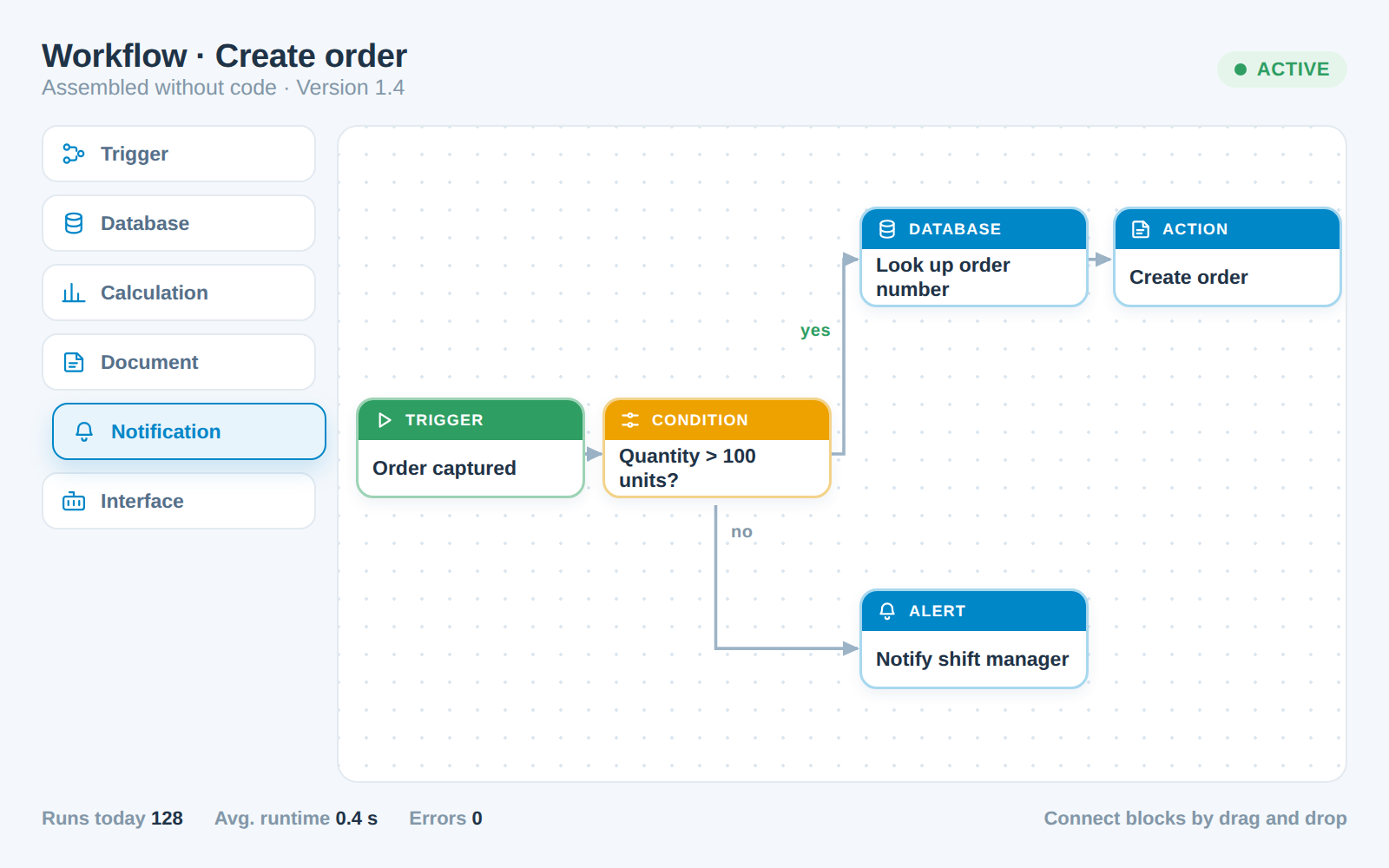
Example: manufacturing-focused no-code platform for Citizen Developers
One clear example of a no-code platform is our own cloud platform manubes.
manubes was developed specifically for industrial use and offers a quick and easy way to create applications for digital production management.
For this purpose, manubes offers graphical tools that do not require any code input: with the manubes Workflow Designer, selected building blocks can be assembled into powerful workflow automations using drag and drop. This allows processes such as database operations, notifications or communication between machines, devices and software applications to be easily automated and monitored.
The manubes Page Designer, on the other hand, enables the creation of web-based pages, allowing all production areas to be visualized in real time. HTML, CSS and other code are not required – instead, drag-and-drop modules and simple selection dialogues are available.
To ensure that many applications do not turn into shadow IT, manubes comes with the guard rails built in: every change is created as a versioned release, tested in staging and only then approved (no-code application development for manufacturing). A role-based authorization concept controls who can see and edit which data (security concept).
Optimize your production with manubes

manubes provides a central platform for data management, visualization and workflow-based process automation.
Manufacturing companies gain access to innovative tools for developing their own solutions – tailored to the requirements of the production environment.
Practical implementation
What are the biggest challenges in Citizen Development?
In the previous sections, we have explained why the use of Citizen Developers can result in numerous (economic) benefits for a company.
Nevertheless, there are important aspects that need to be considered when implementing a Citizen Development approach in order to avoid risks, security gaps, integration difficulties and other undesirable effects.
Most of these fall into the area of IT governance. In practice, this means integrating Citizen Development into the company’s overall IT strategy, while ensuring that all predefined requirements for security, transparency, documentation, etc. are met.
Close cooperation with the IT department and other experts
Even if corporate IT is relieved by Citizen Developers, there is still a need for close cooperation.
The development environments used (low-code/no-code) and the resulting applications should be checked by the IT department for their quality, compatibility and security.
Training for Citizen Developers is necessary to ensure that the required skills are available and that application development is carried out according to defined criteria.
Furthermore, the completely independent development of applications by a single Citizen Developer is neither common nor effective. Just as with traditional programming, applications are developed in collaboration with team members, managers, data protection and security experts.
Governance
Citizen Development vs. shadow IT
Citizen Development is sometimes associated with the term shadow IT. Shadow IT is when software applications are used without the knowledge and control of the IT department. In a Citizen Development concept, this should be avoided at all costs.
The difference lies not in the person, but in the control: shadow IT arises when business departments use their own spreadsheets, scripts or cloud services without the knowledge of IT. Citizen Development, by contrast, takes place on a platform that IT has selected and oversees. Introduced properly, Citizen Development is therefore even a remedy for shadow IT, because employees get an official route to their own software.
The graphic shows an example of this route: an application goes through development, acceptance by the business department and approval before it goes live in production.
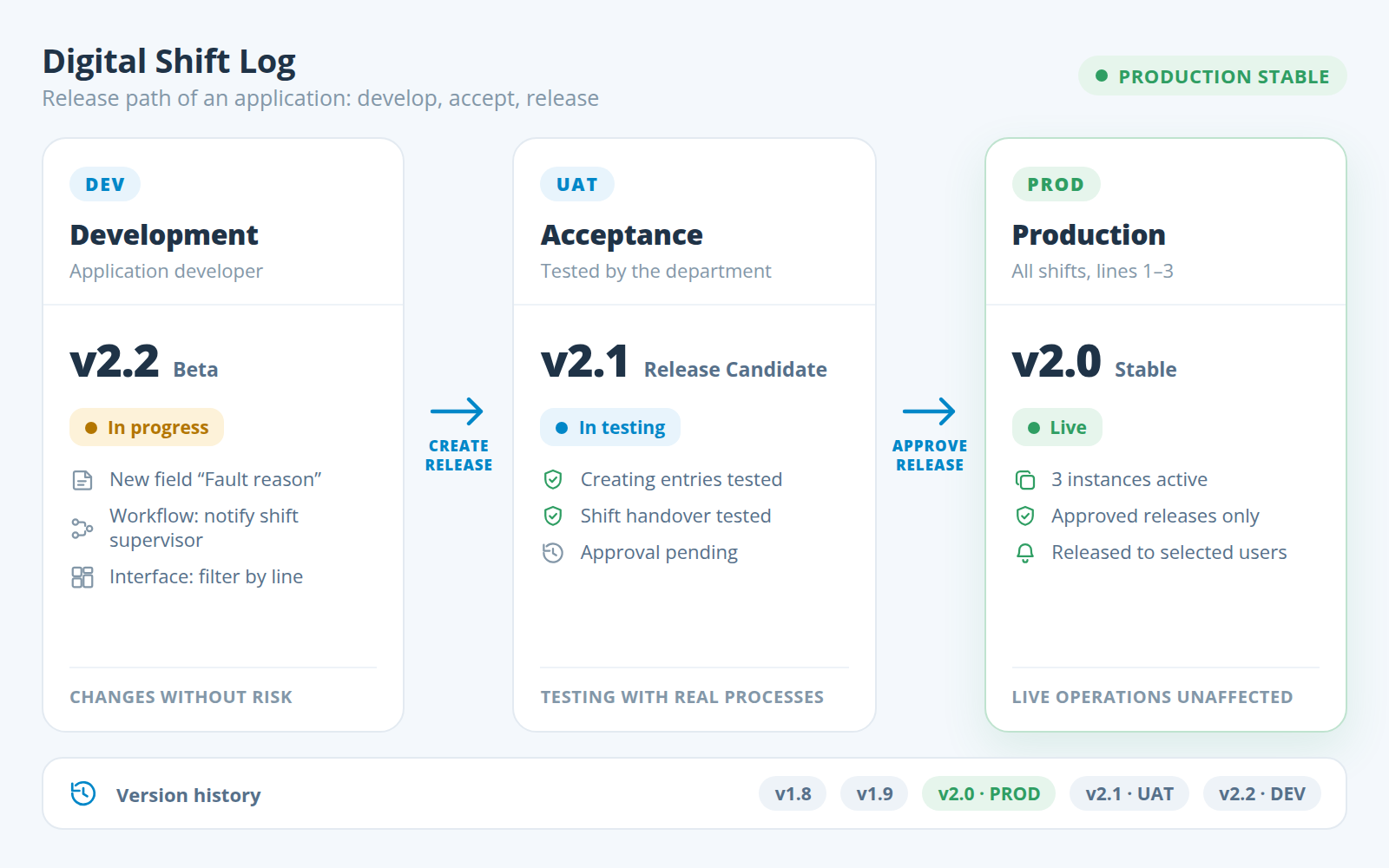
The main differences between shadow IT and Citizen Development at a glance:
| Criterion | Shadow IT | Citizen Development |
|---|---|---|
| IT awareness | IT does not know the application | IT selects the platform and keeps an overview |
| Platform | Private spreadsheets, scripts or freely chosen cloud services | Approved low-code or no-code platform |
| Access rights | Unregulated, often shared logins | Role-based permissions |
| Data storage | Copies on local computers or in private accounts | Central, secured data storage |
| Changes | Made directly in live operation | Versioned, tested and approved |
| Documentation | Usually none | According to defined standards |
| When staff change | Knowledge is lost | The application remains traceable and maintainable |
Requirements for applications
Just like in traditional software development, applications developed by Citizen Developers on the basis of low-code or no-code platforms must also meet certain criteria. Some of these depend on the planned area of use for the application (such as a specific industry, department, etc.), others are general quality criteria for software applications.
Clear objective
Authorization concept
Interfaces for end users
Data interfaces
Documentation
Introducing Citizen Development in 5 steps
Citizen Development is a lever for digitalization and process automation in manufacturing – and it works best with a clear strategy. Companies that start in a targeted way and set the rules from the outset avoid shadow IT and can quickly transfer successful applications to other departments. These five steps help with the introduction, for example as part of a Citizen Development programme:
Choose a pilot project with a clear goal
Start with one application in one department that delivers a tangible benefit, for example a digital shift log instead of paper lists. A clear goal makes success measurable and convinces other departments.
Select the platform together with IT
The business department and IT decide together which platform to use. What matters are the supported interfaces to machines and business software (e.g. OPC UA, MQTT, REST APIs and databases), the security concept and operation. What this looks like in practice is shown by system integration with manubes.
Define guard rails
Roles, access rights, approval processes and documentation standards are defined before the start. This IT governance ensures that Citizen Development does not turn into shadow IT.
Train and support Citizen Developers
Training covers how to use the platform and the agreed rules. Named contacts in IT support Citizen Developers with questions about interfaces, data and security.
Test, approve, roll out
New applications and changes are tested first and then approved. If the pilot proves itself, the team transfers the application to other lines, plants or departments and gradually builds up a community of Citizen Developers.
Conclusion
Conclusion
Surveys show that many companies have been using Citizen Developers for years already – a development that is supported by the shortage of IT specialists and the availability of powerful low-code and no-code platforms.
Good planning and functioning communication structures are necessary in order to maximize the benefits of Citizen Development and at the same time avoid security deficits and a lack of transparency. Both the development and provision of low-code and no-code platforms as well as application development by Citizen Developers should be carried out in accordance with the highest quality and security standards.
In this article, we have summarized the most important advantages and challenges of Citizen Development. If you would like to know what a specialized no-code platform looks like in practice, you can find out more about manubes – our innovative cloud platform for industrial production management – on this website.
Frequently asked questions about Citizen Developers
What does a Citizen Developer do?
A Citizen Developer builds apps for the processes in their own department, such as forms, dashboards or workflow automation. To do this, they use low-code or no-code platforms instead of programming languages. In manufacturing, a Citizen Developer might build a digital shift log, an OEE dashboard or a fault alert on the phone – in coordination with the IT department.
What is a Citizen Developer programme?
A Citizen Developer programme is a company's structured approach to enabling business users to build their own applications. It defines the approved platform, roles and access rights, approval processes, training and the support provided by IT. A programme usually starts with a pilot project and is then extended to other departments step by step.
Do Citizen Developers need programming skills?
No, a Citizen Developer does not need programming skills. With no-code tools, apps are built entirely with graphical tools such as drag-and-drop editors. Low-code platforms, by contrast, require some technical knowledge, for example for scripts or connection data. In both cases, a good understanding of your own processes and data helps.
Is Citizen Development the same as shadow IT?
No. Shadow IT refers to applications that are used without the knowledge and control of the IT department. Citizen Development takes place on a platform selected by IT, with defined access rights, approvals and documentation. Introduced properly, Citizen Development is even a remedy for shadow IT, because business departments get an official route to their own solutions.
How do you become a Citizen Developer?
Citizen Developer is a role, not a profession. Employees become Citizen Developers when their company introduces a no-code platform or similar tools and trains them to use it. What matters is process knowledge from their own department, an interest in digitalization and a basic understanding of data. Training courses on the platform used and a first pilot project make it easier to get started.
What applications do Citizen Developers build in manufacturing?
Citizen Developers in manufacturing mainly build apps for the shop floor: digital shift logs, work instructions and checklists, OEE and production dashboards, mobile fault alerts, material checks by code scan or energy monitoring. The data comes directly from controllers, sensors and business software such as the ERP system.
Can Citizen Developers program with AI?
Yes, AI assistants can generate programs from a description in natural language; this approach is called vibe coding. However, it produces real program code that someone has to review, run and maintain. For applications used long term without programming skills, no-code platforms are therefore usually the safer route, while AI is well suited to quick prototypes.
Product video: Get to know manubes
Further information

Try manubes for free
Test the different manubes features in your personal cloud environment.
Get started
