
Components, Functions & Applications
What is an HMI?
HMIs are user interfaces that enable interaction with machines. They are widely used in industrial settings, primarily for control and monitoring purposes.
Definition
What is an HMI?
An HMI (human-machine interface) is the user interface through which operators control and monitor machines and plants.
HMI is short for Human-Machine Interface, a user interface that allows a person to interact with a machine via buttons, switches, touchscreen displays or other means.
In industrial production, HMIs are everywhere: from the touch panel on an injection moulding machine and the operator panel of a packaging machine to the control room of a filling line. As a key part of the automation infrastructure, they are used to control and monitor a wide range of systems, including CNC machines, injection moulding machines and PLC-controlled production lines.
In the following sections, we will explain how a typical HMI is structured, what functions it performs, and where HMIs are used in industrial settings. Additionally, we will explore recent advancements in HMI technology.
Components
How is an HMI structured?
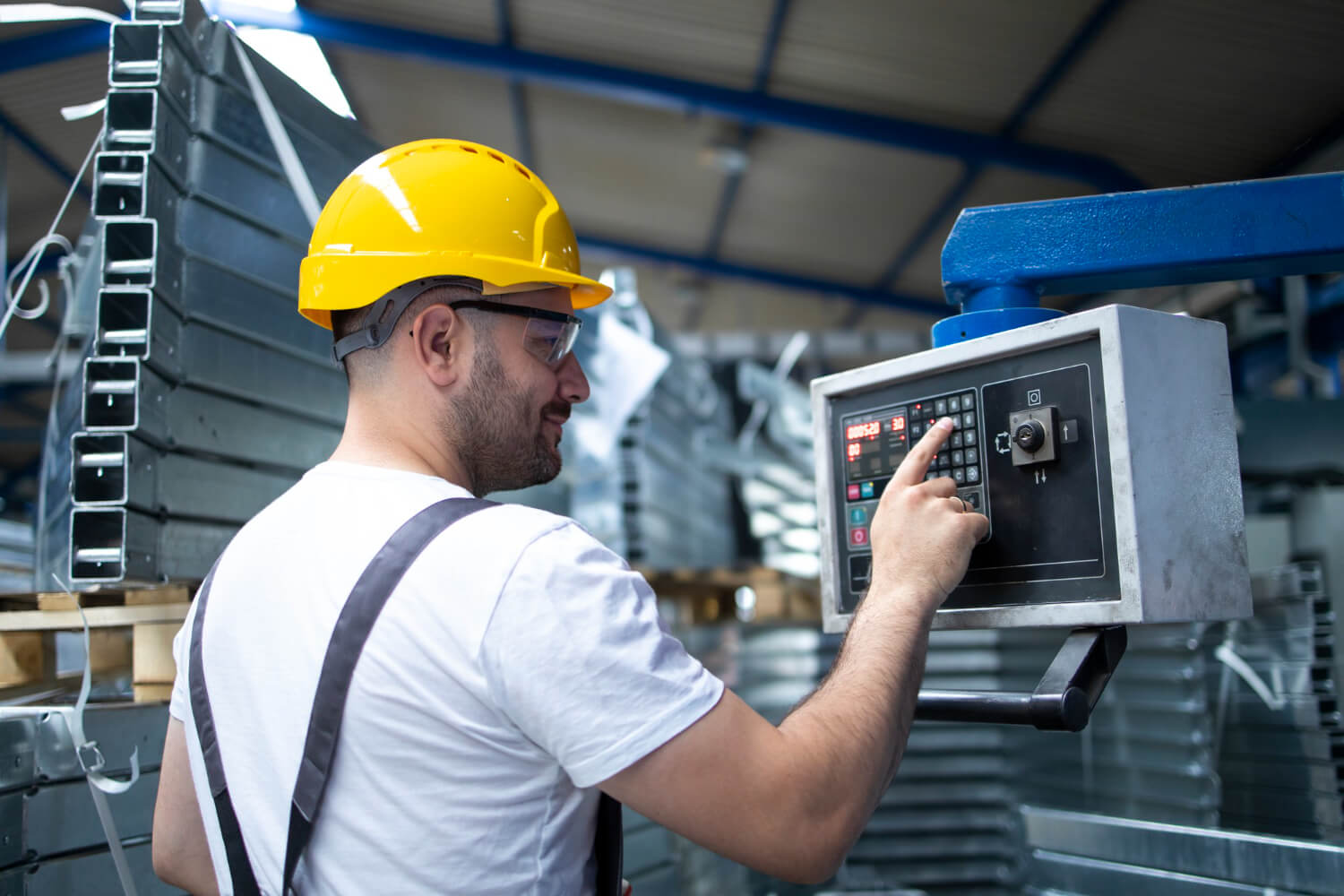
A typical industrial HMI consists of various hardware and software components that facilitate input, output and communication with connected systems.
Key components of a traditional HMI:
- Display: Visualizes data, processes and control options (e.g. LED/LCD display, touchscreen).
- Input devices: Enable user interaction with the system (e.g. mouse, keyboard, touchscreen).
- Hardware interfaces: Facilitate connections to external devices and systems (e.g. USB ports, Ethernet ports, serial interfaces like RS232 and RS485).
In the case of a touchscreen, input and output are combined into a single component. The device runs HMI software that displays values from the controller and passes on operator input.
The graphical capabilities of an HMI can vary significantly, ranging from simple symbols and numerical values to fully customizable dashboards with various visualization types.
The interfaces required for an HMI depend heavily on the specific machine and its lower-level control systems. Additionally, communication interfaces and protocols for integrating with higher-level software systems must be considered. One widely used standard for vendor- and platform-independent data exchange between devices and software applications is OPC UA.
A traditional HMI is often part of a SCADA system (Supervisory Control and Data Acquisition). While the HMI provides a direct, typically local interface for operating a machine, a SCADA system manages multiple HMIs and enables centralized process monitoring.
Types
What types of HMI are there?
HMIs can be distinguished by where the user interface runs. In manufacturing, operators mainly encounter three types of HMI system:
HMI panel on the machine
HMI software on an industrial PC
Web-based or cloud HMI
Functions
Functions of an HMI
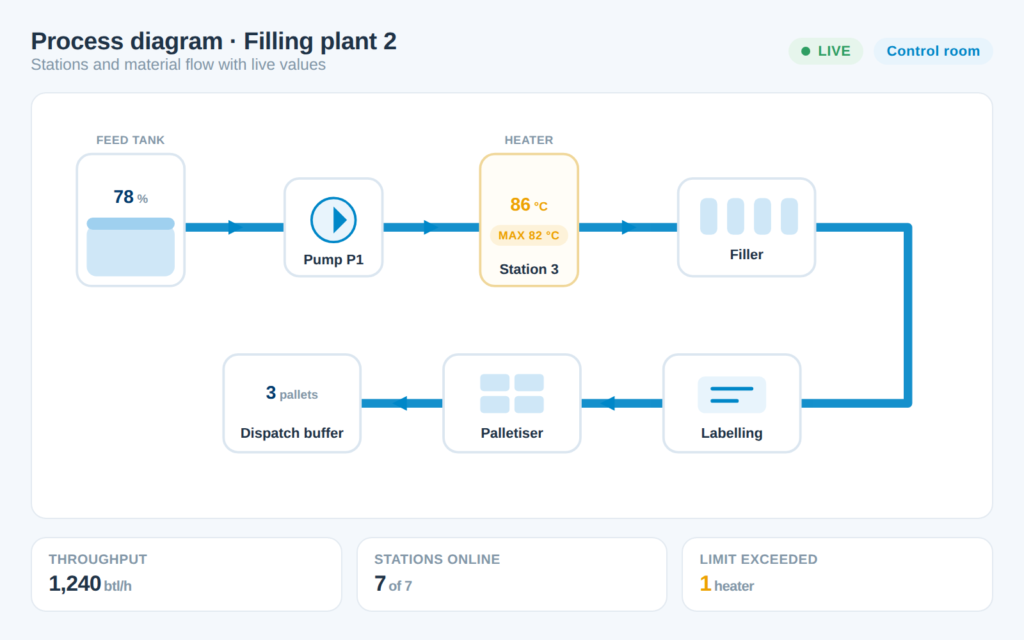
HMIs are a core component of many industrial environments. In the traditional automation pyramid, they are positioned at the process control level, serving as the primary interaction point for operating machinery and systems. Unlike applications at the operations management level (e.g. MES) or enterprise level (e.g. ERP), HMIs are typically located directly near the machine.
The core functions of a traditional HMI include visualizing data for control, diagnostics and monitoring, as well as controlling machines and processes. Additionally, HMIs can record data or trigger alarms when necessary.
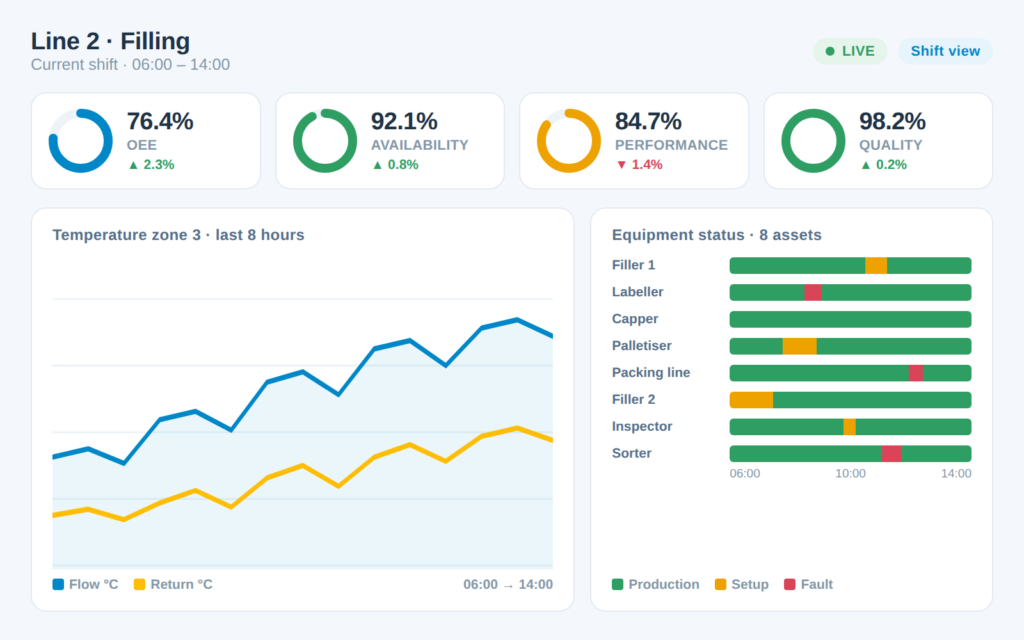
Data visualization
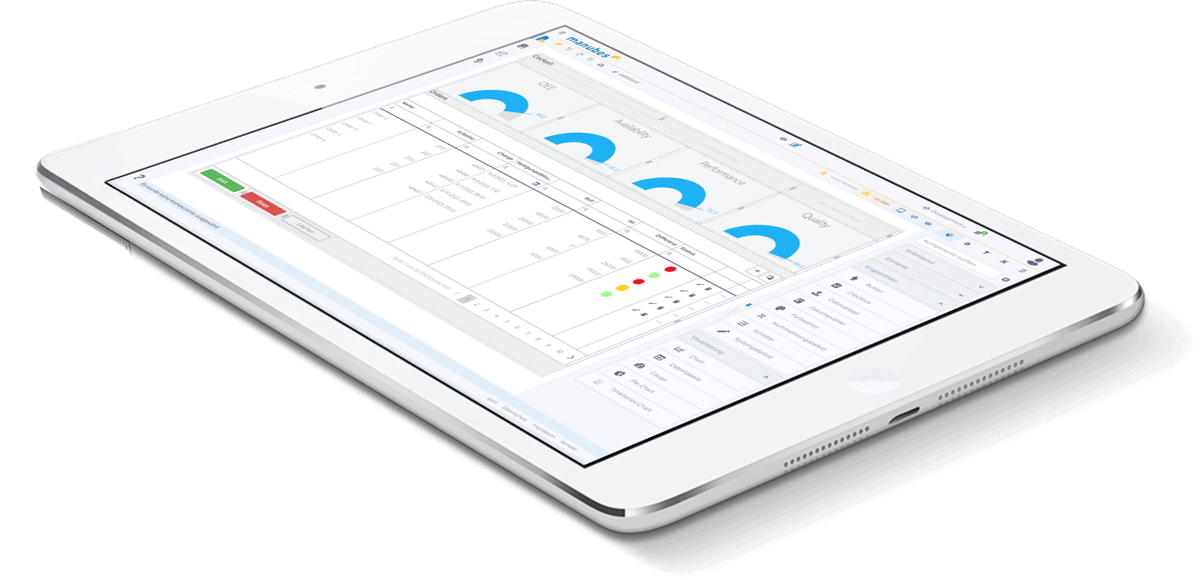
Depending on the type of machine, process and operational data can be displayed in various formats.
Examples:
- Gauge charts / tachometer displays for rotational speed, pressure and temperature values
- Bar / column charts for energy consumption
- Line charts for temperature fluctuations
- Traffic light systems for operating statuses
- 3D models for interactive visualization of individual components
The image shows an example of the visualization of production data with manubes.
Control
The options for interacting with a machine and operating it through an HMI can also vary considerably, especially depending on whether the HMI is an interface attached directly to the machine, a computer or a mobile device.
An HMI may use buttons and switches, mouse and keyboard, or touchscreens. The latter are common in modern HMIs.
Monitoring, diagnosis and alarms
The visualization of data through an HMI is not only intended to support machine control but also plays a crucial role in real-time process monitoring (see also production monitoring).
Ideally, an HMI helps detect errors and deviations immediately, using appropriate visuals and allowing for quick responses.
Additionally, HMIs can trigger warnings and alarm messages – for example, when a value falls below a specific threshold.
Data recording
Process data collected by an HMI can be stored and used for later analysis, for example when reviewing historical data in the context of production optimization.
Comparison
HMI, PLC and SCADA compared
| Criterion | PLC | HMI | SCADA |
|---|---|---|---|
| Task | Runs the control program, reads sensors and switches actuators | Displays process values and alarms and accepts operator input | Monitors and controls several plants, lines or sites centrally |
| Level of the automation pyramid | Control level | Process control level, directly at the machine | Process control level, across plants |
| Location | In the control cabinet | On the machine or operator panel | In the control room or on servers |
| Users | Runs autonomously; automation engineers program it | Operators and setters at the machine | Control room staff, shift supervisors, maintenance |
| Data | Current values in the controller's memory | Mainly current values, sometimes short trends | History, alarm archive and reports |
| Typical devices | Compact or modular PLC | HMI panel, industrial PC, web HMI | SCADA software on servers and clients |
The boundaries are blurring: some HMI panels include an integrated controller, and SCADA systems come with their own HMI screens. What matters is the task, not the device.
Areas of application
Industrial use of HMIs
HMIs play a crucial role in industrial production – wherever operators control and monitor machines and plants. Typical areas of application are:
Discrete manufacturing
Process industry
Intralogistics
Energy and utilities on site
Advancements
Evolution of HMI systems
The term HMI (human-machine interface) is broadly defined and can – depending on the interpretation – encompass a wide range of systems for controlling and monitoring machines.
While traditional HMIs were often installed locally on the machine, a dedicated computer or a touch panel, modern technology allows HMIs to be used in a distributed environment, where users can access the system from different locations.
Web- and cloud-based HMIs take this concept even further, enabling users to remotely access machine interfaces via a web browser without needing to install special software. This requires a secure network connection to the relevant machines (for an example of how this can be implemented, see our page on system integration with manubes).
Compared to traditional HMIs, cloud-based HMIs offer several advantages.
Advantages of web-based HMIs
Centralized management
Mobile access
Cost efficiency
Scalability
Cloud-based HMIs offer another key advantage: their proximity to the enterprise level makes it easier to integrate them with AI, big data and similar applications, enabling the use of collected data for process optimization.
Additionally, cloud platforms that serve as HMI solutions can implement their own data processing functions.
An example is our manubes platform, which offers advanced features such as the Datamodel Designer, Workflow Designer and AI-powered Chat Assistant to enhance industrial data and process management.
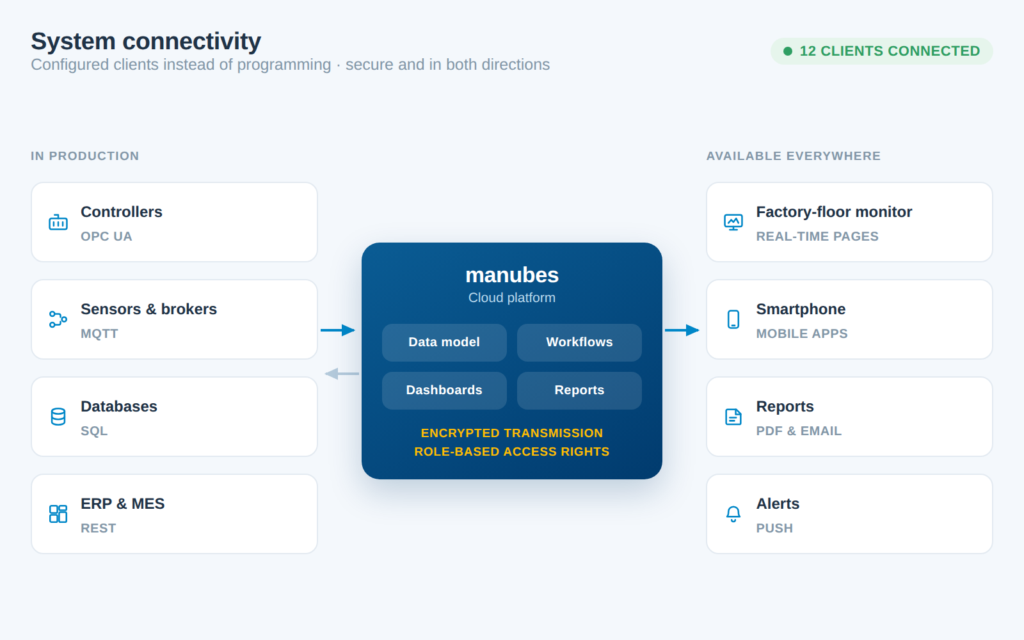
Common interfaces for cloud communication include MQTT and REST, both supported by manubes.
Try manubes as a cloud HMI
Visualize machine data in the browser and read and write controller values via OPC UA – without your own servers and without installation.
Try manubes for freeWhat to look for when choosing an HMI
The requirements an HMI has to meet depend on the machine, the production environment and the operators. Companies should clarify these points before choosing an HMI system:
Interfaces and protocols
The HMI must understand the controllers in use and connect to higher-level systems such as MES or ERP. Vendor-independent standards such as OPC UA, MQTT or REST keep the plant open for later extensions.
Ambient conditions
Dust, moisture, temperature and vibration determine how rugged an HMI panel has to be – for example the protection rating of the front or a touchscreen that also works with gloves.
Usability for operators
Clear navigation, unambiguous alarm display and screens that match the role shorten response times and prevent operating errors. For international teams, language switching is part of it.
Access rights and security
Who may only view values, and who may change setpoints? User management that assigns each user a role, and an encrypted connection, are a must as soon as an HMI can also be reached remotely.
Extensibility and maintenance
Can additional machines be connected without a new project, and how much effort do updates take? Centrally managed web HMIs save effort here compared with many individually maintained panels.
manubes
manubes as an HMI solution for manufacturers
Our cloud platform manubes enables real-time visualization of machine data and provides interactive controls for direct access to automation systems and processes. Via OPC UA, data exchange is bidirectional: manubes reads values from controllers and, where required, also writes values back to them, such as setpoints or parameters – a prerequisite for genuine production control.
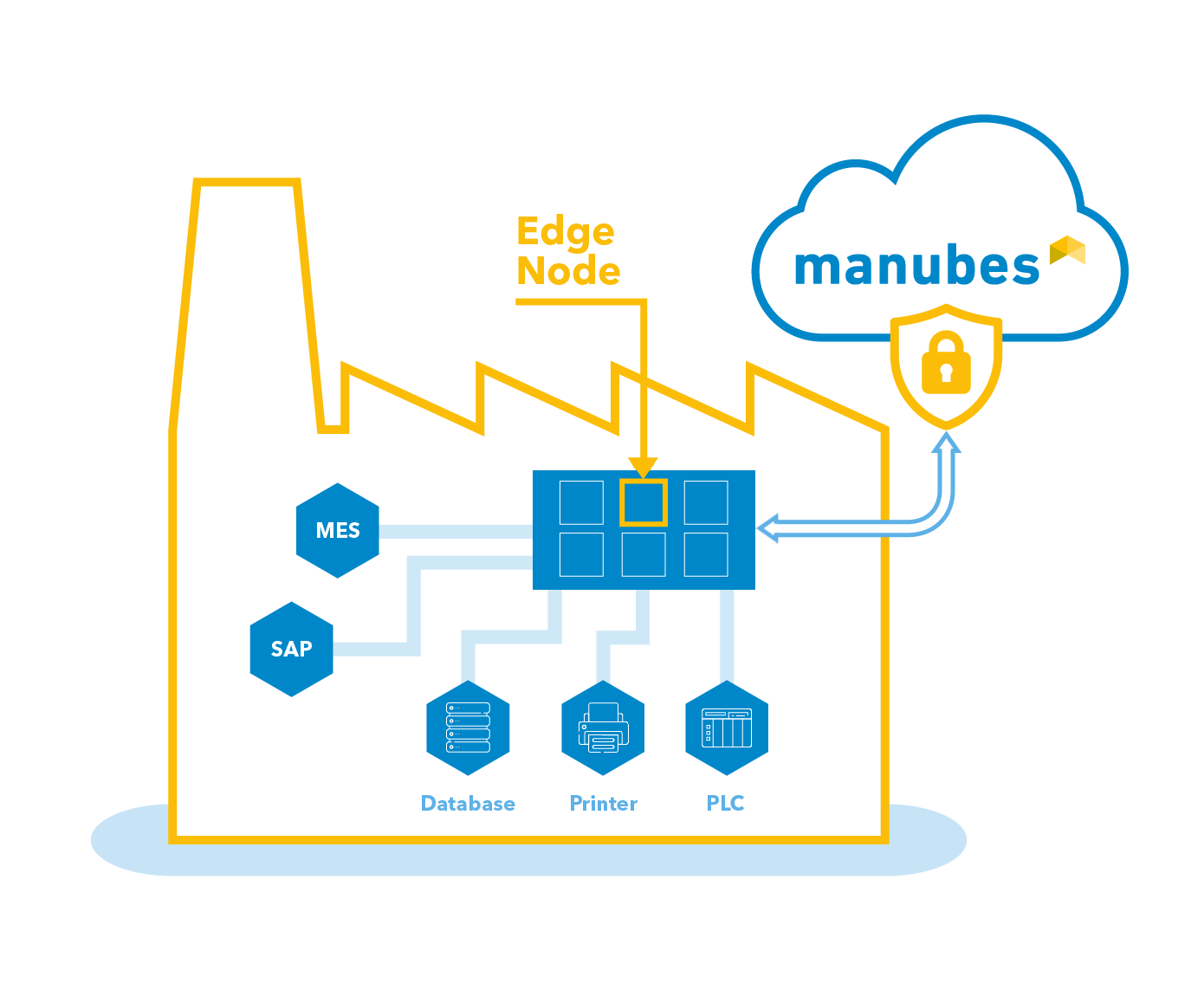
To ensure secure connections to distributed facilities, manubes leverages the concept of edge computing. Edge Nodes operating within local networks process production data and establish secure, bidirectional connections between local systems and the manubes cloud.
manubes delivers all the previously mentioned benefits of a cloud-based HMI. Companies can access all platform functions remotely, eliminate the need for on-premise server hardware, and benefit from high flexibility and scalability.
Additionally, manubes offers a wide range of intuitive tools for managing industrial data and processes. With no-code design tools, production teams can develop custom solutions without requiring extensive programming expertise.
The graphic shows the cloud connection of local production systems with manubes.
Conclusion
HMIs remain essential while becoming more versatile
HMIs are essential interfaces for machine control and monitoring and will continue to play that role in the future. Yet traditional HMIs as described in the automation pyramid have increasingly been complemented by new concepts driven by digitalization.
One significant factor in this evolution is the widespread adoption of standardized, internet-based interfaces such as OPC UA, which has enabled seamless machine communication via centralized systems.
Frequently asked questions about HMIs
What is an HMI and how does it work?
An HMI (human-machine interface) is the user interface through which operators control and monitor machines. It reads values from the controller, displays them on a screen and passes operator input such as start commands or setpoints back to the controller.
What is an example of an HMI?
A typical example is the touch panel on an injection moulding machine: the operator sees temperatures, cycle times and alarms on the screen and changes settings directly on the panel. A browser-based dashboard showing a production line is also an HMI.
What is an HMI panel?
An HMI panel is an operator device with a display and usually a touchscreen, mounted directly on the machine or control cabinet. It displays process values and alarms and accepts operator input.
What is the difference between an HMI and a PLC?
The PLC runs the control program and switches actuators. The HMI is the interface through which people see the PLC's values and enter commands; to do so, it reads and writes PLC variables.
What is the difference between HMI and SCADA?
An HMI is the usually local user interface of a machine. A SCADA system monitors and controls several plants centrally, stores trends and alarms and uses its own HMI screens for this.
How is an HMI programmed?
HMIs are usually not programmed in the classic sense but configured: in visualization software, you create screens, place displays and controls and link them to controller variables. In manubes, this is done without programming by drag and drop in the Page Designer.
What is a cloud HMI?
A cloud HMI is a user interface that runs in the web browser and accesses machines via a secure connection. manubes uses Edge Nodes in the local network and OPC UA for this, so values can be read from and written to controllers.
Product video: Get to know manubes
Further information
Try manubes for free
Test the different manubes features in your personal cloud environment.
Get started
