
Manage Production Data Centrally
Data Platform for Manufacturing
Capture production data from machines, devices, databases and software systems on a central cloud platform. Structure the data in your own data models and use it in dashboards, workflows and applications – without programming.
In Brief
What is a data platform?
A data platform is a central software environment that captures, stores and structures data from different sources and makes it available for analytics, applications and automated processes.
Instead of keeping data separately in individual systems – in controllers, databases, the ERP system or spreadsheets – a data platform brings it together in one place. Consistent structures and access rights make the data usable across the whole company and replace isolated data silos with a shared data foundation.
The term is used in different ways: Cloud services such as Microsoft Fabric, Databricks or Snowflake are data platforms for business intelligence and AI models, and cities run urban data platforms for smart city projects. An industrial data platform is tailored to the requirements of manufacturing. Sometimes called an IIoT platform, it connects machines, equipment and devices via industrial standards and combines their data with order, quality and master data. It makes this data available across all sites: In real time on the shop floor as well as in reports, automated workflows and AI-powered analyses.
Starting Point
Why does manufacturing need an industrial data platform?
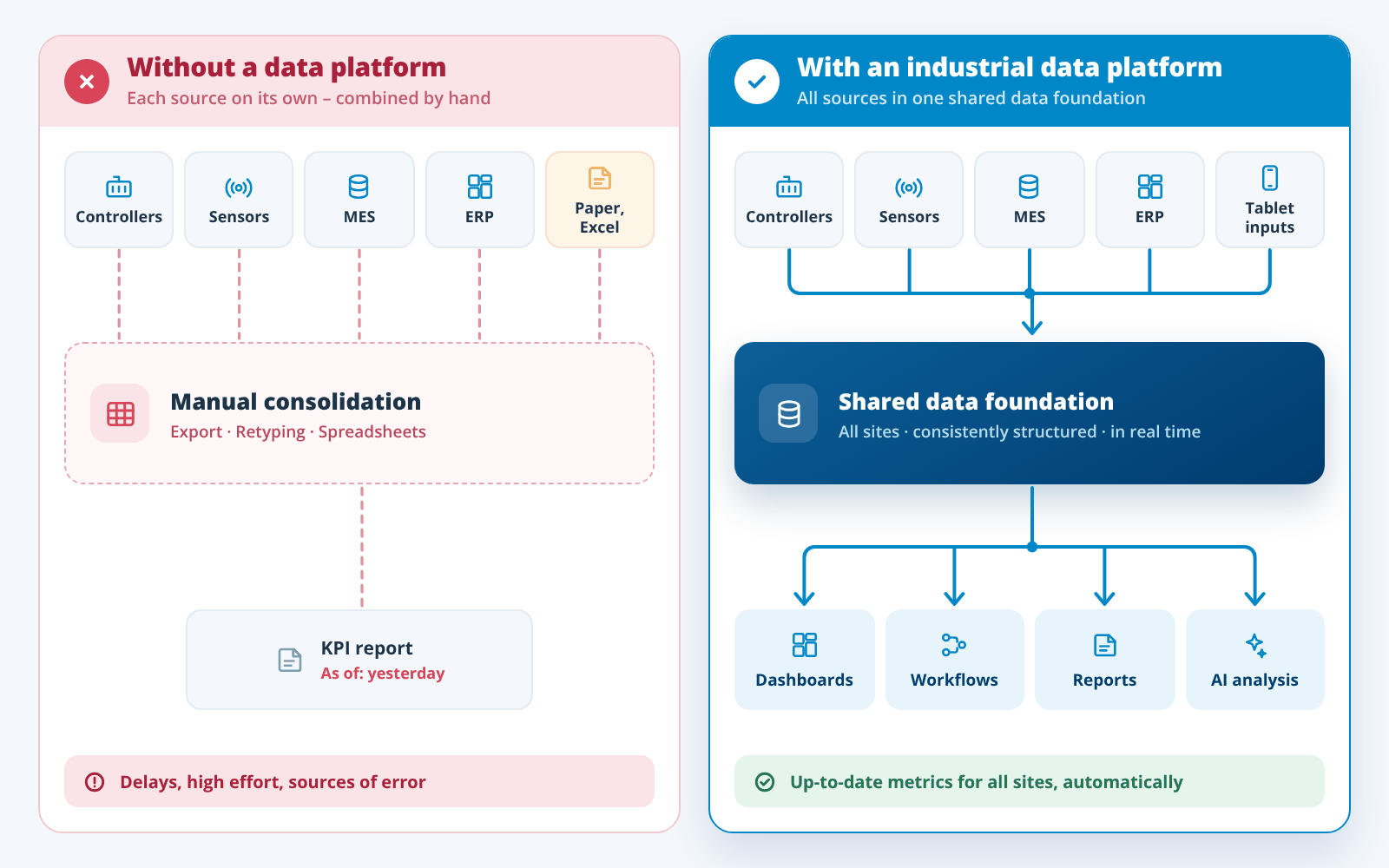
An industrial data platform makes production data that is spread across many systems and sites available in one place. This allows machine, order and quality data to be analyzed together. Metrics such as OEE are calculated without manual exports, and deviations are spotted earlier.
In many companies, production data is generated in dozens of places: Controllers report machine states, sensors measure temperature and energy consumption, the ERP system knows orders and materials, a manufacturing execution system (MES) documents production, and downtime is often still recorded on paper or in spreadsheets rather than in digital form. Each system has its own interfaces, formats and access rights.
This leads to typical problems:
- Data silos: Machine data and order data sit in separate systems and do not match up.
- Manual analysis: Metrics are produced by exporting data into spreadsheets – with delays and room for error.
- No real time: Deviations only show up in the next day’s report.
- Dependence on IT: Every new analysis or application turns into a project.
- No foundation for AI: Without structured, combined data, AI analyses cannot deliver reliable results.
The solution is not another isolated system, but a shared data foundation that dashboards, workflows and applications can access.
Architecture
How is an industrial data platform structured?
The architecture consists of several layers that cover the entire data lifecycle – from capture at the machine to use in analytics and applications. Security and governance apply across all layers.
Data integration
Data storage
Data modelling
Processing and automation
Analytics and delivery
Security and governance
Comparison Table
Data platform, data warehouse and data lake compared
A data warehouse stores prepared, structured data for reporting, a data lake collects raw data of any kind for later analysis – a data platform combines capture, storage, structuring and use in one environment.
Data warehouses and data lakes are therefore often components of such a platform rather than alternatives to it. The table compares the two classic storage concepts with an industrial data platform as used in manufacturing.
| Criterion | Data warehouse | Industrial data platform | Data lake |
|---|---|---|---|
| Purpose | Reporting and analytics based on cleansed business data | Capture and structure production data and use it directly in dashboards, workflows and applications | Store large volumes of raw data for later analysis |
| Data structure | Fixed schema, data prepared before loading | Own data models, adaptable by the department | Raw data in any form, structure applied on read |
| Typical data sources | ERP, CRM, finance systems | Controllers, sensors, databases, ERP and MES | Log files, sensor data, images, documents |
| Timeliness | Scheduled loads, e.g. daily | Live values in real time | Depends on the load process, often delayed |
| Feedback to production | No, analysis only | Yes, inputs, approvals and control commands back to systems | No, storage only |
| Typical users | Controlling, management, BI team | Production management, shift teams, maintenance, quality | Data scientists, data engineers |
| Effort before use | High, ETL pipelines and data model built by specialists | Low, connectors and drag-and-drop tools | High, data preparation before every analysis |
The boundaries are fluid: Modern cloud data platforms combine data warehouse and data lake (data lakehouse). The table shows the typical focus of each.
manubes
manubes: Making production data usable across all sites
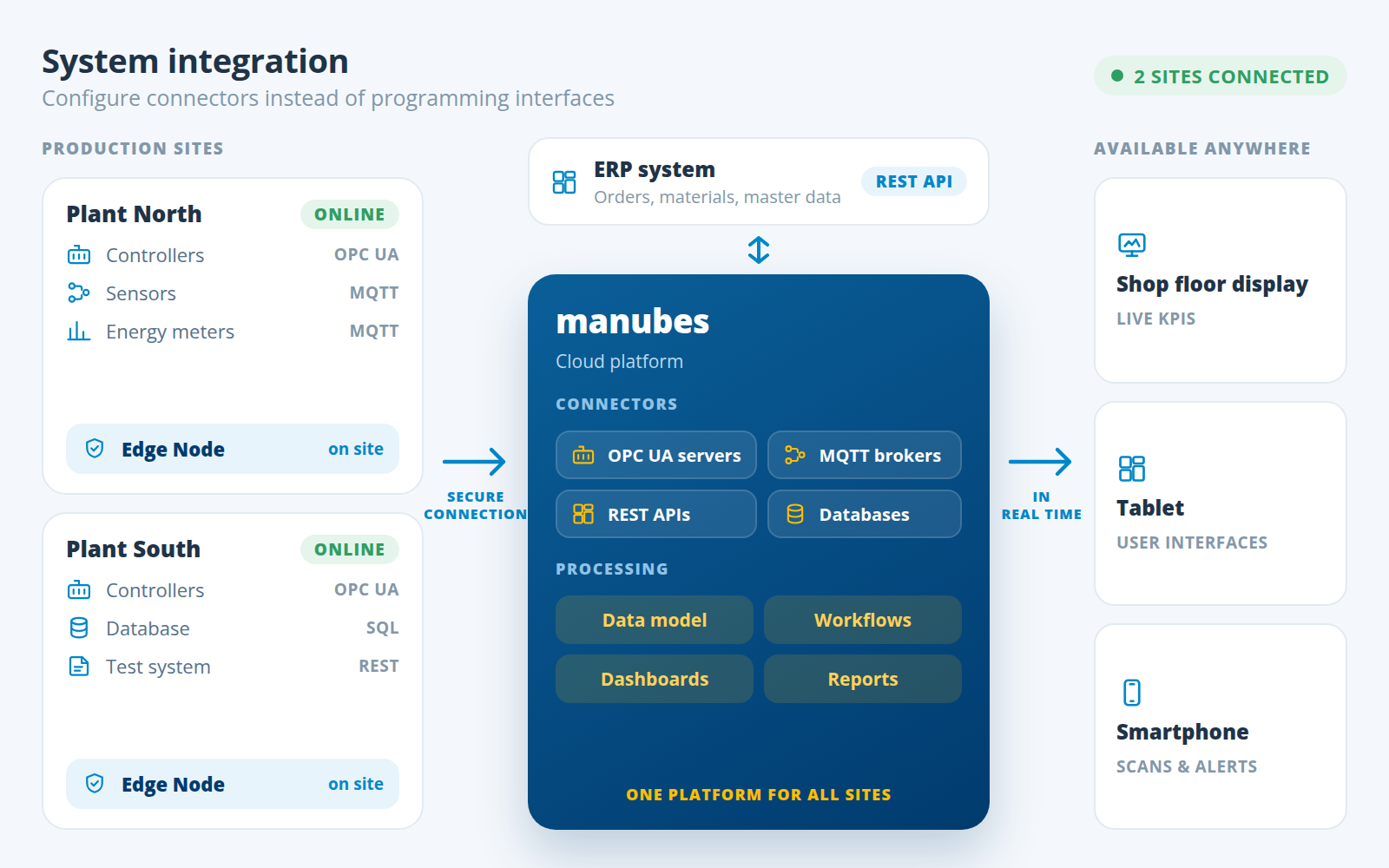
manubes is the industrial data platform from inray: It makes production data from machines, devices and software systems available across sites and gives production teams the tools to build their own solutions – from real-time visualization to automated analysis.
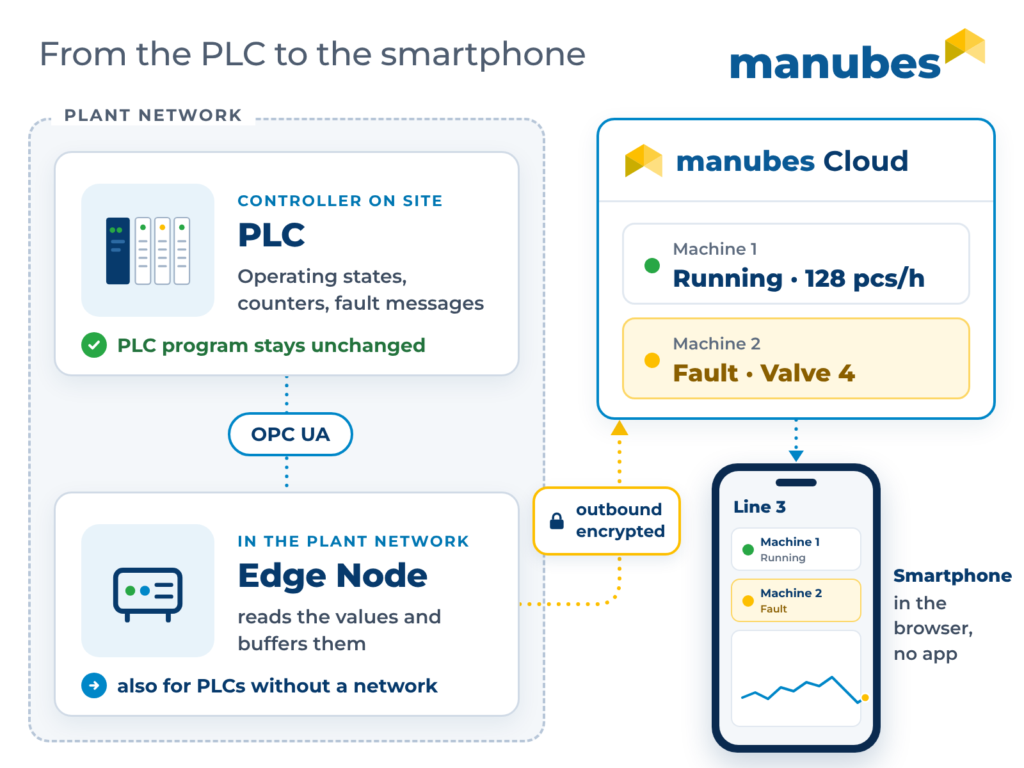
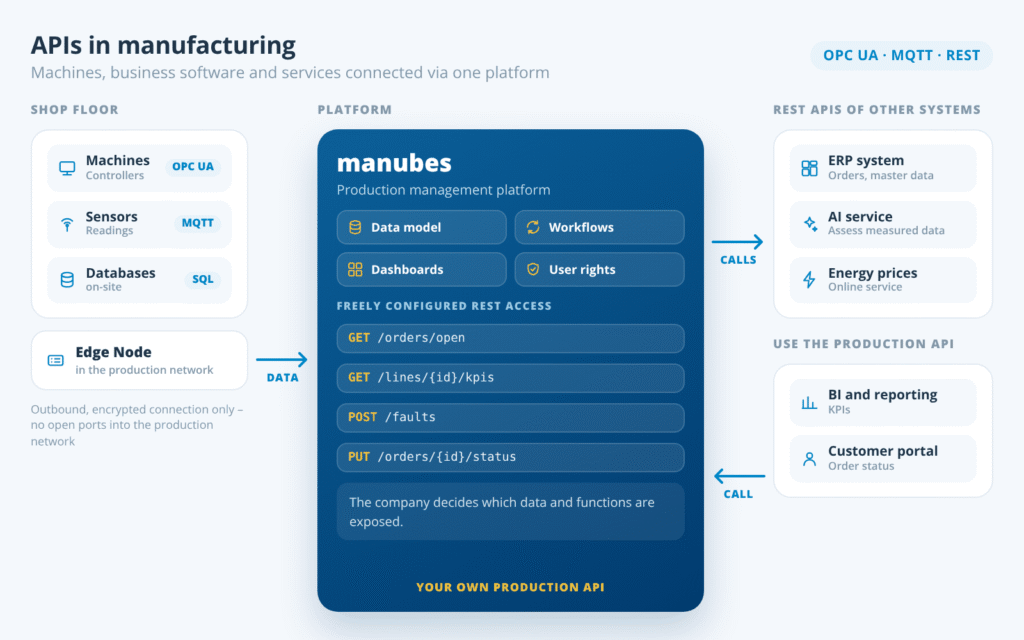
Data sources are connected via a consistent web interface: For each source, users select the appropriate connector – e.g. OPC UA for a controller, REST for an ERP system – and configure the connection in a few steps, without programming. On site, an edge component establishes the connection to the manubes cloud, and the connection is always initiated from within the plant network.
What this means in day-to-day operations:
- One tool for all sources: Machines, sensors, databases and software systems are connected and managed in the same way.
- All sites at a glance: Data from several plants comes together in one environment and can be compared directly.
- Read and write back: manubes does not just read data, it also sends inputs and control values back to local systems where needed.
- Extendable: New equipment and systems are added via standardized connectors without changing existing connections.
How the connection works technically is described on the page System integration with manubes.
Datamodel Designer
Structuring production data with the Datamodel Designer
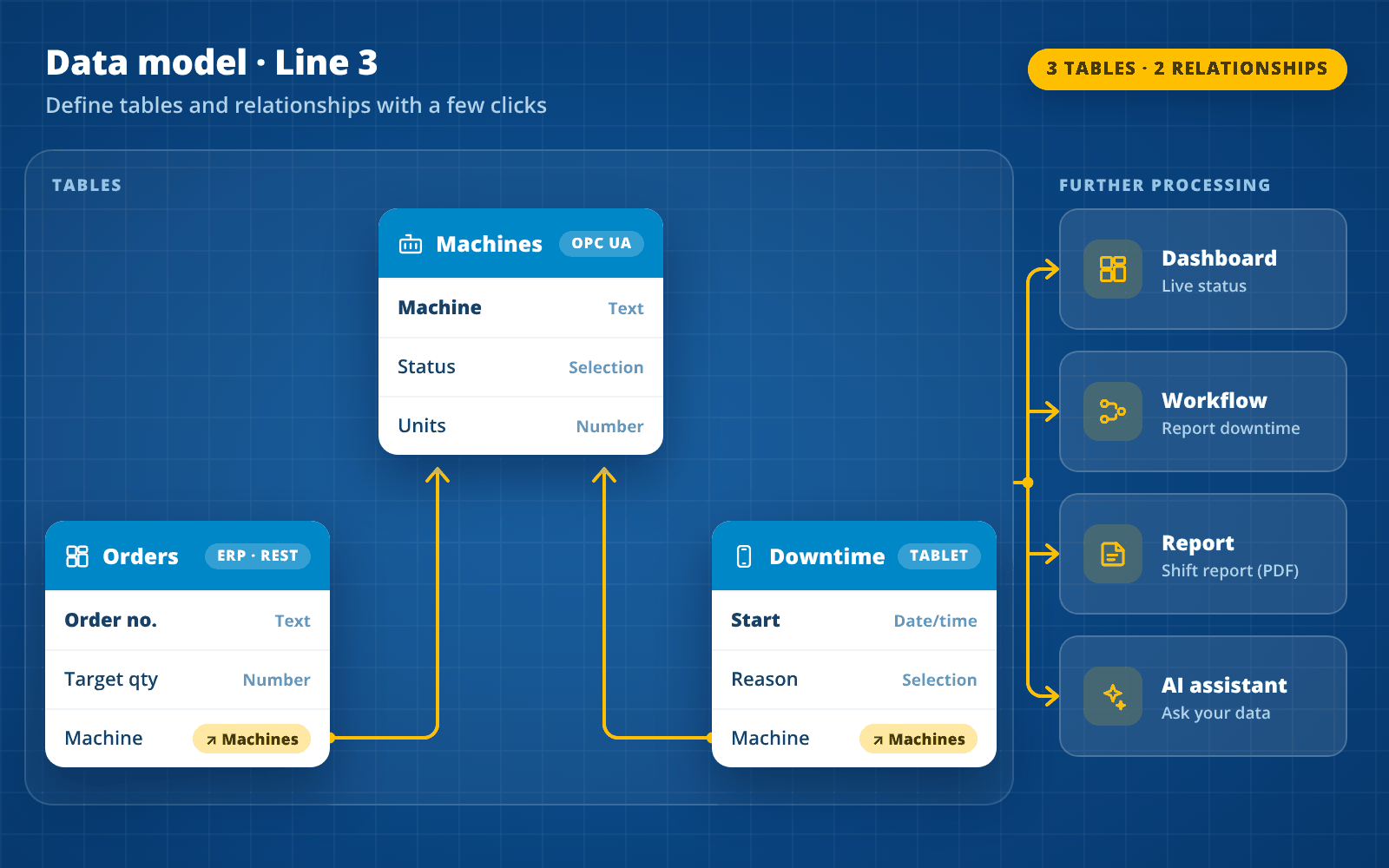
The Datamodel Designer is the tool in manubes that lets users create their own data models: Tables, fields and relationships that reflect the structures of their own production.
Raw data on its own says little. Only when it is clear that a downtime event belongs to a machine and that this machine is currently producing a specific order do meaningful metrics emerge. In the Datamodel Designer, you define these relationships yourself – without database expertise and without programming.
Typical content of data models in manufacturing:
- Order data and material stocks from the ERP system
- Machine parameters and states from controllers
- Downtime, shift events and inspection results recorded by employees on a tablet
- Maintenance records and maintenance dates
Dashboards, workflows, reports and the AI assistant access the data models in just a few clicks. Any change to the data model is therefore immediately available to all applications built on it.
Putting Data to Use
What can you do with the data on the platform?
Centrally stored data only pays off when it is used. In manubes, capture, structuring and further processing run on the same platform – with no-code tools that department users operate themselves.
Interactive dashboards
Display metrics, time series and machine states live – with input fields, forms and buttons that trigger actions directly. Built by drag and drop in the Page Designer.
- OEE per shift
- Shop floor monitor
- Mobile view
Process visualization
Equipment, stations and material flows as a dynamic process diagram in which states and values change in real time.
- Equipment diagram
- Material flow
Workflows
Automate processes based on rules: Calculate metrics, transfer data between systems, approve orders, send notifications when thresholds are exceeded.
- Data transfer
- Threshold alert
- Order approval
Applications
Develop, version and deploy your own applications for the shop floor, warehouse and maintenance via staging – without code.
- Digital shift log
- Material check
- Checklists
Reports
Link report templates to data from the data models and generate production reports automatically or on demand as PDF.
- Shift report
- Downtime report
AI assistant
Ask questions in natural language and receive structured answers on orders, faults, maintenance or resources – based on your own data models.
- Fault analysis
- Order status
Key Properties
Easy access, scalable and secure
A data platform in manufacturing has to meet the realities of a plant: shift teams on the shop floor, several sites, sensitive production data. manubes is designed for exactly these requirements.
From any location and device
Platform without your own servers
Grows with your production
Security concept with five pillars
Designed for reliability
Industrial expertise
Choosing an industrial data platform: 6 criteria
When choosing a data platform for manufacturing, the number of features often matters less than how quickly your own data becomes usable. These six criteria help manufacturers compare providers and solutions.
Connecting industrial data sources
Check whether the platform connects controllers, sensors and databases directly via OPC UA, MQTT, REST and SQL – or whether additional middleware is needed. Every extra layer costs time and maintenance.
Real time and feedback
In manufacturing, live values matter. A good solution shows data without delay and allows feedback: Inputs, acknowledgements and control commands to local systems.
Data models in the department
Data models can change with new products, lines or requirements. Department users should then be able to adjust tables and relationships themselves, without waiting for IT projects.
Further processing on the same platform
Dashboards, workflows, reports and applications should access the data foundation directly. Separate tools for each step mean new interfaces and new data silos.
Security and compliance
Look for outbound, encrypted connections from the plant network, a fine-grained permission concept, two-factor authentication, and contracts and service level agreements that meet your requirements.
Scaling and getting started
A good starting point is a specific use case on one line. From there, the platform should grow to further equipment and sites without having to be rebuilt.
Try manubes – free and without obligation
Connect your first data sources, create a data model and build your first dashboard in your personal cloud environment.
Our customers


















Frequently asked questions about data platforms
What is a data platform?
A data platform is a central software environment that captures, stores and structures data from different sources and makes it available for analytics, applications and automated processes. It replaces scattered data silos with a shared data foundation.
What is data integration?
Data integration means combining data from different systems into a consistent structure. In manufacturing, this means that machine data, order data and manually recorded data are connected on a shared platform via interfaces such as OPC UA, MQTT, REST or SQL.
What is the difference between a data platform and a data warehouse?
A data warehouse stores prepared, structured data for reporting and analytics. A data platform also covers capturing, structuring and using the data in applications and workflows – a data warehouse can be one part of it.
What is an industrial data platform?
An industrial data platform is a data platform that specializes in production data. It connects machines and equipment via industrial standards such as OPC UA and MQTT, combines data from several plants and makes it available for real-time visualization, reporting, workflows and AI analyses. manubes is one such platform.
What is the difference between an industrial data platform and an IIoT platform?
The terms overlap. An IIoT platform focuses on connecting machines, sensors and devices. An industrial data platform goes further and also structures the data in data models and makes it available for dashboards, workflows, reports and applications.
What are examples of data platforms?
Examples include cloud data platforms such as Microsoft Fabric, Databricks and Snowflake for business intelligence and AI, customer data platforms (CDP) for marketing, and industrial data platforms such as manubes for production data from machines, equipment and production systems.
Is a cloud data platform secure?
That depends on the provider's security concept. manubes connects production exclusively via outbound, encrypted connections, protects data with a permission concept and two-factor authentication, and, following the zero-trust principle, gives inray no access to customer data without authorization.
All your production data on one platform
In a product presentation, we show you how manubes connects your equipment and systems and which dashboards, workflows and applications you can build from them.
Request a product presentationFurther information

'/%3E%3C/svg%3E)