
Tasks and Objectives · Digital Solutions
Production Control
Production control puts the requirements from production planning into operational practice. It ensures that production orders are completed as efficiently as possible, without disruptions and on schedule.
Production control is a part of production management that coordinates the operational execution of production orders and puts the results of production planning into practice.
Its purpose is to ensure that planned orders are completed on time and as efficiently as possible – at the right time, in the right sequence and on the right machines.
Key tasks include order release, scheduling and detailed scheduling as well as monitoring production progress and product quality. If deviations occur, production control intervenes and makes short-term adjustments to the plan.
Key Facts
Production control is often described as a “closed control loop.” This means that it regularly compares planned data with the actual data from production and takes corrective actions based on the results.
The tasks of production control typically follow directly after the tasks of production planning. For this reason, both areas are often combined under the term “production planning and control.”
Tasks
Core tasks in production control
Production control builds on the results of production planning. It matches the roughly planned production orders with the currently available capacities, assigns them as efficiently as possible to the available workstations and ensures that all required resources are available on time.
It then monitors production progress, resolves planning conflicts and responds to disruptions and other unforeseen events.
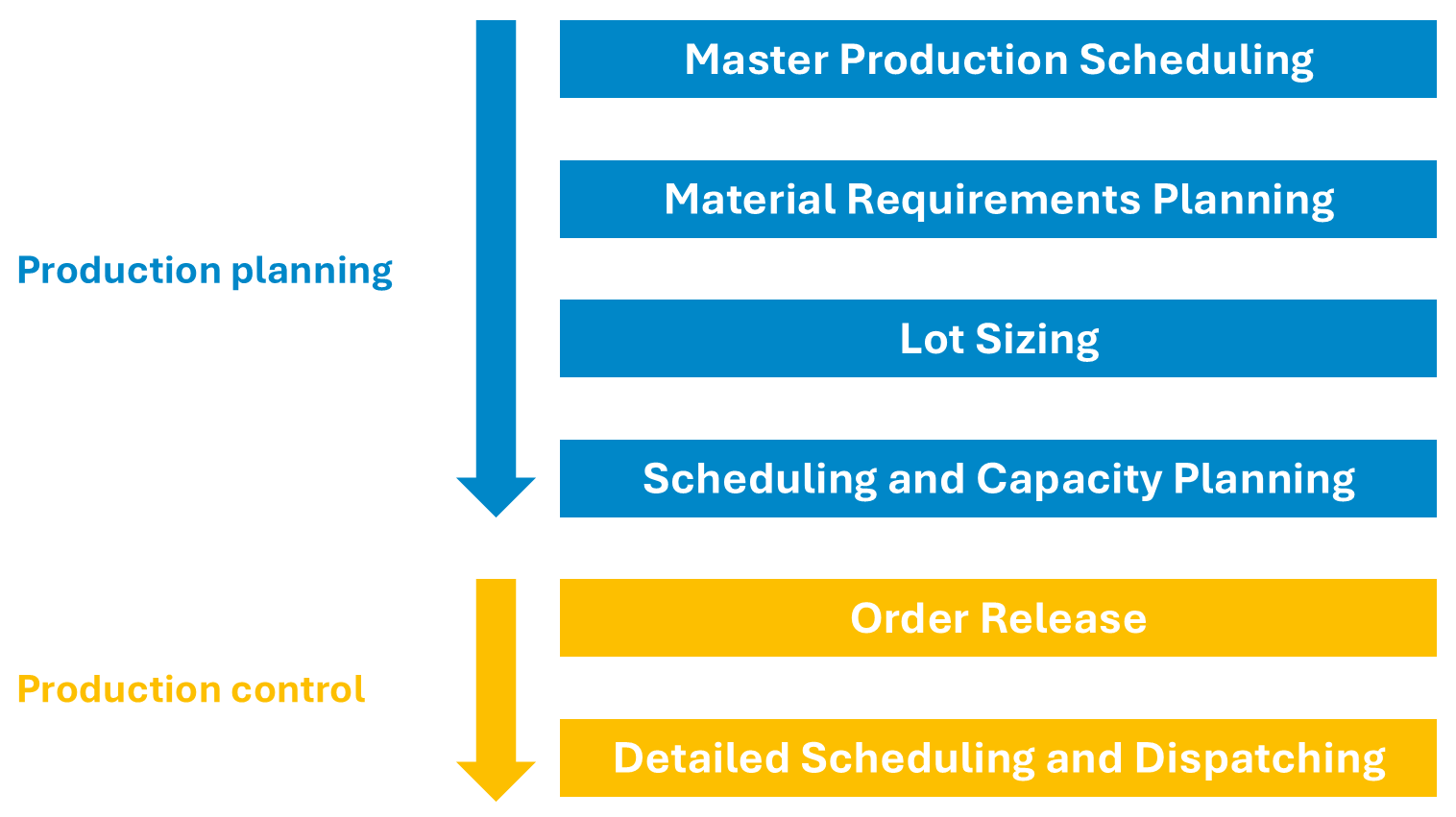
Distinction between production control and production planning
Order release
As part of order release, orders are checked for feasibility and then passed from planning to production. The sequence of orders is based on their priority and the planned start and end dates.
Order release usually includes a final check of material availability and capacity. The required materials for the order are then reserved and production documents are provided in digital form.
In practice, many of these checks are automated with the support of the ERP system or planning software such as APS systems. The system verifies whether all required components are available and whether sufficient machine capacity and personnel are in place. The release itself can be carried out either manually or through automated rules.
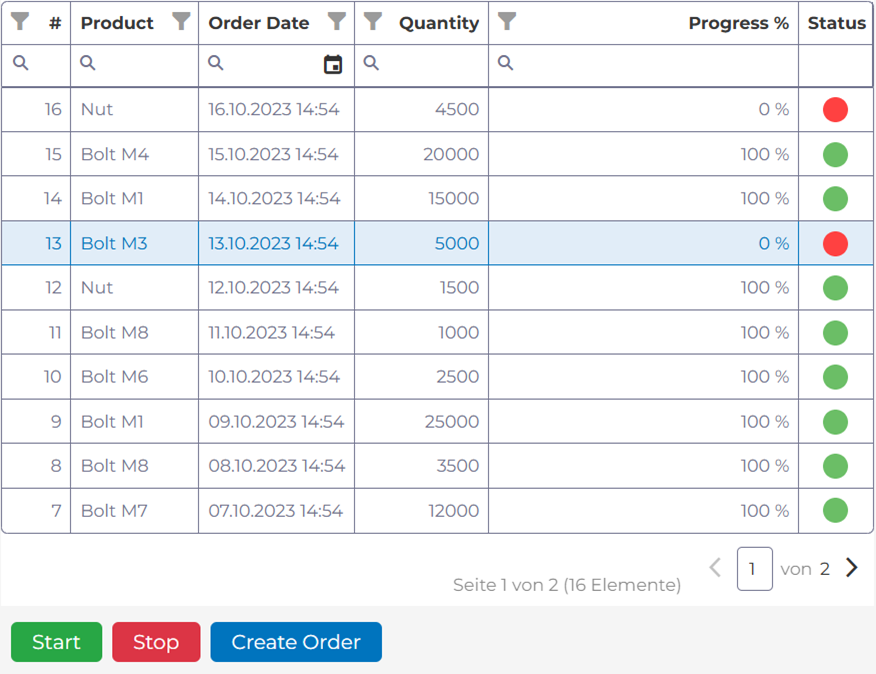
Order release interface created with manubes, utilizing workflow automation and ERP integration in the background
The order is then marked as released and transferred to production (usually a Manufacturing Execution System). At the same time, the ERP system reserves the required materials and initiates their delivery to the workstation.
The checks carried out during order release can take into account both the current situation (static, e.g. for NC programs) and expected future capacity (dynamic, e.g. for personnel).
One variant of order release is load-oriented order release. In this approach, the total available capacity is calculated first. Only the number of orders that fit within the calculated capacity limits for the given time period are then released, with orders prioritized according to urgency.
Detailed Scheduling
Detailed scheduling assigns the released production orders that were previously only roughly scheduled to the available workstations and gives them precise start and end times. In addition to machine capacities, this process considers factors such as setup times, material availability, personnel resources and technological dependencies between operations.
The goal is to meet delivery deadlines while maintaining high capacity utilization and short lead times. Since the last two objectives can conflict with each other (maximum utilization can lead to waiting times), companies typically try to find the most optimal balance.
In modern industrial companies, detailed scheduling is usually supported by specialized software or software modules. ERP systems provide the production orders and offer planning boards and other functions to support scheduling. Advanced Planning and Scheduling systems (APS) are mainly used for detailed planning in complex scenarios (e.g. with many product variants). Based on current data, they calculate detailed allocation plans for machines and workstations while taking into account capacity limits, bottlenecks and priorities.
Manufacturing Execution Systems (MES) then capture the actual production data and enable continuous adjustments to the plan in case of disruptions or changes in the production process.
Order monitoring
After the release and detailed scheduling of production orders, production control monitors order progress using key metrics such as lead time and OEE.
If deviations from the plan occur (for example due to machine failures, material shortages, or urgent short-term orders), short-term adjustments are made. These may include changes to previously assigned machines, schedule shifts, or increased staffing.
In addition, the proactive diagnosis and resolution of issues such as machine breakdowns, material shortages, or quality deviations are also part of production control.
Order monitoring requires the collection and provision of all relevant shop floor data with minimal delay (see also machine data acquisition).

Areas of production control
Objectives
Objectives of production control
Production control ensures that production orders are carried out according to plan, efficiently, and with the required quality.
The main objectives of production control include the following:
- Optimal use of available capacity (e.g. machines, personnel, time)
- Meeting delivery deadlines
- Avoiding delays in the production process (e.g. due to late material supply)
- Reducing downtime and disruptions
- Maintaining quality standards and avoiding scrap
- Reducing tied-up capital and inventory costs
- Providing cross-department transparency on current progress and key metrics
Many of these objectives help reduce production costs – for example, through less scrap and more efficient use of personnel.
Monitoring objectives: Key metrics in production control
A basic requirement for effective production control is transparency about the current state of production. When teams can always see which orders are in which processing stage and which resources are being used, deviations from the plan can be detected more quickly and corrective actions can be taken sooner.
Manufacturers utilize various production metrics to monitor and evaluate production performance, quality and related factors. Two of the most important KPIs in production control are OEE and lead time.
Overall Equipment Effectiveness (OEE):
Overall Equipment Effectiveness (OEE) shows the productivity of a machine or system over a specific period of time or for a specific order. It consists of three factors:
- Availability: What share of the planned production time is actually used for production?
- Performance: What share of the ideal production speed is actually achieved?
- Quality: What share of the produced quantity is actually usable?
OEE is often calculated and visualized in real time (sometimes with preliminary quality data). It serves both as a tool for monitoring orders and as a basis for comparison in longer-term production optimization.
Based on OEE, production control teams can identify where efficiency losses occur, for example due to frequent micro-stops of a machine.
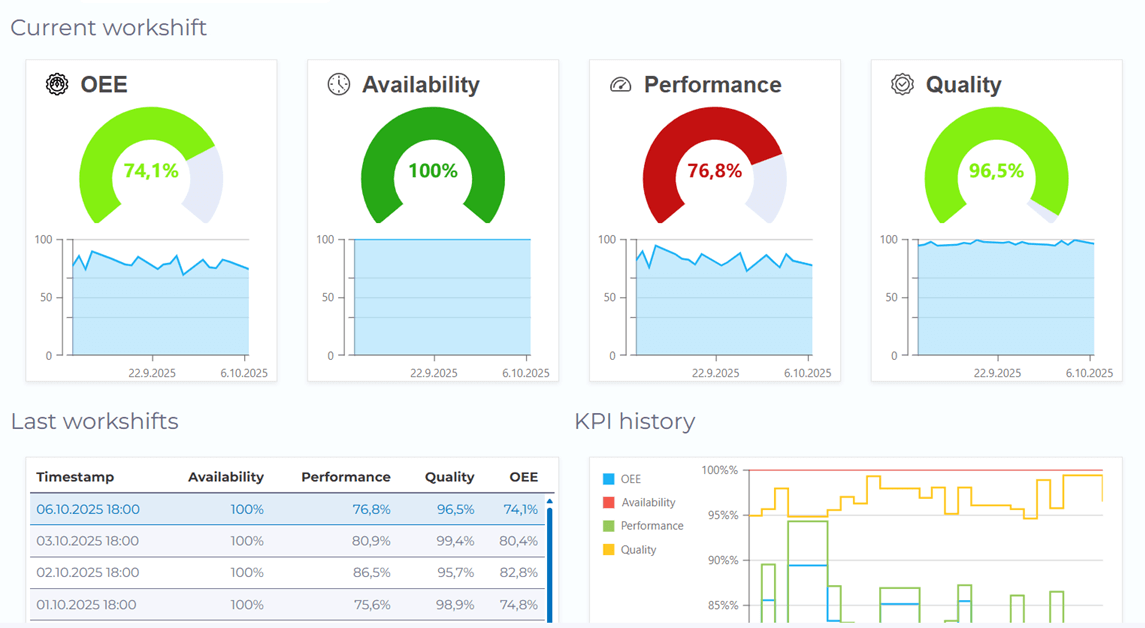
Example of an OEE visualization with manubes
Lead time:
Lead time measures the time from the first operation (or the start of the setup process, depending on the company’s specific definition) to the completion of the product. In addition to the actual processing steps, it includes setup times, waiting times, transport times as well as all time losses caused by disruptions or delays.
Short lead times are one of the main goals of production control. They enable faster order processing, increase responsiveness to customer orders and reduce tied-up capital by lowering the inventory of semi-finished products. At the same time, short lead times often improve on-time delivery, since less time is lost due to unplanned delays.
In practice, lead time is therefore regularly monitored and analyzed. Noticeably long waiting or transport times may indicate bottlenecks, unbalanced capacities or organizational problems in the production process and serve as starting points for improvement measures.
Software
Software in production control
Today, almost all steps of production control are supported or automated by specialized software systems:
- ERP systems manage orders, resources, and master data and perform tasks such as availability checks.
- Manufacturing Execution Systems (MES) represent the operational level and monitor current production progress.
- APS systems support complex detailed scheduling scenarios and generate optimized planning schedules.
- Specialized cloud platforms enable workflow automation and the development of custom control applications.
Enterprise Resource Planning (ERP systems)
In most manufacturing companies, ERP systems serve as the central system for managing production orders, materials, procurement, personnel and master data such as bills of materials and routings.
Because they integrate different business areas, ERP systems are one of the most important tools in production planning. Although production control largely takes place at the shop floor level, it also relies on ERP data in many situations.
During order release the ERP system typically compares material requirements with inventory levels, open purchase orders and planned production orders.
In many ERP systems, the functions for production planning and control are grouped together in the PPC module (Production Planning and Control).
Manufacturing Execution Systems (MES)
Manufacturing Execution Systems (MES) support the operational control of production at the plant level. They continuously capture shop floor data such as processed quantities, machine status, disruptions or completed operations. This information is reported back to production control in real time or at short intervals.
Based on this data, deviations from the plan can be identified early and short-term countermeasures can be taken – for example by reprioritizing orders or adjusting machine assignments. MES systems act as the interface between the planning or enterprise level (ERP system) and the shop floor.
Other typical MES functions include providing work instructions and order information for operators, quality management and inspection data collection, traceability of materials and components and support for maintenance activities.
Advanced Planning and Scheduling (APS systems)
Advanced Planning and Scheduling systems (APS) support detailed production scheduling. While ERP systems mainly handle rough scheduling and capacity planning, APS systems calculate the exact allocation of machines and workstations as well as the precise sequence of individual operations.
They take various factors into account, such as available capacities, routings, setup times, material availability, order priorities and dependencies between operations. In most cases, different planning scenarios can also be simulated, for example when additional orders are added or capacity bottlenecks occur.
Cloud platforms and workflow software
Specialized cloud platforms such as manubes enable the centralized collection and management of production-related data from a wide range of sources, even across multiple sites. This data forms the basis for visualizations and analyses, but can also be used in workflow automations and other applications.
With no-code design tools such as the Datamodel Designer, Page Designer and Workflow Designer, manubes makes it possible to develop flexible solutions for production control – including interactive production dashboards, digital shift logs and work instructions, or custom shop floor interfaces with ERP data integration.
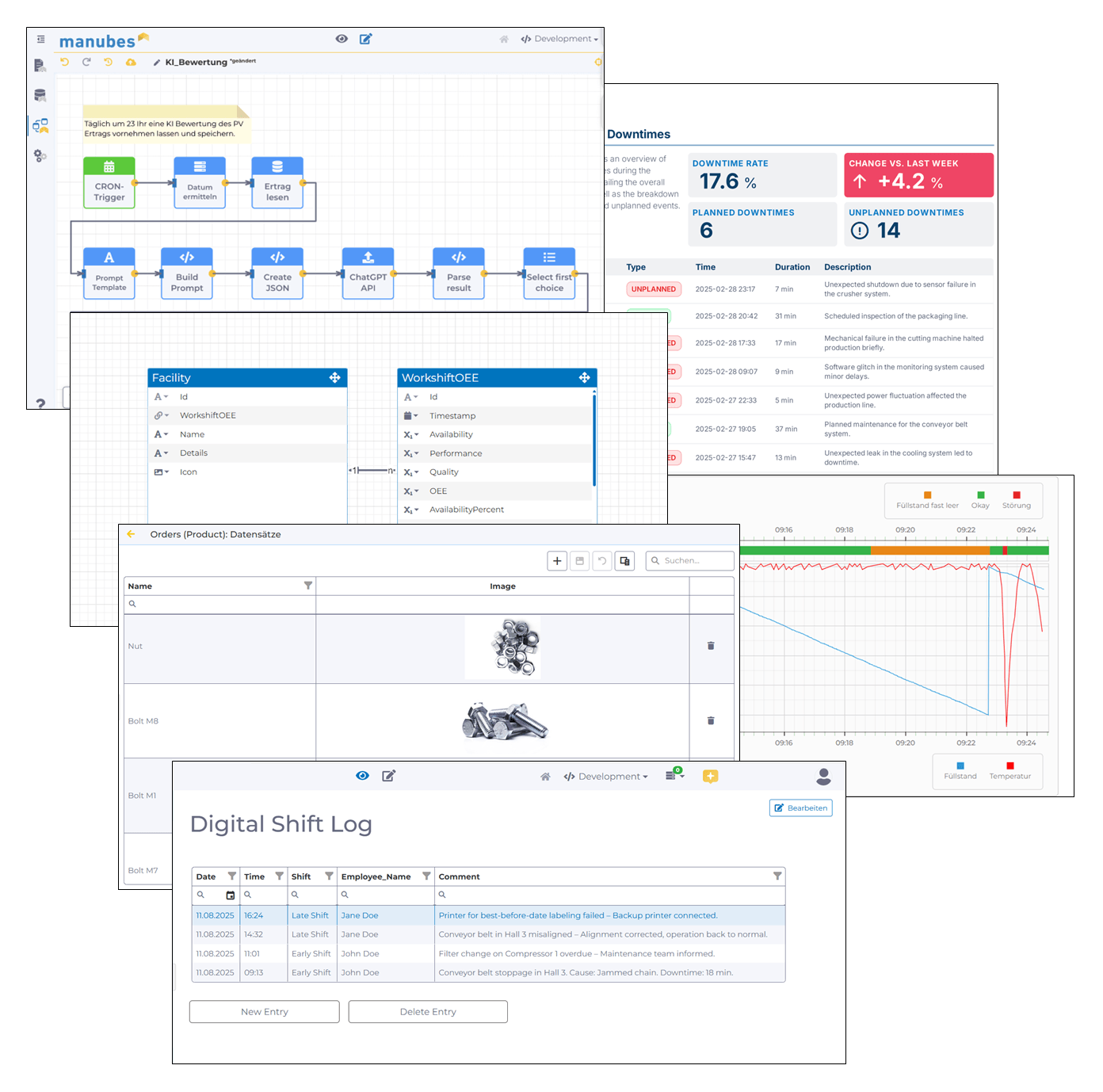
Try manubes for free
Set up your manubes demo environment within minutes and start developing your own applications.
Examples
Optimizing production control with manubes – Example applications
With manubes, you can develop custom solutions for production control – fully integrated with your systems, data and processes.
Provide interactive dashboards and application interfaces for shopfloor operators and automate a wide range of background processes using the manubes Workflow Designer.
Mobile GUIs for ERP data: Display and interaction with order data on the shopfloor
For most manufacturers, the ERP system serves as the central source of order and material data. A data-driven and delay-free production process requires this data to be synchronized between production (shopfloor) and the enterprise level.
With manubes, you can create your own GUIs for ERP data and provide them to operators on mobile devices or terminals directly at the production line.
Integrate your custom GUIs with SAP or other ERP systems to display current orders in real-time and let operators perform status updates.
Material verification via Barcode or QR code scan: Avoid costly mix-ups
Material mix-ups can be extremely costly. By verifying raw materials or packaging directly at the production line, you are able to minimize the impact of errors in material provisioning.
manubes lets you integrate such checks into your processes with minimal effort. Scan QR codes or barcodes on pallets using a mobile device – an automated workflow in the background ensures that the material matches the order.
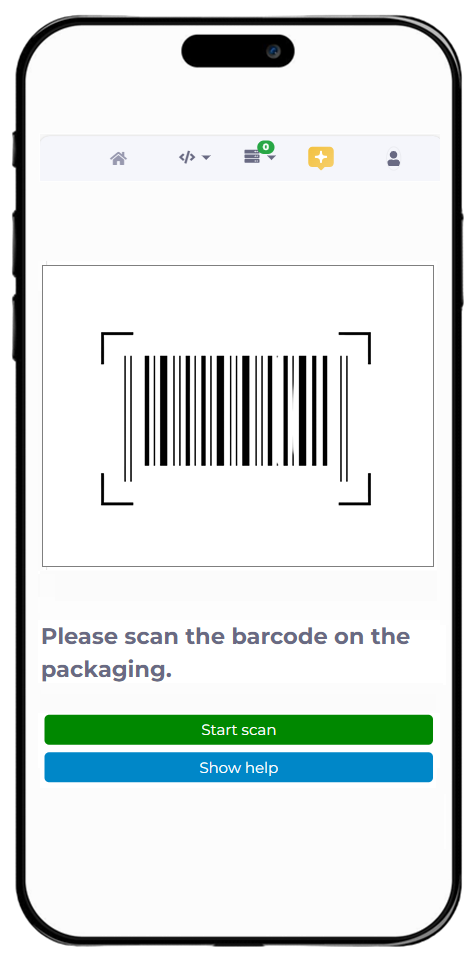
If required, QR code scans can be combined with digital work instructions, checklists and other content to create interactive order interfaces for shopfloor teams.
Real-time dashboards for machine data and KPIs: Important information at a glance
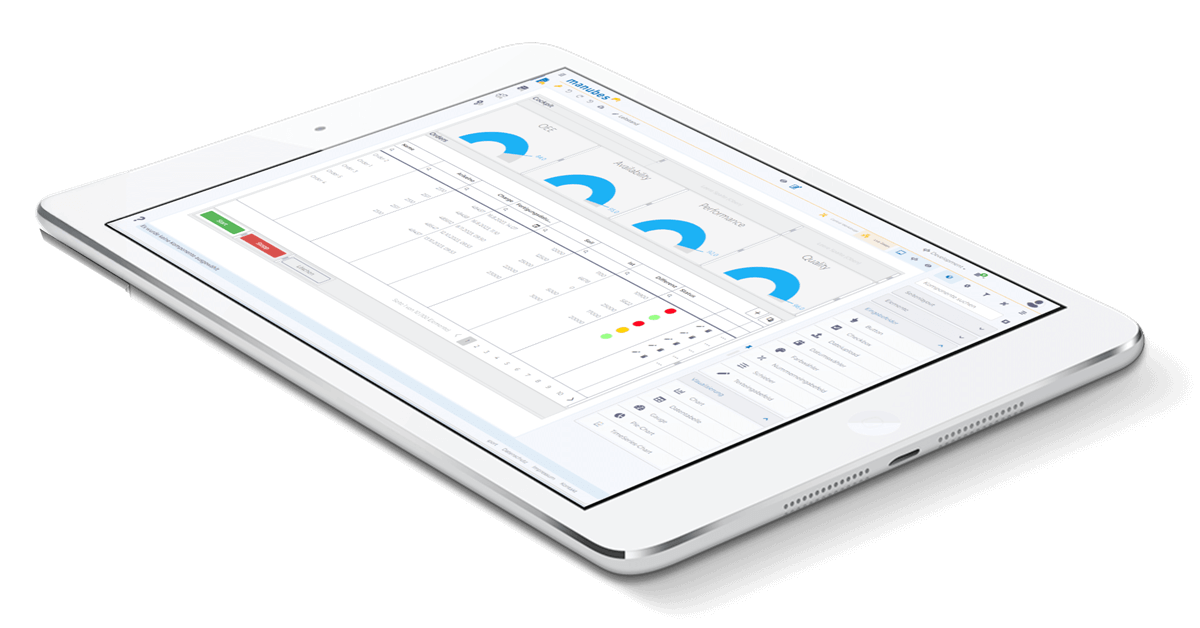
Production dashboards provide a quick overview of selected KPIs, status information, order progress and events. When implemented correctly, responsible teams can immediately recognize when and where action is required.
With manubes, you can create your own dashboards using drag-and-drop. Choose from a wide range of visualization options and connect charts to data sources within just a few clicks.
Automated notifications and alarms: React quickly to any deviations
When individual process steps depend on each other over time, even small deviations can lead to significant productivity losses. Indicators such as unusual machine temperatures and vibration patterns, rising energy consumption or excessive humidity therefore need to be detected and resolved as quickly as possible.
In addition to dashboards that visualize various process parameters in real time, companies also use alarm systems to proactively notify responsible personnel.

With manubes, you can configure push notifications for any end device that are triggered by downtime, errors or specific threshold values. This enables you to respond quickly even in complex production environments.
Try manubes for free
Test the different manubes features in your personal cloud environment.

